7 Reasons to Consider a Home Gym

If you think of picking up better health habits and don't like crowded gyms, consider setting a home gym catered to your needs.

5 Top Picks for Christmas Holiday Like a Fairytale

If you imagine Christmas holiday this year being like a fairytale, you should consider visiting these hidden gems!

7 Fashion Accessories To Lift Up Your Style Quotient

Get heads up on the trendiest as well as classic fashion accessories that would elevate your style to another level.

Pages

▼
Showing posts with label 3D Presentations. Show all posts

5 Animation Trends to Watch Out for in 2017

Description :

For anyone working within animation, or with an intention to, in 2017, it helps to know what you are likely going to be coming into. As technology continues to change and improve to ever higher levels, it helps to know the current major design and planning trends.

5 Animation Trends to Watch Out for in 2017

With the help of the right information, you can make sure that when you enter the market you make an immediate impact. 

5 Animation Trends to Watch Out for in 2017

The year 2016 was a time for stop-motion animation to make a comeback, as brands sought to connect more emotively with their clients. Stop-motion animation gives a great look, and is a wonderfully persuasive art style, but new technology means that it can now be done more effectively than it was ever done in the past. 

So, what can we expect to see for animation trends in 2017?

1. Stylish 3D 

3D animation has long been a staple in making animation come to life and portraying the most beautiful look and feel possible; that is likely to continue in 2017. As political skullduggery probably means that businesses will continue with minimal budgets in an increasingly constrained yet creative world, stylish 3D skills will be a major boon for any animator who wants to make a sterling impact this year. 

Stylish 3D design is making a big comeback in the world of animation and it’s not going to slow down anytime soon. If you want to get a good idea of the next major factor for all animators, it will use a more high-concept style of 3D than ever before. 

Hopefully, this will mean that animators can use their talents to the best of their ability whilst receiving fairer budgets to operate with! 

2. Marketing Collaboration 

Another major impact that is likely to be on the market in the near future is more collaboration between big brands and entertainment industries. We’ve seen it outside of animation this year, with the X-Men-themed adverts, and we’re likely to see more Star Wars themed editions soon as well. These marketing collaborations are making their way into animation now, too; how long until we see characters from the likes of Overwatch appearing in banking adverts? 

After all, big companies are now using famous cartoon characters and animated heroes to sell their goods. From Fred Flintstone buying a mortgage to Top Cat moving out of his bin, many markets are using cool and iconic characters to build their brand. 

The reason why animators should be expecting this trend to continue so vigorously is quite simple—collaborations are making big bucks for both sides of the party. As companies wind up trying to combine two purchases into one advertisement, it’s likely that 2017 is going to see more companies engaging in these crossover promotional styles. 

It’s effective, as it helps to portray events by using characters that people can identify with far more than with actors. 

3. Web-Related Animation 

Animation won’t only be appearing in more adverts and in more 3D styles than ever—it’s becoming a major part of online marketing. It all started a few years ago with the creation of the (awesome) whiteboard systems that everyone loves using and engaging with. Animated explainer videos went a long way towards helping people forge and plan the right kind of way to tell their story—and animators should be ready to deliver more of this in 2017. 

Website animation designs will become far more effective for businesses as they combine content with cool animations and looks. Rich, full-screen animations can be used either as the focal point, the explanation, or as the cool extra that delivers the sale. Whatever the reason, 2017 is going to see far more interest in businesses using the power of animation to sell their websites and products. 

4. Continued Illustration 

This was huge in 2016 and it was so popular we reckon it will be a huge hit in 2017, too. Design trends tend to last quite a long of time and this is no different. Animators who enjoy the illustration style will be rubbing their hands with glee at the prospect of illustration becoming a significant part of the market long-term. 

It’s the best form of animation to use when telling a story, so it’s likely to stay as a staple in a world where everyone wants to have their story told and heard. The fact that illustration allows us to literally take any animation idea and make it so means that for many people, the ongoing presence of illustration as a vital form of art in animation can only be a good thing. 

The story matters, and illustrating it is important for added authenticity. 

5. VR Explosion 

Animation is about to take a wonderful step into a rather unknown future thanks to the mainstream growth of virtual reality. The end of 2016 saw the likes of the PlayStation VR arrive, and VR is about to become the latest trendy technology that everyone loves using. 

For this reason, it’s going to play a massive role in the world of animation for the years to come. It’s a form of projection that lends itself well to animation, allowing quality animators to take people inside their design and let them live within it closely. 

The idea that animation can become more immersive by placing us front row and center is obvious, and it’s about to be tested by a market that shows no signs of slowing down. For one guaranteed animation trend in 2017, stick to VR.

Conclusion 

As you can see, there’s plenty to look forward to and be excited about when it comes to being a young animator. With so much potential in your hands, you can help people to take a whole new approach to the way they sell their vision, their business and their ideas.


You and other people like you have brought us closer to our goals. Thanks ever so much! 

*by andreascy*

Augmented Reality and Its Applications for Education

Description :

Augmented Reality (AR) has had a tremendous impact on education during the past few years. 

Augmented Reality and Its Applications for Education

It started out as something really “cool” before developing into one of the most useful resources available for learners. 

What Exactly is Augmented Reality? 

Augmented Reality, which is also known as AR can simply be defined as the process of viewing or scanning a trigger image through a mobile device. This process would give life to a subsequent action. This action can be another image, a video, QR code, 3D animations, games or whatever you want it to be. Even a GIF image can be considered as an AR in action.


The Impact of Augmented Reality on Education

Imagine that you are a student who is sitting in a history class. The lesson you are going to learn is about Egyptian Temples. Augmented Reality has the potential to create a realistic 3D environment of the temple and you will be able to learn it in more of an interactive and appealing way without even leaving the classroom. You can view every corner of the temple and get a clear view of it. That’s the beauty of AR.

Augmented Reality can be used in education via many different methods. These include:

• Virtual Reality

Even though Virtual Reality mainly focuses on games, it can be used effectively in training and education as well. The immersive learning experience delivered by Virtual Reality has contributed a lot towards its popularity. A 3D immersive environment or a 360 degree video shot becomes useful when teaching new languages for students. A large number of learners will be able to get connected to the same virtual space as well which is particularly useful at a time of globalization and increased connectivity between countries via the internet.

• Virtual Reality Glasses

Virtual Reality glasses have also received a lot of attention in the recent past. More specifically, they have become particularly popular among students who are looking for a convenient method to learn marine biology. That’s because virtual glasses are in a position to immerse the students in a seabed environment and help them learn in an effective manner. This method of teaching is not associated with print books. A tablet is being provided to the student by the teacher and the student is asked to follow what appears on the screen. The students can then simply ask what animals are invertebrates and what vertebrates are. Then the students are asked to point them out by having a look. At the end of the lesson, the teacher would be able to know who has got it right and who has not.

• 3D Objects and Motion Capture

Offering training on 3D objects is not an easy thing to do. People who learn about these objects will not be able to get a clear understanding until they interact with the objects. That’s where 3D Objects and Motion Capture comes into play. This method is based on motion capture technology where the students will be asked to reposition the 3D objects that they see.

• Virtual Learning Environments

Virtual Learning Environments involve a platform where students and teachers can come together and collaborate with each other through an intranet. Teachers can use this network in order to create and send homework for their students. In addition, students can complete the assignments and submit them over the network themselves. In this way it is possible for the teachers to have the homework submitted and gathered in an organized manner, as well as being able to access useful statistics at the end of the day. Virtual Learning Environments have changed how traditional class sessions are managed and are thought of as a revolutionary way of e-learning.

Feedback and Monitoring Through Augmented Reality

Feedback and monitoring holds a prominent place in the education system. Otherwise, teachers will not be able to figure out whether they reach the educational objectives or not. Augmented reality creates an ideal platform to achieve this traceability. For example, the teachers will be able to get a clear understanding of what content is mostly viewed by the students and what assignments are completed by them. This type of information can be used in order to make important decisions respective to the students’ learning styles and performance.

Here is a list of some useful applications based on Augmented Reality, which can be used to enhance the quality of education:


One of the most popular applications allowing to bring tagged images, objects and even physical locations to life. Using interactive digital content like video, animations and 3D scenes named Auras, Aurasma unfolds the amazing world of Augmented Reality with the ‘explore’ and ‘featured’ sections to retrieve the latest Auras. This app has been widely used in education since it allows the teacher and student to create their own interactive content. School displays come to life with this great tool!


This remarkable app created by NASA themselves and recently upgraded, as the name probably gives away, is more closely related to science or space teaching. Once you download Spacecraft 3D and print off the ‘markers’, it is possible to use your iPad’s camera to make a three dimensional spacecraft appear right before your eyes. There is also the option of taking a closer look to the structure of Rovers, Satellites and Telescopes while also looking at all angles of the technology since there are moveable parts on some of the crafts. These features can be quite engaging for children yet the app allows also to single handily bring a research lesson to life. Based on the content this app can be used in particular for students aged Key Stage 2 and 3.


Butterfly Fingers is one app that makes use of the Augmented Reality in combination with SEN. What the app does is that it places animated butterflies in the room while you look through the iPad’s camera. You might be stunned but this fluttering of butterflies can create a calming environment in the classroom especially when you have a very vivid student population. Importantly, the app does not require to be excellent in fine motor skills so it can be useful with children with special educational needs and all age groups.

4. Quiver

Whilst for many applications using AR, the user basically points the tablet’s camera at something and watch the effect, there is nothing physical about the endeavour. In contrast, Quiver is a fantastic app which allows you to physically customize the Augmented Reality object using coloring pages as triggers, and this video shows it in action. The way to do this is simply by downloading and print off markers which you can color and redesign yourself. Once the child (or adult) draws a picture and sketches its parts, pointing at the colored image using the tablet turns it into a three dimensional animation with moveable parts. There different markers, all enabling for creative and imaginative artistic learning. For example, the app can help a child visualize a character and stimulate more ideas for scripts, storyboards etc. 


One extremely favourable app is AR Flashcards. The app is rather simple: there is a card for each letter of the alphabet, featuring one animated animal for every letter. You therefore realize that immediately the app allow you to play with twenty six Augmented Reality animals. There are more exciting stuff to do though, like using a huge number of dinosaur flashcards available for free. This creates endless educational potentials, ranging from phonics teaching and early language development, to topic-related learning such as using the dinosaurs which are pretty popular among children. Embedding these flashcards in your classroom teaching can therefore help with story writing, artistic endeavours, research projects and so much more!


A very interesting Augmented Reality app by the colossus focused on learning about astronomy in a fun and engaging way. Google Sky Map allows you to directly identify stars and constellations using a smartphone camera rather than through a book.


A great educational game app to get elementary level kids to overcome their fear of Maths by learning, Fetch! Lunch Rush released by PBS KIDS uses printable cards as Augmented Reality pieces. Designed in 3D, the app uses the smartphone camera to place graphics in real-world surroundings. Specifically, there is a plot in the game where students help Ruff the Dog feed sushi to a movie crew by solving math problems. 


GeoGoogle is awesome when it comes to expanding students’ geography skills and help them measure distances to specific destinations, like latitude and longtitude by applying GeoGoogle to real-world surroundings. 

9. AugThat

One former teacher developed AugThat specifically targeting students that are not motivated to follow the classroom routine. Using the app's features, it is possible to create animated lessons in a variety of topics to engage students, including 360-degree virtual environments and 3-dimensional experiences.


One of the most quality apps created by DAQRI, a powerful AR developer, is the application Elements 4D. As the name implies, this app brings elements of the periodic table to life to allow students of elementary, middle and high school level, see chemistry in action. The app work by printing out and assembling blocks that are used as trigger images for an AR experience. There are also lesson plans available for integrating Elements 4D at the DAQRI's website.


Another amazing app by DAQRI, Anatomy 4D, allows teachers to design their own anatomy lessons by allows to view 3D images of the human body and heart. The app works by having teachers print off one of the target images and have students look at it through the app. This way they can learn about the different biological systems and bring the human body to life in a fascinating way, turning them "on" and "off" with the touch of a button.

12. Layar

This application employs Augmented Reality features to scanned print materials to enable a rich digital experience. Some of the app’s characteristics include seeing magazines come to life with videos on top of pages, browsing and viewing thousands of Geo Layers to find nearby stuff, enjoying interactice print with pop our content, and sharing your interactive print experiences without having to scan. Layar is thus one great app for use on a variety of learning projects. 

These are only a few Augmented Reality applications that are related to education. You can find a variety of similar applications that have taken the entire education system to a whole new level. Given this increased interest in Augmented Reality in the field of educational technology and technology enhanced learning, substantial empirical research has taken place in the past two decades to determine how this technology meaningfully engages students. 

Conclusion

The existing evidence so far suggests a variety of benefits from using Augmented Reality and similar immersive experiences during the lesson. More research however is needed before a conclusive argument is made, and what is certain, is that the use of Augmented Reality for educational purposes, like any other trending method, should be accompanied by a solid theoretical background while also addressing the individual needs of the particular classroom at hand.


Did you find this article interesting? Don’t forget to drop your feedback in the comments section below. Thank you for reading!

*by andreascy*

Get HQ Professional PowerPoint Presentation Templates and Diagrams with Powered Template

Description :

Despite the advances in technologies and new tools emerging on a daily basis, when it comes to presentation software, PowerPoint is still the king. Are you puzzled however on ways to enhance your presentation in a way that it would be more visually appealing for your target audience? 

Powered Template provides such customizable solutions that will save you time and effort with a vast array of exceptional professional templates, diagrams, charts, maps, images and infographics among others. 

Get HQ Professional PowerPoint Presentation Templates and Diagrams with Powered Template

If you are interested in creative high quality templates that will boost your presentation, Powered Template can help make your presentation stand out from the mass. Search among their huge collection of which you can buy and download your template of choice within minutes.

Impress With Professionally Designed PowerPoint Templates

Key to a compelling presentation is how you manage to get your story across and visual messages are considered one great way to achieve this. In this case, you might want to take advantage of the killer PowerPoint templates by Powered Template to create a stunning presentation. Browse through the gallery of different categories which have been designed with built in layouts and cover any topic, idea or concept that will keep your audience engaged throughout your presentation. 

Each layout is carefully designed by expert professionals paying attention to details like appropriate blend of colors, graphics and ClipArt that give out a world class result that is clear and expressive. You can choose to either download a single template in PowerPoint (PPT) format with 3 master slides: Title Master, Slide Master, and Print Master, or decide to go with the template with additional slides consisting also of 17 additional slides with pre-created shapes, tables, charts, diagrams. All of these backgrounds are provided in separated JPEG files and include 3 or more pre-created palettes.

Get HQ Professional PowerPoint Presentation Templates and Diagrams with Powered Template

Once you have chosen your presentation template, Powered Template offers a wide variety of images in ClipArt available separated in different categories from which you can select to craft your presentation. Images carry a powerful message and can be used as a visual tool that can further boost your engagement with the audience and deliver the expected results.

Also of interest is how you can complete your presentation by getting professional pre-designed customizable document layouts in MS Word format to match your presentation slides. Each package offered by Powered Template consists of a cover page design, built-in heading and text styles, high-quality graphics (72 dpi images). Once downloaded, you can add your own content to the document, edit and print it for your audience as a take away of your presentation.


Visually Appealing Professional PowerPoint Diagrams and Charts

One of most difficult things to display within the limits of a brief presentation is a wealth of scientific research findings, business and marketing analysis etc. The best way to communicate such complex meaning is through diagrams, charts and infographics. Powered Template offers a diversity of creative diagram and chart templates that can captivate your audience with visually appealing presentation of data. Choose among others between education, flow, graph matrix, pie, organizational and medical charts, as well as process, puzzle and tree diagrams, timelines and inspiring infographics for showing general or comprehensive information in a sharp and refreshing way. 

All diagrams and charts are pre-designed and can be easily placed into your PowerPoint slides. With editable shapes, resizable vector graphics and changeable colors these templates are flexible and can be customized to cater for your individual preferences. Each template pack contains SmartArt graphics, objects, shapes, icons, charts, diagrams, or tables in PowerPoint (PPT/PPTX) format. 

The examples below are characteristic of the many diagram and chart templates available:

Get HQ Professional PowerPoint Presentation Templates and Diagrams with Powered Template

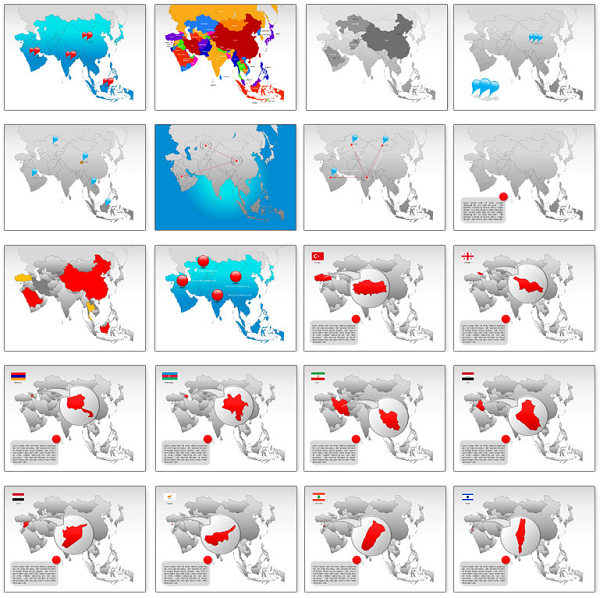
Exclusive High Quality PowerPoint Maps

Powered Template provides also with the option to enrich your presentation with location and regional characteristic features by adding exclusive PowerPoint Maps. These pre-made templates in Microsoft PowerPoint are vector graphics which can be downloaded immediately and used in existing slides while with Adobe Illustrator, you can either have the maps as web-ready graphics or incorporated high-end print designs.

Get HQ Professional PowerPoint Presentation Templates and Diagrams with Powered Template
These maps come with map layers and are conveniently editable and customizable to suit any presentation requirements with the option of changing size, color, position, remove or even add map features using PowerPoint’s drawing tools. You can easily add, change or delete text, define elements such as territories, regions and locations while assemble objects, diagrams and figures to customize these maps.

Comprehensive Collection of Professional Website Templates

Developing a website can be a hustle which you can easily avoid by using the services provided by Powered Template. Browse through their comprehensive and professionally designed collection of website templates which are easily downloadable and editable to suit your needs in terms of quality and cost. 

The templates have been designed with Adobe Photoshop and Macromedia Dreamweaver, paying attention to detail and following international web design trends. To use these templates you will need Adobe Photoshop 7.0 or higher and Macromedia Dreamweaver (Microsoft FrontPage 2003, or Microsoft Expression Web). Powered Templates ensures that these templates are cross browser compatible and therefore you are able to access them regardless of your preferred browser.

If you choose to buy these high quality designs, you should expect to get a website design template package including: Web Design source in Adobe Photoshop format (.PSD), HTML web template (.HTML), and Style sheet file (.CSS). 

Below are some indicative examples of website templates:

Get HQ Professional PowerPoint Presentation Templates and Diagrams with Powered Template

Powerful Professional Custom PowerPoint Designs

While there is no fixed recipe, certain design techniques have been proven most effective in getting the audience’ attention during a presentation. If you are looking to optimize the impact of your PowerPoint presentation, you can make use of the Powered Template experts’ knowledge and get a professional custom design that will be eye catching and succeed to sustain your audience’s interest to follow your message. 

Seek for their advice to create a presentation that will both match your needs and be within your budget. You can choose to incorporate different features like your logo, company colors, and any ask for any other specifications that will enhance your presentation and create a memorable outcome characteristic of your business or other purpose. 

Transform Your Presentations From Plain to Superb

Bottom line is, if you are feeling frustrated whenever you want to prepare a presentation, Powered Template is a business and presentation templated provider that promises to help take your presentation to the next level.

AS YOU GO, CHECK OUT MORE: Presentation Prep: Convert PDF to PowerPoint

To benefit from the powerful designs available by Powered Template you can pick among their wide collection of free templates or purchase their products by either proceed to a single buy or subscribe for one of their membership plans. Make the most of the opportunity to transform your presentations from plain to superb by choosing one of their featured templates to enjoy your presentation!

*by andreascy*

Download Professional PowerPoint Templates And Diagrams At SlideModel

Description :

Professionally designed PowerPoint Templates and diagrams are one of the most handy resource any presenter can have. Unfortunately, there aren't many places from where one can acquire customizable PowerPoint diagram templates; which makes websites like SlideModel.com an exception.

SlideModel Templates For PowerPoint

Professionally Designed PowerPoint Templates, Diagrams And Process Charts

Unlike other PowerPoint template providers, SlideModel focuses in the provision of professionally designed templates which come with a variety of layouts that can be used for making timelines, business charts with elaborate statistical data, academic presentations, 3D models and the like.

Funnel Diagram

PowerPoint Diagram Templates For Making Attractive Presentations

The diagram templates and maps can be used for making anything from generic diagrams to comprehensive presentations about financial models, business projections, academic research, scientific information and the like. The Funnel Diagram for PowerPoint template shown below is a good example of the available flexible diagram templates.

Spiral Diagram for PowerPoint

PowerPoint Templates For Presenting Complex Data The Smart Way

One of the biggest hurdles of presenting complex or lengthy data in a presentation is the lack of space and time to project results. However, with the help of these templates you can project the most complex data in a smart layout to show performance indicators, business strategies, financial forecasts, geographical market trends for a product and other types of multifaceted data.

Dashboard PowerPoint Template

Make Presentations With Picture, Process, Graph And Timeline Layouts

SlideModel templates offer a variety of layouts with various sample slides in each template to help you fashion a presentation with different layouts. You can use the highly customizable sample slides to easily create timelines, picture slides, processes with appropriate diagrams and even present your data in the form of eye-catching charts and graphs.

Drop Powerpoint

Impress Your Audience With Professionally Designed Templates

The templates, diagrams, shapes, maps and charts are designed by expert professionals who are able to fashion slides with the right blend of colors, graphics, and clipart. This ensures that you don’t have to worry about the overall layout of the slides, as the given sample slides can be edited out to make presentations which are easy on the eyes and don’t obstruct the added content due to a heavy background layout. For example, the Score Meter given below can be used for displaying data in an easy to grasp manner, with the help of a visually appealing layout.

Score Meter Template

SlideModel templates can be either bought individually or you can subscribe to a plan to gain unlimited access to several PowerPoint templates, diagrams, shapes, maps and process charts.

For all of THE OFFICIAL ANDREASCY readers, we have an Exclusive 20% OFF Coupon Code below. Let’s face it, we all LOVE saving money. SlideModel coupon codes are hard to find, but today you're in luck. 

If you are a new or current customer, we can help you save up to 20% in any of the subscription plans. That’s a huge savings, so we urge you to write down this code and use it whenever you need it. Give it to your family, friends, and co-workers as well.

------------------------------------------------------------------------------------------------------------------------

Coupon Code :

Download Professional PowerPoint Templates And Diagrams At SlideModel

------------------------------------------------------------------------------------------------------------------------

How to use this coupon code:

1. Visit "Plans" page
2. Select your desired package and click "Order"
3. Fill in the form in order to create your account, enter the Discount Code at the bottom of the page and click the “Register” button
4. Review your order and check out

                                               Visit: www.slidemodel.com for more!

If you have any questions, feel free to reach out for a super fast 24 hours support. Keep sending us your suggestions and spreading our voice! 😊😊

*by andreascy*