


Description :
People love their gadgets, and some people will do almost anything to make sure they look as cool and clean as they did when they first came out of the box.
Today's smartphones are expensive beautiful things. The manufacturers spend quite a bit of money making them sleek and attractive to buyers. However, they also want to cut costs which make most of the phones plastic and easily damaged. To buy a new phone outside of a contract usually costs $750.00. Many people upgrade their phones by signing on for additional years. This discounts the phone but the cost is figured into your contract. If you lose the phone you will pay full price to replace it.

Since people carry their phones where ever they go there is a great danger of damaging or ruining this expensive piece of equipment. Further, most people cannot even imagine going without their set-up on what is now closer to a computer than a phone. This means it must be protected in some way.

There's a whole industry that has emerged to help people keep their shiny new devices just like new. There are hundreds of cases customized for just about any kind of smartphone. And because there are so many options, some people start to feel like they "need" one of these cases to protect their precious device.

I know plenty of people who feel more comfortable when their devices have cases on them. And there are plenty of good reasons to buy a case. There are a lots of people who drop their devices. There are lots of cases available that will absorb the shock from an unexpected tumble.

Also, it's a good idea to get a case if you plan to resell your smartphone at a later date to help defray the cost of a new smartphone. Minor scratches and scuffs can devalue your device on the secondary market. So if you can keep your phone in pristine condition, you're likely to get a better price for it.

Another popular reason for getting a case is simply to show off some personal style. The Samsung Galaxy S III is one of the hottest-selling devices on the market. And that means there are tons of people walking around with the exact same phone that you have. While I don't really care too much about that, some people do. A case offers you a way to add some color or style to your device to reflect your own personality.
What kind of protection DBA Cases offer?
There are two kinds of protection people will use. One is a screen protector - a film to put over your glass to protect from scratches. Most screen protectors feel like plastic (because they are) and can degrade the view of the expensive screen. However if you work where there is a great danger of scratching it then you don't have much choice.
The second kind of protection is the cell phone case. The case is meant to protect from scratches to drops. Some cases are so protective you may not even know what kind of phone is in it. There are some who go "naked" and take the chance of damaging it without a case but those people are becoming rarer as the technology progresses.
The second kind of protection is the cell phone case. The case is meant to protect from scratches to drops. Some cases are so protective you may not even know what kind of phone is in it. There are some who go "naked" and take the chance of damaging it without a case but those people are becoming rarer as the technology progresses.

The case has to IMPROVE the look of the phone. You don't buy a $750 phone (subsidized or not) and then cover it up. Too many cases take that approach and what you get is an ugly case on a great looking phone. Phone manufacturers spend millions every year on the design of their phones - and they generally look amazing. So why cover it?

The case should add some functionality. Does it improve the grip? Does it protect from drops? Does it protect from scratches? For some reason smart phones are not designed to give you a good grip, protect against drops or have a scratch proof back (or glass). Gorilla Glass is great - but like everything else it will scratch and shatter.

No one drops their phone on purpose. How much less would you drop your phone if the grip was improved? 50%? Every case should do its best to reduce the number of times you drop the phone. The case is just not for protecting the phone - it's to reduce the number of times the phone is dropped.
DBA Cases are based on two guidelines :
1. Very lightweight, feel great in your hand, improve the grip of the phone, and protect from scratches and minor falls. Most of all it has to enhance the look of the phone. This is the Thin Grip.
2. It has to protect the phone as much as possible from scratches, bigger drops, give a better grip, and feel great. This is the Ultra.
Thin Grip Case :
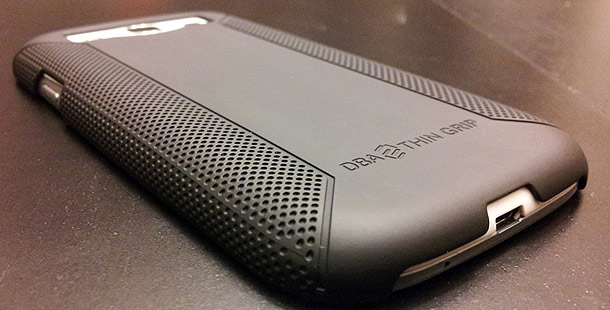
The Thin Grip addresses all of the above. It was designed to look fantastic on your phone. There is a reason why most other phones in this category don't make phones that look like the Thin Grip - It's hard and it's expensive. However you have an expensive phone, so you should have a great case.

The inverted dotted pattern not only looks fantastic but improves the grip. Samsung makes terrific phones but trying to hold onto one is like trying to hold on to a stick of butter.
The instant you pick it up you will tell that this feels like no other case you have used. It feels smooth, warm and comfortable in your hand. It resists scratches better than any case we have found, and it resists oily fingerprints.
The Thin Grip is made completely with polycarbonate and the high end coating. It adds virtually no weight at all to your phone (didn't you buy it because it was light and slim?). The Thin Grip weighs less than half an ounce. You won't notice any extra weight.
Ultra Grip Case :
It's made with the exact same polycarbonate shell as the Slim Grip. The Ultra was designed to be a "maximum protection" case. Most cases of this sort have a hard polycarbonate shell with silicon surrounding the phone under it. Some of what you call "Triple Protection" cases has silicone covered by polycarbonate with TPU on the four edges.
But "why silicone"? It's a very soft black material that won't stay on the phone unless covered by polycarbonate. It is very loose and can rip. TPU gives much more protection which is why they have been putting it on the corners. But that creates a huge, heavy, bulky case. Forget seeing the beauty of your phone because you have three layers over it. But what if you do away with the silicone and replace it with TPU?
Then you don't need the corners protected because they will already be protected. You only need two kinds of materials rather than three. Further, TPU goes onto the case first and grips it. Many people use TPU alone to protect their case. TPU will also protect the case if put on alone - but that's not its purpose. They put polycarbonate over the TPU which creates what we feel is the best protection in the lightest package. The Ultra cases weigh just under an ounce.
The typical TPU case alone weighs an ounce, a very light protective case. If you drop your phone the first thing you're likely to hit is the polycarbonate. As we said before the polycarbonate alone is good protection. The polycarbonate will absorb the initial impact. Then the rest of the impact will radiate to the TPU protecting the case. It's an elegant solution that allows a light beautiful case.
The ULTRA comes in multiple color combinations. You can buy the Ultra Complete Package which is both the TPU and Polycarbonate - or buy any color of each and create the case you think will look nicest on your phone.
They charge half of what the Ultra Complete costs to buy either the PC or the TPU. This lets you have many different looks to your phone without having to buy both pieces together every time. As far as i know they are the first company to offer this. Thus if you get tired of your color combination you just need to go to their site and pick another.
Once the decision to buy a case is made there are thousands to choose from. Many people buy multiple cases since they can be so different. In fact once you have the cell phone case "bug" you will find yourself buying a ton of cases and stopping at every case kiosk at the mall to look.
What About Screen Protectors? Are They A Necessity?
Screen protectors just might be the easiest way to protect your phone from damage right next to phone cases. Just Like Glass TM Screen Protectors are a revolution in screen protection technology. They are the most optically clear film on the market which allows you to see your picture in full HD.
They have the lowest light distortion, there is no "Orange Peel Effect". They are "Smoother than Glass" with such a flat finish that the surface friction is 20% smoother than your actual screen. No plastic feel AT ALL. It's the only film you can buy that is not only scratch resistant but also shatter resistant - the film increases the break resistance of your screen by 35%.
There have been many times when I felt relieved to have made the small investment; like when I look down at my Samsung Galaxy S3 to see what appears to be a long, deep scratch across the screen only to discover that it is actually in the screen protector and not in the phone screen itself.
So, is a screen protector really necessary? The answer is really up to you and how willing you are to risk something unexpected happening to your screen. All I know is that a screen protector is far less expensive than replacing a phone like this. I’m not even sure how you carry your iPhone; whether it be in your pocket, purse, or if you just hang on to it.
From my experience, small scratches that you can hardly see, over time really start to add up even if you are really careful with your phone. A one-time investment can keep you from needing to replace your phone or from being embarrassed to let anyone borrow it because of how scratched up it is.
I guess it’s not really about whether screen protectors are necessary or not, but instead, about how willing you are to take the chance of your phone getting scratched up.
I’m sure you have a busy life; whether it’s work, family, school, or whatever, no matter how careful you are, your attention is going to be diverted from your phone at some point in time, and it won’t take much for your screen to get a small scratch across the surface that will become a permanent part of it.
What is a screen protector really? It’s just an inexpensive insurance policy for your phones screen.
The DBA Cases Just Like Glass screen protectors are available for a variety of devices (Amazon Kindle Fire, Samsung Galaxy S III, iPhone 5, iPad 2/3, iPad mini and more...) and retail from $13.50 to $24.50.
How To Install Just Like Glass Screen Protector
In the video you'll see how to install a Just Like Glass protector on a Note 2 but it's the same for all the other devices.
So...Do You Need To Protect Your Smartphone?
It all depends on what you are doing with it! If it's going to reside in your pocket or purse most of the time, maybe not. If you are a landscaper, car mechanic, construction worker, or plumber then definitely. I've seen some issues with glass breakage on the S3. I've also seen a customer drop one in a pond. Neither of those folks had cases on them and had to pay full retail for new phones. I always recommend some kind of protection based on how and where the customer is going to be using their device.
It all depends on what you are doing with it! If it's going to reside in your pocket or purse most of the time, maybe not. If you are a landscaper, car mechanic, construction worker, or plumber then definitely. I've seen some issues with glass breakage on the S3. I've also seen a customer drop one in a pond. Neither of those folks had cases on them and had to pay full retail for new phones. I always recommend some kind of protection based on how and where the customer is going to be using their device.
In my experience, unless you have a desk job and all of your hobbies are the more sedentary type, just get the cover for your phone. It is amazing how much good even a cheap plastic cover does. A cover has been the difference between life and death for many of our gadgets over the years.
What do you think? Would you go without a case or screen protector for your Samsung Galaxy S3 or iPhone? Let us know below. If our topic have helped you a little, then kindly spread our voice. Subscribe on our feed updates for even more.
*by andreascy*









