7 Reasons to Consider a Home Gym

If you think of picking up better health habits and don't like crowded gyms, consider setting a home gym catered to your needs.

5 Top Picks for Christmas Holiday Like a Fairytale

If you imagine Christmas holiday this year being like a fairytale, you should consider visiting these hidden gems!

7 Fashion Accessories To Lift Up Your Style Quotient

Get heads up on the trendiest as well as classic fashion accessories that would elevate your style to another level.

Sensibo

Showing posts with label Galaxy Note. Show all posts

Samsung Offers Hot Line of Products This Fall

Description :

This year's the world's leading trade show for consumer electronics and home appliances (IFA), was dominated by wearables, slim lines, super curves and a whole lot of innovation. Nearly all the big players had smartphones to showcase – some derivative and some surprising. 

Samsung Offers Hot Line of Products This Fall

Samsung, arguably one of the biggest players in the consumer electronics world, brought its’ A game to Berlin with four new devices custom-made to take the wind out of competitors’ sails. While there's no way to know if the brand revealed everything it has up its sleeve at IFA it certainly showed that it hasn't lost its edge. Here's what had people talking about Samsung and has fans excited for fall:

Samsung Galaxy Note Edge

While the device is similar to the Galaxy Note 4, it does contain a standout feature that will push the boundaries of today's mobile display technology. The Edge features a 5.7-inch screen and adds a seamless 1-inch second screen that curves beautifully around the left-hand edge of the phone. The Galaxy Note Edge screen, which uses a Youm flexible display, may very well change how people interact with their devices. Everything from alerts to apps can be accessed without any interruption to other mobile experiences. Even with the phone locked and the case closed, notifications and messages are accessible. Its release near the end of 2014 could mean an unprecedented level of connectivity with less screen time. Users interested in the Samsung Galaxy Note Edge should sign up at T-Mobile for an alert when the device becomes available. 

Galaxy Note 4

While it still sports the 5.7-inch screen of the Note 3, the screen has gotten a boost with a Quad HD Super AMOLED (2,560 x 1,440 resolution) display that's adaptable to changing lighting conditions. That's super good news since a more powerful camera offers 16MP and lets in 60 percent more light resulting in image quality on par with most users' point-and-shoots. A lightning fast 2.7GHz quad-core Qualcomm Snapdragon 805 processor, an improved S Pen with Smart Selection and a quick charging battery are also among the high-quality features. This flagship Galaxy Note 4 has a forecasted October release. 

Gear VR

Virtual reality is finally coming to consumer's pockets thanks to the Gear VR, which is powered by the Note 4 and slated for end-of-year release. What sets this device apart is that the immersive audio and 3D video experience users enjoy is provided by the Note 4's Quad-HD screen technology. Simply slide the Galaxy Note 4 into the headset to deliver superb gaming environments, cinematic settings for movies and TV and larger than life sound. 

Gear S Smartwatch

This is the company's third smartwatch and its codename – Solo – says a lot about why it's a game changer. Unlike nearly all other smartwatches and wearables that can only be used when linked to a smartphone, the Gear S is a 3G capable standalone device that's so smart it's brilliant. A dual-core 1GHz processor, 4GM on internal storage and 512MB RAM mean it can have its own apps and programs and can even send texts and make calls – all using Samsung's own Tizen portable OS. Though experts disagree on the viability and longevity of the wearables market it's pretty clear the Gear S is going to be a hit. Watch for it in October.

The takeaway? Changes to mobile technology are happening faster than ever and Samsung is keeping pace admirably. It remains to be seen whether the competition will keep up but it's clear fans have plenty to look forward to.

RECOMMENDED: Why Curved Screens are the Next Innovative Trend

If you like this blog post, some engagement or re-sharing would be terrific! 

Thank you! 😍😎

*by andreascy*


Create the Future with SunSaluter and Galaxy Note 10.1


Description : 

The SunSaluter is a technology that enables the automatic rotation of solar panels to follow the sun throughout the day (just like a sunflower) to increase their energy generation - without using any electricity to do so. 


The technology was created by Eden Full and is being developed by her company Roseicollis Technologies.


It has been deployed in two pilot projects in Kenya. Fascinated by biomimicry, Eden Full aims to power a whole village on SunSaluters in Peru and southern India -- by 2013.


The SunSaluter won the Mashable/UN Foundation Startups for Social Good Challenge and was awarded the runner-up prize at the 2011 Postcode Lottery Green Challenge.


"Good technology is something that is simple, something that anyone whether you are 5 years old, a university professor or a farmer in Tanzania, you'd be able to look at it and get it."


Currently in active development, the Roseicollis Technologies website claims that the SunSaluter is :

  • Cheaper: It is constructed from locally-sourced and recyclable materials rather than electronic components.
  • Simpler: Almost anyone can assemble and maintain it because of its intuitive design.
  • Flexible: It can be installed underneath any existing solar panel with a few minor adjustments.

Watch on the video below how the Galaxy Note 10.1 plays a part in creating the future with Eden from SunSaluter.


In order to preserve our planet and encourage societies to adopt renewable energy resources, we need to lower the cost of solar energy so it is more affordable for individual families and their homes and villages. The SunSaluter is a contribution to tackling energy infrastructure growth and climate change.

Read also: Robots Pivot Solar Panels to face the Sun by QBotix

Learn more about Galaxy Note 10.1 and discover other interesting Solar related topics. Subscribe for straight updates to your inbox or your favourite feed reader.

*by andreascy*


DBA Cases - Protect And Enhance Your Phone And Other Devices

Description : 

People love their gadgets, and some people will do almost anything to make sure they look as cool and clean as they did when they first came out of the box. 


Today's smartphones are expensive beautiful things. The manufacturers spend quite a bit of money making them sleek and attractive to buyers. However, they also want to cut costs which make most of the phones plastic and easily damaged. To buy a new phone outside of a contract usually costs $750.00. Many people upgrade their phones by signing on for additional years. This discounts the phone but the cost is figured into your contract. If you lose the phone you will pay full price to replace it.


Since people carry their phones where ever they go there is a great danger of damaging or ruining this expensive piece of equipment. Further, most people cannot even imagine going without their set-up on what is now closer to a computer than a phone. This means it must be protected in some way.


There's a whole industry that has emerged to help people keep their shiny new devices just like new. There are hundreds of cases customized for just about any kind of smartphone. And because there are so many options, some people start to feel like they "need" one of these cases to protect their precious device.


I know plenty of people who feel more comfortable when their devices have cases on them. And there are plenty of good reasons to buy a case. There are a lots of people who drop their devices. There are lots of cases available that will absorb the shock from an unexpected tumble.


Also, it's a good idea to get a case if you plan to resell your smartphone at a later date to help defray the cost of a new smartphone. Minor scratches and scuffs can devalue your device on the secondary market. So if you can keep your phone in pristine condition, you're likely to get a better price for it. 


Another popular reason for getting a case is simply to show off some personal style. The Samsung Galaxy S III is one of the hottest-selling devices on the market. And that means there are tons of people walking around with the exact same phone that you have. While I don't really care too much about that, some people do. A case offers you a way to add some color or style to your device to reflect your own personality. 

What kind of protection DBA Cases offer? 

There are two kinds of protection people will use. One is a screen protector - a film to put over your glass to protect from scratches. Most screen protectors feel like plastic (because they are) and can degrade the view of the expensive screen. However if you work where there is a great danger of scratching it then you don't have much choice.

The second kind of protection is the cell phone case. The case is meant to protect from scratches to drops. Some cases are so protective you may not even know what kind of phone is in it. There are some who go "naked" and take the chance of damaging it without a case but those people are becoming rarer as the technology progresses.


The case has to IMPROVE the look of the phone. You don't buy a $750 phone (subsidized or not) and then cover it up. Too many cases take that approach and what you get is an ugly case on a great looking phone. Phone manufacturers spend millions every year on the design of their phones - and they generally look amazing. So why cover it?


The case should add some functionality. Does it improve the grip? Does it protect from drops? Does it protect from scratches? For some reason smart phones are not designed to give you a good grip, protect against drops or have a scratch proof back (or glass). Gorilla Glass is great  - but like everything else it will scratch and shatter.


No one drops their phone on purpose. How much less would you drop your phone if the grip was improved? 50%? Every case should do its best to reduce the number of times you drop the phone. The case is just not for protecting the phone - it's to reduce the number of times the phone is dropped. 

DBA Cases are based on two guidelines : 

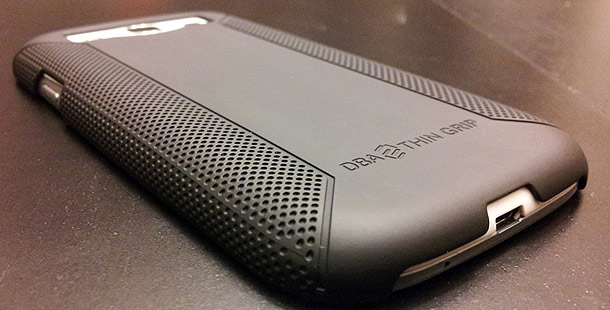
1. Very lightweight, feel great in your hand, improve the grip of the phone, and protect from scratches and minor falls. Most of all it has to enhance the look of the phone. This is the Thin Grip. 

2. It has to protect the phone as much as possible from scratches, bigger drops, give a better grip, and feel great. This is the Ultra. 

Thin Grip Case :

The Thin Grip addresses all of the above. It was designed to look fantastic on your phone. There is a reason why most other phones in this category don't make phones that look like the Thin Grip - It's hard and it's expensive. However you have an expensive phone, so you should have a great case.


The inverted dotted pattern not only looks fantastic but improves the grip. Samsung makes terrific phones but trying to hold onto one is like trying to hold on to a stick of butter.

The instant you pick it up you will tell that this feels like no other case you have used. It feels smooth, warm and comfortable in your hand. It resists scratches better than any case we have found, and it resists oily fingerprints. 

The Thin Grip is made completely with polycarbonate and the high end coating. It adds virtually no weight at all to your phone (didn't you buy it because it was light and slim?). The Thin Grip weighs less than half an ounce. You won't notice any extra weight. 

Ultra Grip Case : 

It's made with the exact same polycarbonate shell as the Slim Grip. The Ultra was designed to be a "maximum protection" case. Most cases of this sort have a hard polycarbonate shell with silicon surrounding the phone under it. Some of what you call "Triple Protection" cases has silicone covered by polycarbonate with TPU on the four edges.

But "why silicone"? It's a very soft black material that won't stay on the phone unless covered by polycarbonate. It is very loose and can rip. TPU gives much more protection which is why they have been putting it on the corners. But that creates a huge, heavy, bulky case. Forget seeing the beauty of your phone because you have three layers over it. But what if you do away with the silicone and replace it with TPU? 

Then you don't need the corners protected because they will already be protected. You only need two kinds of materials rather than three. Further, TPU goes onto the case first and grips it. Many people use TPU alone to protect their case. TPU will also protect the case if put on alone - but that's not its purpose. They put polycarbonate over the TPU which creates what we feel is the best protection in the lightest package. The Ultra cases weigh just under an ounce.

The typical TPU case alone weighs an ounce, a very light protective case. If you drop your phone the first thing you're likely to hit is the polycarbonate. As we said before the polycarbonate alone is good protection. The polycarbonate will absorb the initial impact. Then the rest of the impact will radiate to the TPU protecting the case. It's an elegant solution that allows a light beautiful case. 

The ULTRA comes in multiple color combinations. You can buy the Ultra Complete Package which is both the TPU and Polycarbonate - or buy any color of each and create the case you think will look nicest on your phone.

They charge half of what the Ultra Complete costs to buy either the PC or the TPU. This lets you have many different looks to your phone without having to buy both pieces together every time. As far as i know they are the first company to offer this. Thus if you get tired of your color combination you just need to go to their site and pick another.


Once the decision to buy a case is made there are thousands to choose from. Many people buy multiple cases since they can be so different. In fact once you have the cell phone case "bug" you will find yourself buying a ton of cases and stopping at every case kiosk at the mall to look. 

What About Screen Protectors? Are They A Necessity? 

Screen protectors just might be the easiest way to protect your phone from damage right next to phone cases. Just Like Glass TM Screen Protectors are a revolution in screen protection technology. They are the most optically clear film on the market which allows you to see your picture in full HD. 

They have the lowest light distortion, there is no "Orange Peel Effect". They are "Smoother than Glass" with such a flat finish that the surface friction is 20% smoother than your actual screen. No plastic feel AT ALL. It's the only film you can buy that is not only scratch resistant but also shatter resistant - the film increases the break resistance of your screen by 35%. 

There have been many times when I felt relieved to have made the small investment; like when I look down at my Samsung Galaxy S3 to see what appears to be a long, deep scratch across the screen only to discover that it is actually in the screen protector and not in the phone screen itself. 

So, is a screen protector really necessary? The answer is really up to you and how willing you are to risk something unexpected happening to your screen. All I know is that a screen protector is far less expensive than replacing a phone like this. I’m not even sure how you carry your iPhone; whether it be in your pocket, purse, or if you just hang on to it. 

From my experience, small scratches that you can hardly see, over time really start to add up even if you are really careful with your phone. A one-time investment can keep you from needing to replace your phone or from being embarrassed to let anyone borrow it because of how scratched up it is. 

I guess it’s not really about whether screen protectors are necessary or not, but instead, about how willing you are to take the chance of your phone getting scratched up. 

I’m sure you have a busy life; whether it’s work, family, school, or whatever, no matter how careful you are, your attention is going to be diverted from your phone at some point in time, and it won’t take much for your screen to get a small scratch across the surface that will become a permanent part of it. 

What is a screen protector really? It’s just an inexpensive insurance policy for your phones screen.


The DBA Cases Just Like Glass screen protectors are available for a variety of devices (Amazon Kindle Fire, Samsung Galaxy S III, iPhone 5, iPad 2/3, iPad mini and more...) and retail from $13.50 to $24.50.

How To Install Just Like Glass Screen Protector

In the video you'll see how to install a Just Like Glass protector on a Note 2 but it's the same for all the other devices.


So...Do You Need To Protect Your Smartphone?

It all depends on what you are doing with it! If it's going to reside in your pocket or purse most of the time, maybe not. If you are a landscaper, car mechanic, construction worker, or plumber then definitely. I've seen some issues with glass breakage on the S3. I've also seen a customer drop one in a pond. Neither of those folks had cases on them and had to pay full retail for new phones. I always recommend some kind of protection based on how and where the customer is going to be using their device. 

In my experience, unless you have a desk job and all of your hobbies are the more sedentary type, just get the cover for your phone. It is amazing how much good even a cheap plastic cover does. A cover has been the difference between life and death for many of our gadgets over the years. 


What do you think? Would you go without a case or screen protector for your Samsung Galaxy S3 or iPhone? Let us know below. If our topic have helped you a little, then kindly spread our voice. Subscribe on our feed updates for even more.

*by andreascy* 

Samsung Galaxy Note 10.1 - The New Way


Description : 

Visualize your ideas better by turning squiggly shapes into neat organized figures. Shape Match on the Samsung Galaxy Note 10.1 automatically corrects the lines and shapes. 


With S Note, multiscreen capability and free embedded Adobe Photoshop Touch, the Galaxy Note 10.1 lets you experience a new way to plan, work, and create.


To find out more, visit Samsung.

Read an Introduction to Galaxy Note 10.1 and watch the Official Hands on Video that was featured on our Blog. 

Feel free also to discover other Samsung related topics and don't forget to comment below and show your support to our hard work.

*by andreascy*

Introducing Samsung Galaxy Note 10.1 - Official Hands on Video


Description : 

The Samsung Galaxy Note 10.1 is here : the latest high - profile tablet from the Korean tech giant, and one that sits across many intersections of what's fast becoming a complex Samsung family tree. 


While the Galaxy tag is a given for any Samsung mobile device nowadays, the Note range is also now seemingly becoming a separate line of its own.


The video below is the official hands-on video of Galaxy Note 10.1. 


Learn more about the exciting features that enhance productivity, creativity and learning capabilities. 


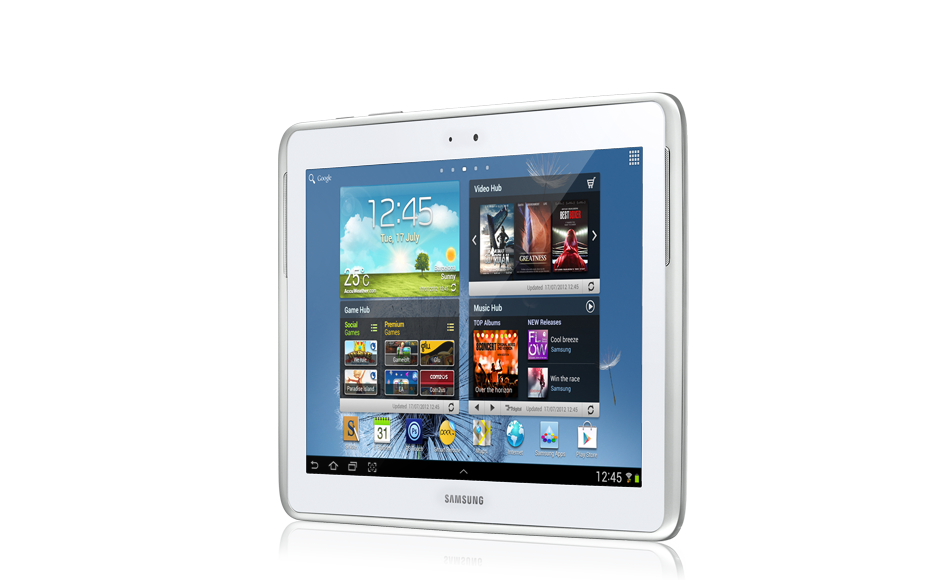
The Galaxy Note 10.1 is outfitted with the functionality and precision of a pen and paper on a 10.1-inch-large-display.


Featuring an intuitive user experience and armed with superior hardware performance, Galaxy Note 10.1 is designed to simplify idea capturing, information access, and multi-tasking, making each easier and faster. 


For more information visit Samsung's official page.  

Don't miss also Tech Republic's Bill Detwiler who disassembles the Galaxy Note 10.1 and shows why it's easy to service and represents an improvemevent over the 10-inch Galaxy Tab. Find out more on this at CNET.

For even more information on the Galaxy Note 10.1, including real-world use and performance tests check out, Eric Franklin's full CNET review.

*by andreascy*

Samsung Galaxy Note S Pen SDK 2.2 Has Been Released. Download It Now!

Description: 

The latest version of the S Pen SDK for the Samsung Galaxy Note is now available to download. Apps developed with the new S Pen SDK can interact with S Pen even when it is not in contact with the Note.

Samsung Galaxy Note S Pen SDK 2.2 Has Been Released. Download It Now!

The combination of Hovering Side Button and Pen Gesture can re-define the way a user interacts with the device allowing you to deliver many new innovative UX scenarios. 

What Is The S Pen?

The S Pen, introduced along with the Galaxy Note, is a new input tool that makes up for the disadvantages of old input methods. 

Samsung Galaxy Note S Pen SDK 2.2 Has Been Released. Download It Now!

The S Pen provides faster and more accurate input than conventional stylus pens. It is an input tool that provides a similar feel to an actual pen by detecting the pressure applied on the screen with great accuracy. 

You can experience the numerous advantages of the S Pen in the various Galaxy Note series of devices.

What Is The S Pen SDK?

By using the S Pen SDK, you can easily add various S Pen features to your applications.

It provides the necessary functionality to take 100% advantage of the S Pen, including checking if the S Pen is activated, checking coordinates, sensing pen pressure, detecting the on/off status of the side button on the pen, and handling hover events, which is supported on Android Ice Cream Sandwich or later. 

Samsung Galaxy Note S Pen SDK 2.2 Has Been Released. Download It Now!

Also, it provides various additional features such as a drawing environment with animation support, pen, eraser and text property settings in the drawing environment, adding image objects, image processing and signature recognition. These additional features make it easy to develop various apps that are specialized for S Pen.

Every time the SDK version is updated, a variety of useful features for S Pen are added and available for you to use.

New Or Changed In The S Pen SDK 2.2 Release

The S Pen’s hovering feature has been improved greatly:

- Hovering - related functions were only available in SCanvasView in the past, but the new SPenEventLibrary class makes it possible to use the hovering features in normal views. 

- To make it easier to set and use hover pointer icons, which are displayed when using the pen, text, color picker, and color-fill-in tools with SCanvasView, the S Pen SDK 2.2 provides predefined setting values such as the S Pen SDK Style and S-Note Style, as well as APIs. 

- It also allows setting and changing hover pointer icons in normal views through the setSPenHoverIcon method of the SPenEventLibrary class. 

The S Pen Detachment Listener API has been added:

- The SPenDetachmentListener listener for handling events that occur when the S Pen is detached from or attached to the device was added. (Note: Applicable to Note 10.1 or later.) 

Drawing - related features have been upgraded:

- In addition to the 4 types of pen brushes (pen, brush, pencil, and highlighter) that were available in the previous Pen Input Mode, the brush type, “calligraphy brush” has been added, and there are now 5 brush types to choose from. 

- A new feature for filling the inside of shape drawn by the user with a specific color picked by the user was added. The SettingView for choosing the fill color was also added 

SettingView-related features and UI have been improved:

- A Pen Setting preset feature has been added with support for up to 12 presets. 

- An align setting feature was added in the Text SettingView and two new fonts (Chocolate Cookie and Rosemary) have been added. 

- A Mini SettingView pop-up window that shows essential features of a SettingView, such as pen/eraser/text/color fill, in a smaller size has been added. 

Object-related clipboard features have been added:

- Related APIs such as object cut, copy, paste, and clear clipboard have been added so that the user can use the clipboard after selecting the image objects that have been added to SCanvasView. 

Context aware - related features have been added:

- Related APIs for getting the list of apps were run when the S Pen or earphones were detached or attached, and checking package & class information, have been added for context aware support. 

Performance enhancements and stabilization have been improved:

- The file saving speed of the SAMM library has been improved. 

- The Pen Only Mode have been added for using only the pen and erasers from the S Pen SDK (excluding text, image, and fill objects), is now supported. 

Unnecessary and duplicate APIs have been deprecated, and the names of some APIs have been changed:

- Deprecated methods can be used in the previous 2.1 version and the current version, but they will be removed in future versions. 

10 sample apps, which were provided separately for each feature, are now integrated into one sample app:

- The sample app has been changed to one sample app that shows each feature in a list format, and shows a demo of the feature that the user selects. 

Examples of new features added in version 2.2 have been added to the sample app:

- Examples of changing hover pointers, linking hover and pop-up windows, checking S Pen Events in a normal view, applying image filters, and color filling have been added. 

Some errors in SDK 2.1 have been corrected in this release.

In addition, it's not too late to join the Samsung Smart App Challenge, the largest app competition ever. In the "Best S Pen Apps" category, entries will be scored on their creativity and originality and the 20 apps with the best S Pen functionality will be awarded with up to $200,000 in cash prizes.

Good luck! 👍

*by andreascy*

Samsung Smart App Challenge 2012 Launched Today!

Description :

Lately, we wrote about Samsung Smart App Challenge 2012, the world's largest global mobile app contest by Samsung Electronics

Samsung Smart App Challenge 2012 Launched Today!

Today, Samsung has announced that the challenge is now launched and open for submissions!


Samsung Smart App Challenge 2012 Launched Today!


Make sure to submit your app soon and win your share of over $4 million in prizes plus mega marketing support! 

We wish to all the participants Good Luck!😎💪

*by andreascy*

Samsung Smart App Challenge 2012

Description :

Samsung Smart App Challenge 2012, the world's largest global mobile app contest launched by Samsung Electronics, is slated from May. 

Samsung Smart App Challenge 2012

This contest will identify and honor outstanding works in the field of GALAXY Tab and Note application, the main pillar of smart life along with smartphone.

In particular, a total of $4.08 million in cash prize, the largest ever in history, will be awarded to the winners, along with multi-faceted marketing supports. So, this event is expected to become an attention-grabber for mobile developers around the globe. 

If you are a mobile developer, keep abreast of the upcoming news on the contest!


Share the good news with your friends! 😉

*by andreascy*

🦾 Stay Motivated

👩🏻‍🚀 Artemis II Crew: From Friends to Family

▶️ Just Press Play

We all have days like this

[image or embed]

— Chris Paxton (@cpaxton.bsky.social) April 17, 2026 at 1:51 PM

⭐ Leading ShipYard's Leaderboard

🚩 Milestone Unlocked!

🏅 Win-Win