7 Reasons to Consider a Home Gym

If you think of picking up better health habits and don't like crowded gyms, consider setting a home gym catered to your needs.

5 Top Picks for Christmas Holiday Like a Fairytale

If you imagine Christmas holiday this year being like a fairytale, you should consider visiting these hidden gems!

7 Fashion Accessories To Lift Up Your Style Quotient

Get heads up on the trendiest as well as classic fashion accessories that would elevate your style to another level.

Sensibo

Showing posts with label Android. Show all posts

Top 6 Social Media Mobile Applications for Business in 2017

Description:

As we head into a new year, it’s vital that businesses appreciate the various challenges that may lie in wait in the weeks and months ahead. What does 2017 promise us in terms of the genuine development of technology to amplify business performance? Let’s take a look at some of the most powerful social media mobile applications for businesses.

Top 6 Social Media Mobile Applications for Business in 2017

With the increasing interest in social media, comes also the more intensive use of mobile applications, along with relevant business content. As this infographic demonstrates, businesses recognize the value of social media and therefore it makes sense to seek related mobile apps as a means of promoting more efficiently, networking productively, and appealing to clients. 

As we are at the beginning of 2017, we figured on exploring some of the potentially best apps for boosting social media reach, among other benefits. Some are already here, but there could be an explosion in popularity for others in the months to come. 

1. Peach 

Peach is an iOS app that provides an easy way to use various social media features all in the one place. It’s like a simple version of Facebook, Snapchat, Tumblr, and Slack all put into one powerful marketing tool.  

Top 6 Social Media Mobile Applications for Business in 2017

As some people look to cut down on the amount of apps they use, this all-in-one package, might be just what they need.

Peach is a very effective marketing tool, but it is expected to offer businesses much greater versatility in the weeks and months to come. It’s not there yet, but 2017 could be the year it breaks through. 

2. Wanelo 

One of the major problems so far with social media, has been the lack of integration with buying and selling—for the most part. Wanelo, is a social shopping app that promises to be very powerful for businesses in the long-term. It has got lots of sellers on it, including big-name brands and single product Etsy accounts.

Top 6 Social Media Mobile Applications for Business in 2017 
As such, being on this app, is like being on a Yellow Pages for online businesses, which is worth paying attention to. Wanelo is expected to continue in its growth and development after what was a very good 2016 for the app. Businesses should look to get themselves on here, and make themost of what some people are referring to as a “Tinder for Buyers”. 

Overall, this app is not perfect by any means, but it provides the means to promote your business in yet another way. 

3. The Roll 

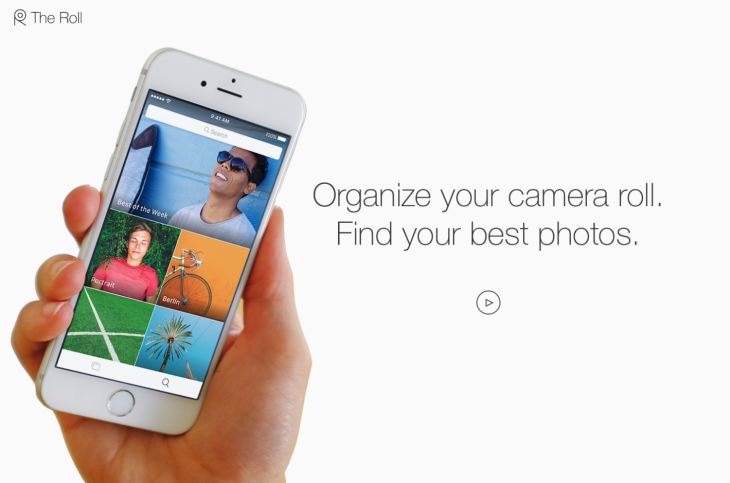
The Roll is a brilliantly named tool by EyeEm that is all about making the power of visuals even more effective for your content. You already know the vital nature of design, no doubt, but The Roll facilitates a much better quality of image overall. It uses a smart analytical program to analyze your content and rate it on a scale of 0-100. It then adds smart keyword suggestions for your images to help them rank better on Google, which is VERY important for marketing growth and visibility. 
Top 6 Social Media Mobile Applications for Business in 2017

Since this is an artificial intelligence (AI) app, it’s only going to grow more with input and therefore we expect 2017 to be the year that The Roll starts to rise from above its competitors and takes control of the web. 

4. Tuurnt 

Tuurnt is a brilliantly named tool that you can use as both a business app and a social media tool. Some of its more disparaging reviewers, claim it’s just a Snapchat clone, but it’s nothing of the sort. 

You get around 24hrs to respond to a photo or a video, and then the chance to respond is gone. This helps to turn a basic image or caption into a massive social event, helping to get people contributing and engaging with one another. 

Top 6 Social Media Mobile Applications for Business in 2017

This allows people to join in using images and video to create a more hospitable feel to your marketing as a business. Although this is still quite niche, it’s showing a very impressive level of growth as the years go on, with increasingly impressive changes to the app’s interface and overall participation numbers. 

For that reason, we expect Tuurnt to see a big 2017. 

5. Yubl 

Last year, Yubl managed to surpass the likes of Skype and LinkedIn as the fourth most downloaded free app in the United Kingdom, and it is likely to see continued growth in 2017, as people cotton on to just how good Yubl is. 

Yubl offers an easy way to get access to a social media and networking platform that just works. The app comes with a very impressive interface that attracts users in the first place, as well as facilitating easy interaction between business and customer.

Top 6 Social Media Mobile Applications for Business in 2017 
Many believe that Yubl is not yet diverse enough to break the mold of the likes of Facebook and Twitter, but at the very least, 2017 should see it take some very interesting strides in the right direction. There is little it needs to change or improve upon, and it will gradually become more visible next year which is equally important. 

You might not think that your business needs another social media profile, but that couldn’t be any further from the truth when it comes to Yubl. 

6. Shake 

The wonderfully named and designed Shake is a good choice to go for, when you want to start managing contracts a little better than you already do currently, by sending legally binding documents quickly and easily. With everything from NDA samples to freelancing contracts, you can make sure that your business comes across far more professionally than ever before. 

Top 6 Social Media Mobile Applications for Business in 2017

Legality is a vital part of the world of business and freelancing, and smart contracts are very useful in covering yourself legally. With this tool, you can create, manage, edit and send legally binding documentation, in a process that is bound to become a staple for businesses in 2017. 

In Closing...

Undoubtedly there is an array of apps to choose from when it comes to social media business apps, yet we think the aforementioned should be top of your list to embrace a more successful 2017!


Let's be Instagram buddies! 😃

*by andreascy*

Image to Word App: How to Convert and Edit Your Receipts

Description :

How Fast Do you Lose Track of Your Cash?

Do you find it hard to keep track of your daily spending? Many people often have problems with handling their finances, day-to-day spending and taking care of their bills, so they turn to technology for help. Ask any millennial and they will tell you the importance of managing your cash in today’s world… There just isn’t any money we are ready to give up that easily!
Image to Word App: How to Convert and Edit Your Receipts

If you are an avid fan of money, you should consider using technology to help you save your money. There are many useful apps that can provide the same user experience as if you were reading out the receipt just handed to you. One such app is Image to Word, a mobile app converter that will help you track your spending. This app allows its users to take a photo of their receipt, or a screenshot of an image, and convert it to the easily editable MS Word file. The apps developer Cometdocs has recently released a bunch of new apps, among which this was one of them, if not even the most successful of all apps in this past release.

Money in the Bank, Tracking Ain’t Easy!

Well, not really in the bank since you are spending it, but at least this way you will know how to track it. Here are some of the standout features that make Image to Word one of the best converters on the market:

- Great conversion quality and absolute data recognition

- Screenshots and complex tables are convertible too

- No limitations when it comes to file sizes and numbers

- Won’t drain your battery

- Very intuitive and easy-to-use

The app offers two ways of converting files: by choosing a file from your library, or taking a photo with your camera and then selecting to convert it.

Image to Word App: How to Convert and Edit Your Receipts

If you click on Photos, you will see a list of folders which are located on your device, and from there you can select any image you want to convert. If you wish to convert a screenshot of you receipt, or a photo you previously made, this is the option you need to select. If you click on Camera, the app will open your rear camera, with which you can quickly snap a photo of your receipt or maybe a newspaper. 

Once you’ve selected your file, the conversion will begin. The file being converted will appear on the main screen. You can also see all active and finished conversions on your main screen below the part where you choose between Camera and Photos. Those files are saved on your phone for future use, unless you choose to delete them by hand.

Image to Word App: How to Convert and Edit Your Receipts

The converted file will be in .docx format, which is the primary format for editing text in many apps, mainly MS Word. By clicking on your converted file, you will see a preview of your new file and you can export it to the app where you wish to edit it by clicking on the Share button in the bottom left corner. The app will then open a list of suggested apps to use, as well as all previous editing apps you used.

Image to Word App: How to Convert and Edit Your Receipts

If you are having trouble using the app, click on Options and then click on Guide for better results for a few quick tips. This guide will take you through the app and show you the proper way to take a photo of your receipt, or how to make a screenshot suited for conversion.

Image to Word App: How to Convert and Edit Your Receipts

From there you can also rate the app, stop all conversions or contact customer support in case you have issues with using the app. Also, by clicking on Settings in that same menu, you can allow and deny Image to Word access to certain parts of your iPhone/iPad, such as the Photos and Camera, as well as managing the notifications you get from this app.

With this app you shouldn’t have anymore trouble tracking your receipts because now you can have them all stored in your phone. While this app is very popular among iOS users, Image to Word is also available on Android so feel free to try it out, and let us know how much it helped you in managing your finances.


If you enjoyed our post kindly leave us a like on Facebook.  Hope you will come back soon!

*by andreascy*

Spotify vs Apple Music; Where Does the Scale Lean?

Description :

If you are one of those people who cannot live a day without listening to music, chances are that you have done so via a popular streaming music platform. As of late, the two main contenders in the arena seem to be Apple Music and Spotify. 

Spotify vs Apple Music; Where Does the Scale Lean?

These streaming services are the present and future of music industry. Each has its own unique advantages; but which one will surpass the other?

Spotify

Spotify is a platform that uses streaming as its means of media acquisition. Streaming is quickly becoming the dominant choice among media consumers. It doesn’t eat up memory on the device, new music is refreshed to the package, and playlists are sharable among friends, and the world, if you wish. Gone are the days of entering a password every time you make a purchase.

Spotify vs Apple Music; Where Does the Scale Lean?

Soundtracks and compilation albums have been proven money makers in the music industry. Think of the playlist as a graduated version of the variety CD. These shared playlists benefit the user and composer alike. Every time and artist’s song is played, they get paid for it. Likewise, the user gets to enjoy the music at a fraction of the price, had they downloaded it.

Apple Music

Apple Music has been the dominating force when it comes to media downloads. You have the option to download a single song or an entire album from the 45 million in the iTunes Library, 15 million of which are unavailable to stream though. Also you have the option to get the digital art if you miss the old school days of CD booklets.

Spotify vs Apple Music; Where Does the Scale Lean?

Apple has about 1 billion registered users on its network as well as a reputation for continued longevity. Despite iTunes’ staying power, Apple has seen a decline in downloaded albums and songs in 2015 by 16% in nominal terms, according to music industry analyst Mark Mulligan at Canadian Music Week in Toronto. This decline is expected to increase between 25% and 30% this year, nevertheless, iTunes music downloads are still estimated to be worth $600 million in 2019. Does the decline in sales spell the end of iTunes as Apple is preparing an aggressive two-year termination timetable for iTunes store?

Spotify vs Apple Music: the Clash

With music crossing over to the digital, the industry is poised to offer better quality, at a competitive rate. One of the major down sides to having music so readily accessible is that the sound quality suffers a bit. Even on the newest devices the compression technology doesn’t offer the same fidelity and listening quality that a CD does. Although the idea of streaming is still catching on, eventually the growth will plateau. This will give the music industry the chance to introduce ‘premium packages’ in which they can charge a slightly higher fee, for better sound quality. This may seem a tad on the greedy side, but compare this to the days when you were forced to pay $13-$17 dollars for one song, and maybe a few others you might like. When the two are seen side by side, streaming seems like a much more agreeable option.

1. Subscription Plan:

When comparing the subscription prices, Spotify and Apple Music have similar competitive packages. For example if you decide to go with either Spotify Premium or Apple Music Membership, the cost is $9.99 a month (with a 3-month free trial on both platforms), or you can sign up to a Family Plan for $14.99 a month, for up to 6 different people. Most people opt for the $9.99 option, so the actual cost is $120 a year, but that’s still pretty good. Apple Music also offers a Student Membership for $4.99 a month, which is quite cheap considering its benefits.

Another advantage that Spotify has is that you can listen to an entire album the day of its release, rather than just samples. A major downside to this service is that it doesn’t have all songs available. That ends up being true with both services because even Apple Music has a few bands that you won’t be able find in its libraries.

2. Compatibility:

In terms of beating the competition in providing digital services, one major factor comes down to compatibility issues. Spotify adhering to this concern, is compatible with a number of devices and even supports older versions of iOS. It also has native clients for Windows, Android and Linux. A strong advantage, Spotify’s web player will work almost on any operating system. 

Apple on the other hand, has taken a leap of faith by working on different operating systems, including Android. However, it is still not possible for users of older iOS devices to enjoy Apple Music, as it is not supported on iOS 8.4 or less. In addition, Apple Music has the disadvantage of not working on a web player and needs iTunes to play on a desktop. Practically, it is therefore inconvenient to play Apple Music for example when you are not using your own computer and have to install iTunes.

3. Sound Quality:

Music is all about the sound quality, right? Both Spotify and Apple Music bring decent audio quality to your ears. Spotify premium offers an adjustable rate with extreme quality as it calls it reaching a peak at 320 kbps Ogg, whereas Apple Music uses 256 kbps ACC. Hearing the experts’ viewpoint on the matter, findings from a listening study conducted by CNET comparing Spotify and Apple Music audio quality, it seems that Spotify wins this battle over their rivals.

4. Music Discovery:

This list of examining the pros and cons of each music streaming service, would not have been complete without looking into the discovery features of each platform. 

Spotify has a number of options to find songs and artists or albums. Spotify’s “Discover” feature is perhaps not as effective, and does not recommend playlists but only artists, albums and individual tracks. However, its more recent addition “Discover Weekly” is a great way to browse new releases, as it offers a custom playlist of up to 2 hours of the hottest hits each week according to your preferences. There is also the “Now section”, a smart feature which recommends songs based on the time of day and day of the week using a grid instead of Microsoft’s hip tiles. 

Their competitors, Apple Music shares a similar feature with the “For you” screen, a cool layout offering a mosaic of music suggestions inspired by Windows Phone’s live tiles. The feature allows you to find playlists, individual tracks and artists though it might take a bit longer to incorporate your preferences to know what suits you. There is also its “New” section which indicates suggestions of what other Apple Music users are listening to, and current playlists to enhance your music experience. 

Spotify has a “Browse” section serving for similar purposes, yet it seems to have a more user friendly interface with top lists, genres and moods, as well as news.

5. Free Music:

Spotify is an exclusive streaming music service provider of free in-demand music. Users can enjoy any song or album for free, although intermittent ads subsidize the streaming. This free service feature has been heavily criticized by artists who claim that there is little gain money-wise. Nonetheless, Spotify claims that their free service prevents piracy and artists do get compensated through Spotify. 

On the other end of the scale, although the impression is that Apple Music does not allow users to listen to songs for free, the reality is that Apple Music is available for free, including the Beats 1 station. This feature is available although interfered by advertising and you can enjoy up to 6 songs per hour. 

6. Voice Control:

As far as apps is concerned, perhaps not surprisingly, Apple has the upper hand. On iOS for instance, only Apple can use Siri with apps, a feature that has been integrated into Apple Music. This digital assistant can handle requests like playing songs, albums or artists, and even locate and play the top playlists from a given year. 

Spotify on the other hand, does not offer this type voice control or digital helper. You can enhance your overall Spotify experience with third-party apps like Vela, yet they are not integrated into iOS.

Conclusion

It’s tempting to look for a winner-looser situation when it comes to rivalry services or software. 

The above comparison, was not meant to be exhaustive. In a perfect world we would just be able to combine the services, and then use it as we saw fit. Some songs that you like may not be on Spotify, and likewise, Apple Music may not have the songs you’re looking for either. There are people who use both services and cherry picking the features they like. People like the convenience of access to songs on the go, as well as being able to download and save them once in a while. Both services have their advantages and disadvantages. Who knows? Maybe soon the companies will merge and then we can enjoy all the benefits. 

Until that happens, the answer to the question of which is better, Spotify or Apple Music, boils down to personal preference. If you like owning your music and having the files physically on your computer, Apple Music is the way to go. If you don’t want to be hindered by computer memory loss and have access to a ton of songs at any time and virtually from any device with decent sound quality and different discover music options, then check out Spotify.

COULD BE OF INTEREST: Best Apps for Music Lovers

We're always around if you have any questions or suggestions. 

*by andreascy*

Is the Nearshore Trend All about Cost?

Description :

To say that nearshore outsourcing is a hot trend right now is to state the obvious. Whether you are talking about technology, the legal industry, or even the energy space, companies of all scopes and sizes are seriously looking at trading in their offshore outsourcing partners for new nearshore partners. iTexico, a nearshore services provider in Austin, has firsthand experience of this growing phenomenon.

Is the Nearshore Trend All about Cost?

The nearshore trend began in the previous decade but did not start gaining steam until just a few years ago. Now it seems to be spreading like wildfire. As it does, experts are stepping back and asking whether this trend is really just about cost.

I don't think so. Sure, iTexico works with a lot of clients looking for nearshore outsourcing for everything from Android and iOS development to cross-platform titanium development. And yes, many of these clients are doing so because outsourcing is a more cost-effective means of accomplishing their goals. The question is why they choose the nearshore model rather than the traditional, decades-old model of offshore outsourcing.

A Technology Industry Redo

To gain a little insight into what's going on in technology; consider a 2013 piece published by Computer Weekly on its website. The emphasis of the article was the idea that offshore outsourcing was for large enterprises while nearshore was for smaller ones. On its face, the argument seems reasonable. But once you dig a little deeper, you find out there is more to it than that.

The Computer Weekly piece asserted that large companies outsource primarily to save money, making offshore locations like India very attractive. On the other hand, small startups outsource in order to get the talent they need in the shortest time possible. They are not necessarily worried about cost while spending investor money. This view seems rather shortsighted, if not somewhat fatalistic.

Still, if the Computer Weekly argument is true, then there is something deeper here. Big tech companies that only outsource to save money may be shooting themselves in the foot by not taking advantage of new ideas, new ways of doing things, and innovative solutions to old problems. They are stuck in the same rut of using the same outsourcing contractors who never seem to change things up.

On the other hand, startups are all about a redo complete with new ways of thinking. They are not relying on the same outsourcing partners their competitors have relied on for years. Rather, they are looking for partners with the same mindset and goals they have while going above and beyond cost savings, which can be reached through undertaking nearshore practices.

Nearshore Is Fresh and Exciting

iTexico's role as a provider of nearshore services in Austin gives them access to a lot of different clients with a vast array of goals. Yet the one thing that seems common to most of them is a desire for something fresh and exciting. Clients want flexible outsourcing solutions that fit their company culture yet do not sacrifice innovation and quality. Itexico is one of those leading companies that will satisfy these needs through their affiliation with multiple partners in Mexico and therefore the client's interest is immediately piqued.

At the end of the day, evidence shows that nearshore outsourcing is about more than just saving money. Indeed, saving money is a significant factor in motivating companies to outsource, but in the arena of technology and mobile app development, companies also want partners who can deliver cutting-edge results that will lead us all into the future. That is what nearshore outsourcing provides. And by the way, nearshore does it exceptionally well.


I have to tell you...we have A LOT of really cool stuff coming VERY soon. 

Stay tuned! 😎💝

*by andreascy*

Tightening Android Security Against Data Stealing Applications

Description :

It’s common knowledge that Android devices aren’t foolproof when it comes to malware and viruses, but for the most part these threats are hiding in the back alleys of the operating system. You’re most likely to run into them when you start downloading apps from sketchy third-party app stores, or side-loading pirated APKs. 

Tightening Android Security Against Data Stealing Applications

But here’s something scary. There is a family of apps containing malware just relaxing in Play Store, and they have multiplied at a decent pace during the last few years or so. 

Last year, DCCI (Data Center of China Internet) released an investigation against various Android markets and found that 66.9 percent applications were tracking private data, and 34.5 percent of them were engaged in cross-border tracking; tracking information that has no relevancy to the app’s main permissions and not informing users about what is happening. 

So what kind of data are these apps tracking from your android device? In short, everything -- from your phone book contacts and text message history to your account credentials. The fact that such apps are looking at your data even when it has nothing to do with the features provided should be a major concern. 

Even more worrying is that the apps responsible may be different than the ones that you expect to breach your privacy. The report, for example, reveals that beauty and study apps are among the worst privacy offenders in case of location tracking, while travel apps top the list when it comes to swiping user contact information. 

And this was just once instance where many applications were unethically crossing the line. A recent report cited by ComputerWeekly reveals that 79 percent of the clones released for the famous Flappy Bird game contained some form of malware. 

These clones were doing more than just tracking user privacy; hackers used them to make phone calls without the consent of the user, extract list of contacts, install more applications and establish root gateway for control over everything on the device. Data-breaching criminals are finding success by manipulating the familiar features in mobile games and apps that users trust and recognize. 

Taking Measures to Protect Your Personal Identity 

So, what can you do keep these app-stealing threats at bay? Before installing apps on your device, follow these best practices to ensure your personal information is not being compromised:

Utilize advanced internet security solutions: Advanced internet security solutions feature support for android and iOS devices. According to Trend Micro, some advanced solutions not only provide internet security virus warnings, they protect your android phone by identifying apps that steal your personal data. Further, they back up and store your information for retrieval in case a hacker is able to gain access to your device and wipe your data.

Review permissions: The next time you install an application on your device, take out a few minutes to read the app permissions for making sure your personal information is not shared with third parties. This kind of information is usually buried in the last few sentences. 

Use official download channels: even though the Google Play consists of data-stealing applications, whatever you download through the official route would be much less harmful due to official policy procedures than downloading apps through third-party app stores and unofficial channels.

RECOMMENDED: Are You Underestimating the Importance of Data Security? 

Thank you to every fan out there for watching! Blessed, humbled and inspired. Please subscribe below to stay connected. We have a better way. 😉💛

*by andreascy*

What We Do On Smart Phones To Get Entertained?

Description :

Infographics are awesome! They allow people who are bombarded with too much information on a daily basis, to learn something new or digest data in a quick and easy format.

Lately, we've been working super hard with Coupon Audit on creating an infographic on “Smartphones in our lives” and how we use them to get entertained.

What We Do On Smart Phones To Get Entertained?

According to a latest survey, the standout statistic was that 65% of iPhone owners now say they "can't live without their iPhone." Of course, a smartphone is not necessary for existence, but for a lot of people, it's an important part of their working life and without it they would get less done. 

40% said that they would give up coffee first, 18% said that they would stop bathing every day before giving up their iPhone, and 15% would rather give up sex than having a weekend without their nice device. 

Besides these stats, a Nielsen study examined some basic categories of mobile apps that were most used by people who had downloaded an app. Here are the results: 

- Games: 64% 

- Weather: 60% 

- Social Networking: 56% 

- Maps: 51% 

- Music: 44% 

- News: 39% 

- Entertainment: 34% 

- Finance: 32% 

- Movies/Video: 26% 

- Shopping: 26% 

Regarding games, the average time a user spends (hours/month) playing games is: 

- iPhone: 14.7 

- Android: 9.3 

- Windows phone 7: 4.7 

- Blackberry: 4.5 

Another interesting fact is that smartphone owners with a housewold income of $75,000 or more are 3-5 times more likely to own a Blackberry or iPhone. 

Do you want more? Check out some of the interesting facts below and let us know what you think.

What We Do On Smart Phones To Get Entertained?

This Infographic is produced by Coupon Audit and THE OFFICIAL ANDREASCY.

We also want to make it easy to share our visual content. We include below an embedded code, a snippet of html code that easily allows you to copy and paste it into your own web pages and as such, display the infographic or image.

Share This INFOGRAPHIC On Your Site:


If you're new here, you may want to subscribe to our newsletter. We also have a Twitter account. Follow us at @ofclandreascy for lots of cool updates and Trending Tweets

Thanks for visiting! Go ahead and flood the comments section! 😃

*by andreascy*


HTC One Max Vs. Samsung Galaxy Note 3

Description :

First came the smartphones, then the tablets, and now the latest fad is "phablets" - devices that sit somewhere between oversized phones and undersized tablets. 

HTC One Max Vs. Samsung Galaxy Note 3

License: Image author owned 

The latest phablet from Samsung, the Galaxy Note 3, has had tremendous success on the market, and now HTC is entering the scene with the HTC One Max. 

HTC One Max Vs. Samsung Galaxy Note 3

License: Image author owned 

Can it stand up against the Note 3? Let's look at the specifics and find out.

Size

When it comes to size, it all depends on whether you're more excited about the phone or the tablet part of the phablet. It makes a difference here, since the One Max is significantly larger and heavier than the Note 3. Samsung's device measures in at 5.95" x 3.12" x 0.33" with a weight of 5.93 oz, while the HTC is a whopping 6.48" x 3.25" x 0.41" and weighs 7.65 oz. If you're on the fence about whether to get a phablet versus a regular smartphone, you probably don't want to start off with the One Max. Its formidable size makes it fall much more solidly in the "tablet" category. If, however, you're looking more for a tablet that can call and text, the One Max's size won't throw you at all. Of course, the Max's 6" screen is a nice bonus when it comes to watching movies or reading text.

Internal Specs

When it comes down to the numbers, the Note 3 easily wins this race, with its 2300 MHz processor and ridiculous amount of RAM - a full 3 GB - trumping the One Max's 1700 MHz processor and 2 GB of memory. In practical use, however, most will not notice the difference. The HTC One Max has enough memory and processing power to effortlessly handle the average user's workload. The Note 3 will be heavily discounted at Sprint Black Friday 2013 sale on November 29. Given the impressive specs, the Samsung Galaxy Note 3 is a better buy for the holiday shopping.

Input Options

The Galaxy Note 3 was designed to be used with a stylus and even ships with one. This makes it easier to accurately access what you want. The HTC One Max has chosen instead a touchscreen method. Will most people miss the stylus? Maybe not, unless they've gotten used to it on a Note. What the One Max does have that is unique is its fingerprint sensor. Taking its cue from the iPhone 5s, the sensor sits on the back of the device, allowing you to securely unlock your phone with just a touch of the finger, rather than inputting a passcode or something more time-consuming.

Software

Both these devices are up-to-date with Android 4.3, the latest version of Google's Android operating system. Each phablet's manufacturer has put its own user interface on top of Android. Samsung's TouchWiz Nature UX 2.0 offers heavily-advertised features like S Pen functionality and Air Command, while HTC Sense 5.5 includes a feed reader on your homescreen and Zoes, a video clip recorder connected to the camera app.

Which Is Better?

The HTC One Max, in many ways, has just taken its popular HTC One phone and made it larger. The Galaxy Note 3 is more technologically innovative, has better specs, and better demonstrates why a phablet might be preferable to a smartphone. That's not to say the Note 3 is for everyone. The HTC One was an excellent phone and its larger counterpart has many of the same great qualities. If you're set on a phone-tablet combination, however, you can't beat the Note 3 for convenient phablet-centered features.

David Johnson loves to review gadgets and share money saving tips. He recommends buying a new smartphone during Sprint Black Friday sale to get the best price of the season. 

*by andreascy*

10 Stories You Shouldn't Miss This Weekend

Description :

Who's awesome? You're awesome! 😍 😍

We wanted to just take a second and say thank you to everyone. Have a wonderful weekend!

10 Stories You Shouldn't Miss This Weekend

It is good to have spent sometime reading this week and i had a tough task to pick through many dozens of shortlisted stories. I guess the ones here are those pieces that had a lasting impact (click the headlines to read the full story). Hope you like this selection.

1. Brands - it's time to stop being faceless and start showing character on social media. There was a time when brands could get away with all-out self-promotion. Things have changed a lot in the last couple of years. Now, businesses really need to take into consideration what audiences want - especially personality. A great piece that is worth reading.

2. Why is Android’s growth rate suddenly flat? (Hint: Android is not the same as Google Android). Mobile phone technology exploded over the last 7 or so years,… the whole industry is much slower now. Saturated, and a bit non-plussed at this point.

3. The Psychology of Color in Marketing and Branding. We love color, it makes life so much better. This is one of the best info graphs we've seen in a long time! Read this extensive discussion about the impact of color on ‪marketing‬. 

4. Social media giants' features compared. Google+ comes on top with 50 features vs 30 supported by Facebook and 20 by Twitter. One of the best things I have read this week.

5. Brands: Who Owns What? Ever wonder what massive corporation controls all of the other companies? This crazy-amazing graphic shows who owns what and how.

6. Why Social media actually works for small business [Infographic]. Social Media is a powerful tool for small businesses and startups to market themselves with the right intent. It's easy, effective and the fastest way to approach the intended customer base.

7. A Smooth, 3D Printed, Multicolored, High-Resolution Vaze. The ProDesk3D from botObjects, an unreleased 3-D printer, says they've conquered the problem of crappy resolution in 3-D printed objects. Watch out the video that demonstrates the beauty and finish quality of 25 micron printing, using PLA (Not ABS) thermoplastics.

8. Smart Surgical Knife Detects Cancerous Tissue. Surgeons may have a new way to smoke out cancer! An experimental surgical knife can help surgeons make sure they've removed all the cancerous tissue. This knife could be a groundbreaking development in cancer surgery.

9. Spell Check on Paper With Lernstift's Digital Pen. Digital Pen points out spelling errors with a subtle vibration to help kids (and adults) acquire better writing skills! This is possibly the smartest pen we've ever seen.

10. Mural.ly loves Evernote. Evernote is fast becoming my go to organization tool. Linking it to mural.ly makes it even more useful. I can now use the material in my Evernote account to create a mural.ly presentation. 

Looking forward to hearing your feedback and insights in the comments below. Please don't forget to like our Fan page and show your love like always! 

Peace out. ✌

*by andreascy*

🦾 Stay Motivated

👩🏻‍🚀 Artemis II Crew: From Friends to Family

▶️ Just Press Play

We all have days like this

[image or embed]

— Chris Paxton (@cpaxton.bsky.social) April 17, 2026 at 1:51 PM

⭐ Leading ShipYard's Leaderboard

🚩 Milestone Unlocked!

🏅 Win-Win



