7 Reasons to Consider a Home Gym

If you think of picking up better health habits and don't like crowded gyms, consider setting a home gym catered to your needs.

5 Top Picks for Christmas Holiday Like a Fairytale

If you imagine Christmas holiday this year being like a fairytale, you should consider visiting these hidden gems!

7 Fashion Accessories To Lift Up Your Style Quotient

Get heads up on the trendiest as well as classic fashion accessories that would elevate your style to another level.

Sensibo

Showing posts with label Mobile Internet Experience. Show all posts

Marketing Design Tips and Trends For Success

Description:

With website design impacting 94% of first impressions, one of the main factors impacting if a user will stay on your website or not is your design and its elements.

Marketing Design Tips and Trends For 2021

An ideal website design is simple, functional, and also consistent with the branding of your business. Most good-looking websites use a grid-based layout to make content aligned, they have short load times, are mobile-friendly, and use inviting copy.

Use these website design hacks and trends to make informed decisions for your website in 2021.

Keep Design Clean and Simple

Use minimalistic elements, simple fonts, easy colors, and compelling copy to create a clean website design.

A rising trend in 2021 is comfortable colors. We suggest thinking outside of the box and avoiding the classic black and white. While these can work for certain industries, we suggest using soft color palettes to create a calm and relaxing environment for your visitors.

Use Stunning Visuals

No matter if it’s for your product pages, blog posts, or about us page, always use high-quality images and videos (of course while, at the same time, keeping in mind size limitations).

In 2021, 3D graphics and parallax animation are increasingly popular among web designers and website owners. That will help you stand out from your competitors and keep your users engaged and longer on your website (which also brings benefits in terms of SEO and conversions)

Make Your Web Design Responsive

All the pages on your website need to be responsive and render well on all devices and screen sizes.

To stay updated with the latest industry trends, you can try using vector graphics. These are points on a vector map that web designers use to resize images without losing quality. That ensures your site is responsive without compromising the quality of your visual assets.

Make Your Website Engaging

No matter which industry you’re in, your website shouldn’t be boring. Try to capture the attention of your readers by using elements of interactivity.

In 2021, we’ve seen a rising trend in 360-degree views, as well as micro-interaction elements. These, again, engage users and also keep them on your site longer.

Create a Simple Navigation Experience

The structure of your content should be easy to understand and your website easy to navigate through.

A growing trend in web design is infinite scroll technology, which makes it a seamless experience for users to navigate your website, especially on mobile devices.

As you’ve seen there are some marketing design tips you can take advantage of to create a stunning website.

However, you should adapt your layout to the type of content you share. The design of your website will vary depending on the industry you’re in and the content you share. Because of that, you must find inspiration from some of the best-designed websites on the internet.

Website Design Examples:

1. Avoriaz 1800 – Visite Virtuelle

Marketing Design Tips and Trends For 2021

This website uses animation, 360-degree technology, storytelling, and stunning visual assets to make users feel like they’re part of the experience. Definitely consider creating something like this if you’re in the travel and hospitality industry.

Technologies Used: CSS3, HTML5, Apache

2. Playbook

Marketing Design Tips and Trends For 2021

This cloud storage platform for designers website uses clean design, stunning photography, and an innovative UI experience that captures the user’s attention. The website also uses interactive design elements to create a personalized and engaging experience. Make sure your web design is clean and simple, especially if you’re a technology company targeting designers.

Technologies Used: Ruby, GraphQL, React

3. Animus Studios

Marketing Design Tips and Trends For 2021

This video agency uses animation, videos, and lots of colors to stand out from competitors and also show the company’s capabilities in terms of videos. Try using a similar web design if you’re a creative business agency that wants to make work more fun.

Technologies Used: Craft CMS

4. PUBLIC DOMAIN

Marketing Design Tips and Trends For 2021

This website, founded by Virgil Abloh to show his collections and to tease upcoming product launches, uses big background images, a horizontal menu, and innovative content architecture

Technologies Used: JavaScript, HTML5

5. Globalance World

Marketing Design Tips and Trends For 2021

Globalance World is an investment platform that creates an interactive experience for users to make investment decisions by looking at economic, societal, and environmental factors. To do this, the website designers used interactivity, a fully responsive design, and 3D data visualization.

Technologies Used: next.js, CSS3, Three.js, React, D3, GraphQL

6. UXPERT

Marketing Design Tips and Trends For 2021

This website chose to use elements like animation, clean design, graphic design assets, and an innovative user interface. For example, on the homepage, users can play a showreel to learn everything about the brand.

Technologies Used: WordPress, CSS3, HTML5

7. MAD

Marketing Design Tips and Trends For 2021

MAD is a creative digital design website taking a creative approach to interactivity. The result is an unusual design that surely captures the attention of users, who can play with the logo, move objects, and more. By using experimental and unusual design, transition elements, filters and effects, an innovative user interface, and micro-interactions, this website creates interest and curiosity.

8. Glob

Marketing Design Tips and Trends For 2021

Do you own an eCommerce website? This is the example you’re looking for. Glob sells reusable bags for a plastic-free lifestyle. On their website, they use filters and effects creatively to grab the users’ attention and making web design elements entertaining. For example, users can move their mouse around and interact with designs with a liquify effect.

Technologies Used: WebGL

9. Gucci Beauty Foundation

Marketing Design Tips and Trends For 2021

This website offers a quiz game, shades palettes, and interactive video tutorials to allow users to discover the uses in an entertaining way. Consider creating a subdomain or subfolder of your website, similar to this example, to present a product you offer and create a buzz.

Technologies Used: CSS3, HTML5, React, Anime.js

10. Mario Russo Archive

Marketing Design Tips and Trends For 2021

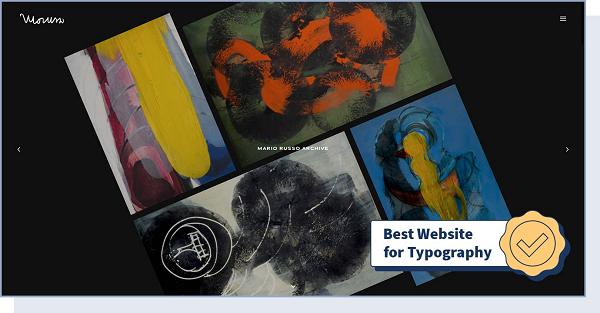
Using features like responsive design, appealing typography, and storytelling, artist Mario Russo’s archive offers a simple way of showing creative work online. More specifically, typography (font style, appearance, and structure) is an extremely important factor when it comes to improving the user experience.

Technologies Used: CSS3, HTML5, jQuery, Typekit

11. Yusuke Fukunaga

Marketing Design Tips and Trends For 2021

Yusuke Fukunaga’s portfolio uses infinite scroll, parallax, scrolling, and various filters and effects for a simple yet innovative design. Consider experimenting with something similar if you’re a creative professional and want to showcase your portfolio.

Technologies Used: WebGL, GSAP Animation, Three.js

12. IdeaRocket

Marketing Design Tips and Trends For 2021

IdeaRocket is an animation studio making its website popular for its uncommon user experience work presentation. Design features that stand out here include animation, video, scrolling, and great use of storytelling.

Technologies Used: WordPress, CSS3, HTML5. GSAP Animation

13. Omega Funds

Marketing Design Tips and Trends For 2021

Are you in the B2B space? We suggest taking a look at the way this website uses animation features, transition elements, and micro interactions to communicate information in a fun way without distracting users. This is perfect for inspiration especially if you have a corporate website.

Technologies Used: WordPress, CSS3, GSAP Animation, Three.js, Matter.js

14. Low Five Brewing

Marketing Design Tips and Trends For 2021

Single page, uncommon navigation, and responsive design are the features that stand out when users enter this website. Low Five Brewing is one of the best single-page websites on the internet. This technology includes all the content on one page, with no menu at all. As a result, navigation is simple and the website is fast and responsive.

Technologies Used: Vue.js, Nuxt.js

15. Swissdent

Marketing Design Tips and Trends For 2021

Swissdent created a website that uses photography, animated visuals, clean design, minimalistic elements, and parallax technology to tell a story. The minimalistic and clean web design creates a simple and fun shopping experience for visitors.

Technologies Used: WordPress, CSS3, HTML5, GSAP Animation, PHP

16. Goodfight

Marketing Design Tips and Trends For 2021

Using a horizontal menu and layout, responsive design, transition elements, and fun filters and effects, this website creates a more interactive experience for users who want to learn about the brand.

17. Hanwag – 100 Years

Marketing Design Tips and Trends For 2021

Experimental and retro design. This is what users think of when looking at this website. The entire site consists of a single page, which details the history of the Hanwag shoe brand from the first shoemaker’s shop in 1921 to 2021.

18. Vintageria

Marketing Design Tips and Trends For 2021

Definitely, get inspired by this website if you’re looking for a retro web design for your eCommerce store. The website is colorful and uses fun storytelling elements and an innovative user interface to stand out from other clothing brands.

Technologies Used: Node.js, GSAP Animation, PixiJS, Webpack, Vue.js, Nuxt.js

19. Fabulatorij

Marketing Design Tips and Trends For 2021

Take a look at this event agency’s website if you’re planning to use vector graphics for your website design. It uses geometric shapes to create high-quality images that render well on all devices.

Technologies Used: GSAP Animation, VideoJS, Vue.js, Nuxt.js, Netlify

20. BURGER & SAUCE

Marketing Design Tips and Trends For 2021

What elements stand out on this website? Big background images, vector graphics, and responsive design. This restaurants chain focuses on these elements on its website to picture its handmade burgers, with an impressive and memorable user experience.

Technologies Used: WordPress, SVG, Cloudflare

Conclusion:

If you’re launching a new website and blog or are looking to redesign your existing one, it’s important you have original and cohesive design elements.

Having said that, the specific characteristics and technologies you’ll include will change based on your industry and your company’s goals. Follow the infographic below to choose the right web design elements for your website.


Marketing Design Tips and Trends For 2021

Source: WebsiteSetup


Keep up the good work! 😎👍

*by andreascy*

Mobile App Security Threats To Plan For

Description :

Mobile apps continue to grow with technology. There are countless ways that apps make our lives easier—whether it be tracking our fitness progress, or improving our online shopping experience. The rapid growth in app usage around the world means that, a lot of people don’t have experience on how to protect themselves against a possible security attack. 

Mobile App Security Threats To Plan For

In 2018, 71% of fraud transactions came from mobile apps and mobile browsers. In comparison, 29% came from people using the web, which is a 16% increase year over year. Additionally, one out of every 36 mobile devices has high-risk apps installed. 

Savvy hackers don’t rely on one method to gain access to you and your users’ private data. That’s why, you must anticipate their attacks ahead of time, and design your app so that your users won’t have to worry about whether their data will be compromised. In return, this will signal to others that the business or service you provide through your app, is not only high-quality but also safe. 

Mobile App Security Threats

If a hacker can’t gain access to your precious passwords one way, don’t celebrate too early. They have an arsenal of other weapons they have at their disposal. And after they do exploit your personal information, a lot of the times you won’t even notice it until after the damage has been done. 

Here are a handful of ways that hackers will try to catch you off guard:

No Multifactor Authentication 

You’re especially vulnerable to this attack if you’re the kind of person that uses the same password across all your online accounts and apps. If a hacker is able to uncover it from one of your accounts, they will no doubt gain access to related apps you use. 

Adding an extra step to “authenticate” your account doesn’t always mean you must remember two passwords. It can also mean that you must answer a personal question, or access your account using an SMS confirmation code. 

No Proper Encryption 

Like changing the combination of a security lock, encryption puts data into an indecipherable code that can only be viewed after implementing a secure password. But everyone makes mistakes, and sometimes a developer can design an encryption code that is too easy to crack. After a hacker gains access, they can clear the encryption so that your private data is available in plain sight. 

Reverse Engineering

If your code is too easy to figure out, a hacker can take their hacking a step further and learn exactly how your app functions. They’ll know your code inside and out. And if they have a plethora of experience to draw from, they might even know more about your app than you do. 

This means a hacker can not only expose encryption, but they can modify the source code—using their knowledge to build a fake app designed to look like yours. A hacker can use this fake app to inject malware or worse to your misled users. 

Learn From Others

Mobile app hacks result in time-consuming (and expensive) data breaches. Plus, you lose the trust of your potential users as they don’t want to lose their personal data to hackers. 

Unfortunately, every day there are new cases of hackers taking advantage of a growing app or business. Learn from the mistakes of others so you can understand how to shield yourself against a potential attack. 

TimeHop

TimeHop was the victim of an unauthorized attack that led to a privacy breach of over 21 million users. The hack occurred in December of 2017, but it wasn’t uncovered until July 4, 2018. The attack not only led to the exploitation of TimeHop’s users, but it also led to an app crash.

And what was the main reasoning for the attack? TimeHop failed to use multifactor authentication. As a result, the hacker used the security information found from a TimeHop employee, to access the cloud of the company. 

Fortnite 

Fornite originally released its beta version of the game using an invitation-only environment. Hackers saw this as an opportunity to produce fraudulent links to fake clone versions of the game. 

These versions of the game misled fans, because the hackers cleverly used reverse engineering to include the same loading screens, music, and images the real version used. 

It doesn’t matter if the app you use provides a business, service, or is a video game. If the code is simple to break, hackers will take advantage. 

What Can You Do?

Prevent Reverse Engineering With Obfuscation

Reverse Engineering occurs (like the Fortnite example) because of faulty code. But obfuscation and minification make the code less readable—meaning hackers won’t be able to study how your app functions to build their own. 

Validate Inputs

Remember, it’s dangerous to rely on the same password for all the apps and online services you use. A stranger can access your accounts just by knowing a single password, but when you add more validation inputs to follow, you add an additional layer of app security. 

More Tips

Who’s most vulnerable to attack? In 2018, apps in the tools and lifestyle categories made up a combined 54% of malicious mobile apps. But regardless of which category your app resides in, you can’t take your app security lightly.

Remember, some of the top ways hackers gain access to your app is because of a lack of multifactor authentication or lack of encryption practices. But staying on top of these two aspects leads to a safe and trustworthy app for your users. 

Implementing the right security protocols for your app requires intensive collaboration between your design and development team. And it doesn’t stop there, you must envision yourself as if you were in your hacker’s shoes. What other ways would you try to hack your app? If you plan several steps ahead, you can safeguard your app and focus on the success of your business

Learn more about the cases you can learn from, as well as how to make sure you’re doing multi-factor authentication or encryption the right way, by reading this infographic from CleverTap.

Mobile App Security Threats To Plan For

Source: CleverTap


Keep reading my friends! 💗

*by andreascy*

All Systems Go: Launching a Small Business (and the Tools You'll Need)

Description :


Starting a business requires an ample selection of tools to make operations manageable. Without them, you'd spend more time with its administration than selling and customer interaction.

Where's the fun in that? Almost 1 million businesses are launched each year with most being small operations. This is an interesting trend because it shows the viable nature of starting a business where before launching was heavily determined by access to finances and resources.

All Systems Go: Launching a Small Business (and the Tools You'll Need)

Perhaps the tools make the difference? I think so. I haven't launched a brick & mortar operation but I have started several successful, online businesses. Many tools I use are same (or similar) to those found in many, other small businesses. I can reaffirm this based on my networking and business with owners.

What common ground did I find with business tools?

1. Payment Processing

All businesses need a form of payment gateway services to complete transactions. Brick and mortar stores will likely use Point-of-Sale systems whereas online businesses rely on shopping cart software.

2. Accounting

The first year in business comes as a shock when it's time to pay taxes. Business taxes depend on its organization, profits, and expenses. Average business tax rates are usually 19.8%.

Accounting software is a must to keep income and expenses in order. Both TurboTax and Quickbooks make great options for small business owners.

3. Legal or business document(s)

All businesses should have a business plan to keep efforts aligned and to improve their chances to secure funding through loans and investments. Other important documents may include a bill of lading, trademarks, seller's permits, and more.

Legal and business documents are costly if they're created by professionals. Like taxes, a small business owner may use tools to create these items in-house. 

Tools include DocuSign and Formswift.

4. Computer and mobile hardware

What's a business to do if team members don't have access to computers, mobile devices, and the Web? These two sets of tools, alone, present many opportunities -- including:

 Access to website building tools
 Mobile CRM and networking tools
 Social media marketing and always-on monitoring
 Warehouse management and logistics
 Payroll and time management software

These tools become vital for its launch as Web efforts will generally lead to high engagement, low-cost marketing campaigns to build awareness and sales.

Also, businesses may choose to bring advertising and marketing creative design in-house by making flyers, posters, brochures, and business cards for a fraction of the costs if done by a designer. 

Tools all small businesses will want to explore include Salesforce, Hootsuite, Wix, and ADP.

5. Business Intelligence

BI tools give small business owners insights into the business operations and organization. Data is uploaded to these tools to compile information and records to produce actionable reports.

Microsoft Power BI offers a free version of their tool many small business owners may want to explore if they feel it provides a benefit.

6. Helpdesk

Gathering customer (and employee) feedback is tedious if these items are stored and organized through traditional filing systems.

Helpdesk software sits on your workplace hardware. Or, it's cloud-based. These tools create a gateway for feedback and handling issues. Other benefits include:

 A central hub for FAQ's
 User roles and hierarchy for management
 Community forums to crowdsource help

There's a Tool for Everything

No matter the task or problem... there's a tool to provide a solution. Yes, each tool you introduce will produce a learning curve and time investment. But, they will greatly reduce the tedious tasks.

This frees more of your time to work on the enjoyable activities like interacting with customers, exploring new ventures, and nurturing team cohesion.

I've found most businesses all use one or all types of these tools. Though, ask your fellow entrepreneurs for extra pointers and suggestions.

*by andreascy*

How to Easily Edit a Resume Anytime Needed

Description :

How many times did you miss the opportunity to land a dream job because you didn’t send your resume on time? If you are counting, then you can probably relate with the following situation. 

You noticed, or your friend sent you a great job ad that perfectly describes you and you think: “Wonderful, I’ll definitely apply, I just need to adjust my resume.” That’s understandable given that it’s very important to create a resume that fits a job description and requirements. That will bring you one step closer to landing a new job. However, as it usually happens, you procrastinate and wait the last minute and then, of course, something goes wrong and technical problems arise. In the end, as a result, you don’t get called for a job interview.

How to Easily Edit a Resume Anytime Needed

Nevertheless, it doesn’t have to be like that. You can take advantage of a modern technology and mobile device and edit your resume right away, without delays and technical issues.

PDF to Word Convert will easily and successfully convert your PDF resume into an MS Word document on your iPhone or iPad. In that way, it will become editable, so you are able to make necessary changes, to update your resume or to modify it a little bit, in just a few taps.

Step 1

Download PDF to Word Converter from the app Store.

How to Easily Edit a Resume Anytime Needed

Step 2

Whether you store your resume on the phone, or you have it on Gmail or cloud services, just click on the button and find your CV.

How to Easily Edit a Resume Anytime Needed

Step 3

You’ll find your document among converted files. Afterwards, simply open it in Word application and edit your resume.

And that’s it! Now you don’t have to wait the last minute when you can modify your resume immediately and send it right away. In that way, you’ll avoid negative surprises and hopefully get a dream job. 


Good luck and let us know how did it go. We would gladly help!

*by andreascy*

Snap Studies: How Brands Can Connect with Snapchat Fervent User Base

Description :

When Snapchat first burst onto the scene in 2012, it attracted millennials and Gen Z-ers in droves. But brands (for the most part) stayed away - they were still trying to harness the power of Facebook, Twitter, and Instagram. And millennials and Gen Z-ers loved having a network all to themselves, a space where they could communicate with their friends all day without any brand interruptions. This peaceful paradise didn’t last too long, however, as brands quickly took notice of Snapchat’s impressive user stats. Younger generations were living and breathing snaps, and brands wanted in. Now with a daily video view rate of 10 billion daily views, brands are experimenting with various storytelling and ad formats to serve always-on content to their growing audiences. 

Snap Studies: How Brands Can Connect with Snapchat Fervent User Base

Today, Snapchat is a publicly traded company with an IPO boosted by the network’s ability to secure consistent user engagement. And brands boast features tailor made for brands, including Discover Stories and custom filters and geotags to promote specific events. As of 2016, advertisers were coughing up a minimum of $100,000 to run ads on the platform; a cost well worth the advantage of connecting with two generations aging up and gaining spending power.


In addition to paid promotion, brands are also investing more in their organic content on the brand. Through regular behind-the-scenes stories and influencer takeovers, the platform is giving brands the opportunity to share more relaxed and playful content with audiences. However, some features and storytelling strategies are proving to be more valuable than others. Here are a few lessons you can learn from some of the most successful campaigns and brands on Snapchat. 

The Good

Real-Time Marketing: Netflix (Gilmore Girls)

To garner even more excitement for the Gilmore Girls Netflix revival ahead of its November 2016 release, the Netflix team enacted a massive offline-meets online Snapchat campaign. Netflix took over 200 cafes and effectively turned them into Luke’s Diner, the Gilmore Girls casts’ main hangout on the show. Each cafe distributed cups with a Snapchat QR code that gave customers access to a custom Luke’s Diner filter on the app. The one day stunt was a massive success as the branded filter was viewed over 880,00 times.

GE: Storytelling

Since 2014, General Electric (GE) has been a brand that has used Snapchat’s storytelling capabilities to the fullest extent. From launching geo-targeted travel filters over the holidays to all-star story appearances from Buzz Aldrin, GE uses Snapchat to educate and entertain their followers about the wonders of science. In 2016, the company even livestreamed a 1,200 foot descent into a volcano on the platform. The channel is not devoted to selling GE products, but rather, its primary intent is to teach audiences interesting lessons - lessons that often entice to audiences to visit GE’s social profiles for more explorations. GE continues to push the boundaries of creative education and video storytelling by utilizing all of Snapchat’s features. 

Taco Bell: Sponsored Filters

To celebrate Cinco De Mayo in 2016, Taco Bell launched a giant Taco filter. While the images of people’s heads as tacos were frightening, the filter’s stats were anything but scary. The viral filter racked up 224 million impressions for Snapchat throughout the one-day only marketing campaign. Taco Bell has always been on the cutting edge of Snapchat because it never took itself too seriously on the platform; their ongoing platform success stems from a willingness to get content creative and take risks. It’s content is filled with hand-drawn illustrations and playful copy. And as the Giant Taco filter proved, funny and playful content on Snapchat can generate big brand results.

The Bad

Discover 

Snapchat Discover has had a difficult time resonating with the platform’s primary demographics. Perhaps it’s because the intention of Snapchat Discover, to bring news, entertainment, and pop culture coverage to the platform, is so disconnected from why people use Snapchat in the first place: to connect with people through playful fleeting stories. But Snapchat Discover is enticing for brands, because it gives them an opportunity to slip more traditional ads between publishers’ content. Some argue that the wave of publishers is diluting the app, as the more publishers that get added, the less spontaneous Snapchat feels. Since Discover’s 2016 redesign, publishers have seen a 28% drop off after the first story. However, a decrease in engagement has stopped partners from signing up. 

While time will only tell if the Discover section becomes less disruptive for Snapchat users, one thing is for certain today: there are other, effective ways to engage with audiences on the network.

 What's the Conclusion?

In the coming years Snapchat will only become more valuable to brands. Snapchat is quickly attracting older audiences, which means that the platform’s diversity should attract brands across verticals. The brands that can constantly utilize Snapchat’s features to their fullest extent and experiment with ongoing storytelling angles will be the ones best positioned to transform on-platform engagement into off-platform results. 


Fancy this article? Share it... 

*by andreascy*

Top 6 Social Media Mobile Applications for Business in 2017

Description:

As we head into a new year, it’s vital that businesses appreciate the various challenges that may lie in wait in the weeks and months ahead. What does 2017 promise us in terms of the genuine development of technology to amplify business performance? Let’s take a look at some of the most powerful social media mobile applications for businesses.

Top 6 Social Media Mobile Applications for Business in 2017

With the increasing interest in social media, comes also the more intensive use of mobile applications, along with relevant business content. As this infographic demonstrates, businesses recognize the value of social media and therefore it makes sense to seek related mobile apps as a means of promoting more efficiently, networking productively, and appealing to clients. 

As we are at the beginning of 2017, we figured on exploring some of the potentially best apps for boosting social media reach, among other benefits. Some are already here, but there could be an explosion in popularity for others in the months to come. 

1. Peach 

Peach is an iOS app that provides an easy way to use various social media features all in the one place. It’s like a simple version of Facebook, Snapchat, Tumblr, and Slack all put into one powerful marketing tool.  

Top 6 Social Media Mobile Applications for Business in 2017

As some people look to cut down on the amount of apps they use, this all-in-one package, might be just what they need.

Peach is a very effective marketing tool, but it is expected to offer businesses much greater versatility in the weeks and months to come. It’s not there yet, but 2017 could be the year it breaks through. 

2. Wanelo 

One of the major problems so far with social media, has been the lack of integration with buying and selling—for the most part. Wanelo, is a social shopping app that promises to be very powerful for businesses in the long-term. It has got lots of sellers on it, including big-name brands and single product Etsy accounts.

Top 6 Social Media Mobile Applications for Business in 2017 
As such, being on this app, is like being on a Yellow Pages for online businesses, which is worth paying attention to. Wanelo is expected to continue in its growth and development after what was a very good 2016 for the app. Businesses should look to get themselves on here, and make themost of what some people are referring to as a “Tinder for Buyers”. 

Overall, this app is not perfect by any means, but it provides the means to promote your business in yet another way. 

3. The Roll 

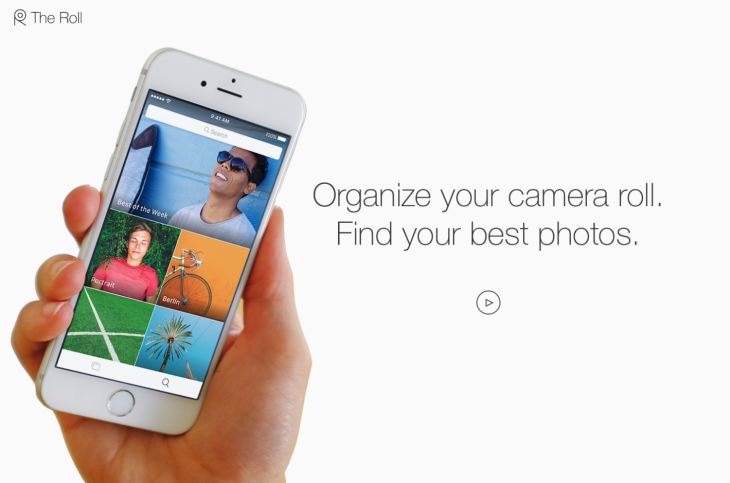
The Roll is a brilliantly named tool by EyeEm that is all about making the power of visuals even more effective for your content. You already know the vital nature of design, no doubt, but The Roll facilitates a much better quality of image overall. It uses a smart analytical program to analyze your content and rate it on a scale of 0-100. It then adds smart keyword suggestions for your images to help them rank better on Google, which is VERY important for marketing growth and visibility. 

Top 6 Social Media Mobile Applications for Business in 2017

Since this is an artificial intelligence (AI) app, it’s only going to grow more with input and therefore we expect 2017 to be the year that The Roll starts to rise from above its competitors and takes control of the web. 

4. Tuurnt 

Tuurnt is a brilliantly named tool that you can use as both a business app and a social media tool. Some of its more disparaging reviewers, claim it’s just a Snapchat clone, but it’s nothing of the sort. 

You get around 24hrs to respond to a photo or a video, and then the chance to respond is gone. This helps to turn a basic image or caption into a massive social event, helping to get people contributing and engaging with one another. 

Top 6 Social Media Mobile Applications for Business in 2017

This allows people to join in using images and video to create a more hospitable feel to your marketing as a business. Although this is still quite niche, it’s showing a very impressive level of growth as the years go on, with increasingly impressive changes to the app’s interface and overall participation numbers. 

For that reason, we expect Tuurnt to see a big 2017. 

5. Yubl 

Last year, Yubl managed to surpass the likes of Skype and LinkedIn as the fourth most downloaded free app in the United Kingdom, and it is likely to see continued growth in 2017, as people cotton on to just how good Yubl is. 

Yubl offers an easy way to get access to a social media and networking platform that just works. The app comes with a very impressive interface that attracts users in the first place, as well as facilitating easy interaction between business and customer.

Top 6 Social Media Mobile Applications for Business in 2017 
Many believe that Yubl is not yet diverse enough to break the mold of the likes of Facebook and Twitter, but at the very least, 2017 should see it take some very interesting strides in the right direction. There is little it needs to change or improve upon, and it will gradually become more visible next year which is equally important. 

You might not think that your business needs another social media profile, but that couldn’t be any further from the truth when it comes to Yubl. 

6. Shake 

The wonderfully named and designed Shake is a good choice to go for, when you want to start managing contracts a little better than you already do currently, by sending legally binding documents quickly and easily. With everything from NDA samples to freelancing contracts, you can make sure that your business comes across far more professionally than ever before. 

Top 6 Social Media Mobile Applications for Business in 2017

Legality is a vital part of the world of business and freelancing, and smart contracts are very useful in covering yourself legally. With this tool, you can create, manage, edit and send legally binding documentation, in a process that is bound to become a staple for businesses in 2017. 

In Closing...

Undoubtedly there is an array of apps to choose from when it comes to social media business apps, yet we think the aforementioned should be top of your list to embrace a more successful 2017!


Let's be Instagram buddies! 😃

*by andreascy*

Ways That Tech Can Help When You Have to Move on Short Notice

Description :

Hi all and Happy New Year! We can’t believe it’s 2017! Hope everyone is getting caught up and settled in after the holidays. 

So you just found out you have to move ASAP. Be it for a new job or unfortunate eviction, the short notice skyrockets your stress levels and panic begins to set in. But have no fear, technology is here. 

Ways That Tech Can Help When You Have to Move on Short Notice

Take control of a short-notice move by taking advantage of all the technology at our finger tips. Here are some key ways tech can save the day. 

1. Apartment Hunting Websites

Say you’re looking for apartments for rent in NYC, currently live in California and don’t have time or the means to travel last minute to find a place. Apartment hunting websites like ForRent let you filter housing requirements and provide extensive information on multiple options that fit what you’re looking for. You can also get a virtual tour of each unit so it feels like you’re there even from afar. 

2. Google It

If you’re moving to a new city and want to get a feel for what it’s like to live there, typing in a good ol’ Google search can give you exactly what you need. Search “Living in…” or “Moving to…” and the World Wide (wonderful) Web will list endless articles and the inside scoop on a particular city. That way you’re prepared to transition from transplant to local as soon as you get to your new city. 

3. Virtual Moving Guidance 

If there’s a need, there’s an app for it. The MoveAdvisor app helps you through a move by taking inventory and helping you visual where you’ll put your items in a new home. It can additionally provide weight estimates for your moving items and lists reputable moving companies near you. A timeline feature further provides a framework for all the work that must be done in a short amount of time. 

4. Match for Roommates 

If you’re in need of a roommate and don’t know where to start, you can use mobile apps like Roomi. It’s like the Tinder of roommate matching. You get the details potential roommates and swipe through various profiles to ultimately match with the one for you. Finding roommates on sites like Craigslist can often be very successful too. With instant communications like email, you can efficiently start a conversation with someone who’s also in need of a roommate and discuss what they’re looking for in a living partner.

5. Mapping Out a Floor Plan

If you’re in a crunch trying to decide what needs to be kept during a move or tossed, you can use mobile applications like Magic Plan to map out where items will go in your new home. It aggregates 3D floorplans and does the measuring for you so you can automatically see where everything will fit. 

6. Mobile Moving Service Fulfillment 

Moving service apps make the process of finding, hiring and paying movers easier and more efficient. You can use Dolly, a mobile app that helps you book reliable movers, coordinate timing and details of the move and pay for those services all on your phone. You don’t need to lift a finger, besides the one that’s used to tap your phone for services. 

7. Sort the Stuff

One of the most stressful parts of moving is organizing everything there is to move and keeping track of it. Sortly is a mobile application that easily organizes all your stuff by taking pictures of items, categorizing them and allow you to search for them via the interface. It provides visual hierarchies of everything you own in tidy folders and also creates QR labels for boxes that can be scanned and identified in the sea of brown boxes. You’ll immediately know which room to put boxes in as soon as they are unloaded from the truck.

Final Thoughts

Technology can be the biggest gift to anyone moving on short notice. Utilize the various moving apps that assist with organization and coordination, and use the internet to access information. These tech tools will give you the greatest advantage to moving on short notice and convenience that’ll directly decrease a potentially stressful time.


With a new year comes a fresh start. Cheers to an epic 2017! 

*by andreascy*

🦾 Stay Motivated

👩🏻‍🚀 Artemis II Crew: From Friends to Family

▶️ Just Press Play

We all have days like this

[image or embed]

— Chris Paxton (@cpaxton.bsky.social) April 17, 2026 at 1:51 PM

⭐ Leading ShipYard's Leaderboard

🚩 Milestone Unlocked!

🏅 Win-Win