7 Reasons to Consider a Home Gym

If you think of picking up better health habits and don't like crowded gyms, consider setting a home gym catered to your needs.

5 Top Picks for Christmas Holiday Like a Fairytale

If you imagine Christmas holiday this year being like a fairytale, you should consider visiting these hidden gems!

7 Fashion Accessories To Lift Up Your Style Quotient

Get heads up on the trendiest as well as classic fashion accessories that would elevate your style to another level.

Sensibo

Showing posts with label Demonstrations. Show all posts

The Mystery of the Bottom: Strange Creatures Found in Salt Water

Description :

Have you ever pondered what lays beneath the surface of the water? The most amazing creatures are hidden in the deep blue! 

The Mystery of the Bottom: Strange Creatures Found in Salt Water

Should you wish to explore some of them, the following article will provide you with an overview.

1. Bioluminescent Octopus

When you watch the movie Avatar, you will be surprised by the pinkish creatures which look like fancy light bulbs illuminating in the dark. In the movie they are known as Pandoran flora. However, these creatures are not from fiction. They are quite real and the movie gets the idea from actual creatures living in the oceans. These creatures have developed the ability to create their own light and this technique is known as bioluminescence.

The Mystery of the Bottom: Strange Creatures Found in Salt Water

Like the creatures in the Avatar movie, this bioluminescent octopus glows with its own lights proving that Pandoran flora are real. This glowing ability exists to attract its prey. There are only a few bioluminescent octopus found half a mile deep in the Gulf of Maine.

There are ample strange deep sea creatures, which are the subject of scientific research and documentaries, such as the one below.


2. Goblin Shark

We live in an atmosphere having temperatures below 40 °C though summers are exceptional. However, underneath the deep sea, there are hydrothermal vents that are more than 100 °C temperature. These hydrothermal vents are fissures in the planet's surface and are commonly found near volcanic areas. Surprisingly enough, there are organisms living there. There are crabs, lobsters, different types of worms and some other creatures living near the hydrothermal vents. Sometimes the liquid coming from these hydrothermal vents reaches temperatures between 100 °C to 400 °C. 

Biology underneath the sea has always been an untold mystery. Part of the mystery is about to be revealed. Do you remember the scary looking fish in fresh waters in South American rivers? Maybe you are confused. But, if I say the word ‘Piranha,’ you would be like ‘oh… yes!’ Thus, there are many other strange creatures in the sea which look at least as scary as piranha.

The Mystery of the Bottom: Strange Creatures Found in Salt Water

Goblin sharks dwell in the deep sea and has scary looking sharp teeth. Though it looks scary, it does not cause any harm to humans because it feeds on bottom-feeding fish. It is known as a living fossil since the goblin shark is the only representative of its family. 

3. Humpback Anglerfish 

Humpback anglerfish is another scary looking fish with sharp teeth.

The Mystery of the Bottom: Strange Creatures Found in Salt Water

It is a deep water fish found in tropical and temperate oceans. 

4. Fangtooth

Fangtooth fish also looks scary because of its teeth.

The Mystery of the Bottom: Strange Creatures Found in Salt Water

The fangtooths are found in tropical and cold-temperate water and they do no harm to humans.

5. Christmas Tree Worm

Apart from all the scary looking strange creatures in sea, there are also fancy and beautiful strangers found in the ocean. The Christmas Tree Worm is one such beautiful creature found at Great Barrier Reef’s Lizard Island.

The Mystery of the Bottom: Strange Creatures Found in Salt Water

These worms use spiral branches as their breathing and feeding apparatus. Amazingly enough, the worm lives in a tube kind of thing and it withdraws like a tree when it is under attack or feels threatened.

6. Marrus Orthocanna 

Another weird creature is the Marrus Orthocanna which looks like a swimming rocket. This creature is microscopic and it is made up of multiple repeated units. It has multiple stomachs and tentacles.

The Mystery of the Bottom: Strange Creatures Found in Salt Water

These strange creatures are also known as physonect siphonophore and look like jellyfish. They are found in the North Atlantic Ocean, Mediterranean Sea, Arctic Ocean, North West Pacific Ocean, and so on.

7. Sea Pig

Sea pig is another strange creature found in the ocean. These creatures live at the bottom of deep oceans and are commonly found in the abyssal plain in the Atlantic, Pacific, and Indian Ocean. Typically they live at depths over 1000 meters.

The Mystery of the Bottom: Strange Creatures Found in Salt Water

They mostly find their food by digging deep-sea mud. Deep sea trawling holds a threat for sea pigs.

8. Harp Sponge

Harp sponge is also a fancy looking stranger found in sea water. This is a carnivorous deep sea sponge discovered deep down in the California coast.

The Mystery of the Bottom: Strange Creatures Found in Salt Water

Sponges eat bacteria and filter other microscopic organisms from the surrounding water.

9. Vampire Squids

Vampire squids are also found in temperate and tropical oceans.

The Mystery of the Bottom: Strange Creatures Found in Salt Water

These creatures are very small and they have retractile filaments that helps them to be given their name.

10. Red Lipped Batfish

One reason of existence for these strange sea creatures is evolution. Evolution allows diversity of creatures as they evolve with continued strength and progress. Darwin, whose name is linked with the theory of evolution, is also connected to the Galapagos Islands. Darwin wrote the book “The Origin of Species” after he visited Galapagos. One strange sea creature from the Galapagos Islands is the red lipped batfish, also known as Galapagos batfish.

The Mystery of the Bottom: Strange Creatures Found in Salt Water

Interestingly enough, the red lipped batfish actually has red lips. They are not good swimmers, so they walk on the ocean floor. These creatures feed on small fish, shrimps, and mollusks. They are found in depths of 3 to 76 meters in the oceans of the Galapagos Islands.

11. Blue Glaucus 

Blue glaucus is another gorgeous creature found in the deep sea. They are sea slugs and they are found in temperate and tropical oceans throughout the world.

The Mystery of the Bottom: Strange Creatures Found in Salt Water

Usually beautiful and colorful organisms indicate that they have stored toxins inside them, for instance blue glaucus have toxins inside them which they store to use for their own protection. 

Conclusion

In summary, there are many different types of strange creatures under the blue blanket. Some are pretty, making their own light and illuminate. Beautiful creatures like the aforementioned in this article can attract predators easily as they are so visible. On the other hand, some sea creatures look scary but do not harm humans. Some others look so weird you think they are the result of science fiction films. We have only listed a few from the strange sea creatures found at the bottom of the sea. It is profoundly evident that there are numerous more out there worth exploring! 


Like what you're reading? Subscribe to our top stories and get all the goodies straight to your inbox.

*by andreascy*


Personal Learning Networks for Educators

Description :

A Personal Learning Network (PLN) is the learning theory of digital era; it tries to explain complex learning methods within a rapidly changing digital social network.

In their world famous book on learning networks introduced by Stephen Downes and George Siemens posit that “For the first time in history, we know now how to store virtually all humanity's most important information and make it available, almost instantly, in almost any form, to almost anyone on earth. We also know how to do that in great new ways so that people can interact with it, and learn from it.” The previous conceptualizations draw on the theory of connectivism, which integrates principles from chaos, network and complexity and self-organisation theories.

Personal Learning Networks for Educators

Nowadays, these informal learning networks are popular among the educators all around the world. Basically, Personal Learning Networks aim for educators to benefit by extending their knowledge and experience beyond their schools, as well as their geographical boundaries. To achieve the latter, Personal Learning Networks are forming connections and making personal relationships with educators, subject specialists, teachers, university professors and experts all over the world.

How it Works

It doesn’t matter where you come from or where you live, you can always be in the network and get connected with the people available, share your experiences, and discuss with them about relevant subject matters and the class room. Mainly, the educator chooses whom to get connected with on these networks and how often to be involved.

Within a PLN, educators have distinct goals, interests, needs and matters that are often expressed to the group they include in their network. Other than that, the educator will work together and connect with various members, beginning to develop strong relationships with some people and have a low level of interactions with some other members. Not all crossings will be equally treated. There are several pre-existing Personal Learning Networks, which are highly famous among the educators globally.

Examples of PLNs Around the World

‘Powerful Learning Practice’ is one of the professional development programs for liberal minded learners. It’s a year round program of studies which provides groups of educators with new ideas and practical experience in order to support their technical knowledge and talents, revising classroom activities and making them applicable for today’s classroom, finding other educators with same ideas and plans, and creating their own interactive learning tools. Unfortunately, this Personal Learning Network costs $1,500 per person for a year of professional development in a school and $1,000 per district team individual. Moreover, teachers can get education credits for their participation in this network.

EdChat is another popular Personal Learning Network, which started as a Twitter conversation for learners and now has been expanded to a PBworks wiki that inspire the ideas made on Twitter that interpret in to practical advice. To participate in the EdChat on Twitter, you just have to click the hashtag #edchat and then you can join in the EdChat conversation. EdChat members can also go through the success stories of the network, joining in two live conversations each Tuesday, and join the EdChat group at the Educator’s Personal Learning Networks.

The Educator’s PLN is a Ning website which is an online platform for creating one’s own social network that makes interactions between educators around the globe. It is enriched with an impressive collection of resources like downloadable audio files with education chives such as invited speakers, discussion panels with specific topics like experimenting the Bernoulli’s theory in the classroom, and descriptions of relevant blogs, documents, and lists of resources, videos and events.

edWeb.net is a newly introduced online social network that is freely available and it allows educators to connect with their colleagues and to work together on their work plans and projects based on their own professional learning groups, mentor each other and practice using a variety of new methods. Particular strategies inside the network follow a game-module learning assembly that brings together teachers and the game developers to discover the best practices and conduct further discussions relevant to their field.

Classroom 2.0 is another Personal Learning Network designed for the ones who are interested in sharing ideas and methods on using Web 2.0 and latest media in education practice. This is a meaningful and accessible way of connecting with associates, and organizing events, merging different groups, participating Webinars each Saturday and mainly discussing everything about online projects.

Leading a PLN

Many early believers in Personal Learning Networks have now become major leaders of this approach in educational systems. Not surprisingly, most Personal Learning Networks seem to advocate a great amount of collaboration and reflection. Activities within Personal Learning Networks facilitate self-expression, chatting, blogging and referring e- books. Other than that, many existing educating leaders proceed to upgrade Personal Learning Networks to maintain relevant contents, spread the good ideas and encourage discussions and resources. Personal Learning Networks always accept educators for their ideas and not for their titles.

Numerous books, blogs, newspapers, journals, magazine articles and research papers maintain the continuous development and active use of Personal Learning Networks as a tool for learning. This ongoing process of evolutionary practice is benefiting educators both professionally and personally in many ways.

However, educators need to remember that life-long learning needs continues effort. Similarly educators expect this dedication from students. Personal Learning Networks are always in the form of collaborations. Collaboration is a method of educating which has been among us from the beginning of modern education system. Nevertheless, it was mostly constricted to confronting interactions within classrooms, divisional areas or, in some instances, conferences, only if educators get a chance to participate in one. This is the way educators collaborated and connected and through the time. Some may think that we don't need internet to be connected as educators. However, internet technology is the most prominent way of removing barriers of the time and geographical location and connects people.

Conclusion

Based on the above, it would be meaningful therefore to engage in learning via Personal Learning Networks, since schoolchildren exchange several information on cultural studies, history and many other studies with other students around the world. Educators also share methods, work plans and strategies. Resources are readily accessible when they are on internet. The popular social media application, Twitter is the pillar for most Personal Learning Networks. Interestingly, that view of Personal Learning Networks will continue to change along with evolution of the technology.

Overall, it could be claimed that it is worthwhile to proceed and engage in Personal Learning Networks as these hold a prominent place in the future of education. Nevertheless, like any trend arising, it should be adapted based on the needs of the particular institution and people.


If you have any questions regarding the article, email us. Thanks for reading!

Use Video to Help Mobile Viewers Connect to Your Products & Services

Description :

Americans increasingly want content delivered directly into the palms of their hands. In the fourth quarter of 2013, U.S. mobile-data revenue jumped to $24.8 billion, according to Bloomberg Businessweek. That’s a 20 percent increase, which experts are attributing to the ongoing spike of people using smartphones, tablets and in-vehicle infotainment. Meanwhile, the Cisco Visual Networking Index reported that mobile data traffic grew 81 percent overall last year. 

Use Video to Help Mobile Viewers Connect to Your Products & Services

These numbers are difficult to ignore. The technology is in place to provide users with clear, informative and creative video content—and now is the time to update how your business shares its stories on the mobile video platform.

Mobile Video Should Stand Alone

Most smartphones can view videos sent through mobile apps or via Web browsers through Flash technology. What you see on YouTube on your desktop is the same video you’d see on your phone or tablet, for example. However, from a marketing standpoint, mobile video ought to take into consideration the ultra-brevity of the medium and short attention span of the mobile user.

The Mobile Marketing Association lists 10 characteristics of a successful mobile marketing video campaign. The MMA suggests businesses start with a mobile perspective and work from there by connecting mobile video into a company’s primary site and landing pages.

Multi-screen connectivity is another priority. The MMA cites how many smartphone users juggle multiple devices at the same time, viewing a video on one while navigating the Web or an app on another. Understanding user habits from device to device will help tailor video for an iPad or an Android smartphone, knowing how video looks and feels in the different formats. Ask yourself if the video is fit for an app, or does it exist purely inside a website viewed through a mobile browser? There’s a different feel and the ease of navigation varies. So as you create a campaign, never forget to think like each specific type of mobile user.

Strengthen Your YouTube Presence

If your company doesn’t use YouTube, it’s time to launch a channel. There’s a lot to consider, though, before you attempt to tap into an audience that includes one billion unique viewers each month.

Brand messaging should be consistent with your company’s primary media. To reach the most viewers possible, video content needs to be posted regularly, so the audience grows familiar with seeing recurring features or brand messages. Sharing video links through social networks like Facebook and Twitter helps capture mobile viewers’ attention.

Optimizing videos on YouTube is also critical, especially if your company is new to video. The average user must be able to find it based on keywords related to your services or products.

Not every company has a team of videographers to produce original content, however. In this case, use stock video through Shutterstock or a similar service. You'll get colorful, inexpensive visuals to accompany your product descriptions or company stories, and these sites have footage for just about anything you could look for.

SEE ALSO: 5 Cool Things You Can Do With The Leading Video Editing Software Programs

With today’s media consumption habits, video helps spread messages. What ideas do you have? Let us know in the comments.

*by andreascy*

5 Cool Things You Can Do With The Leading Video Editing Software Programs

Description :

What's up? There are some five cool things that you can do with the leading video editing software programs. These are things that can, in the final analysis, make your video productions look more professional. 

5 Cool Things You Can Do With The Leading Video Editing Software Programs

We will be examining the said ‘five cool things’ with the objective of understanding their import. We will also be looking at ways in which you can do these ‘five cool things’ using the best tools that are available in the market. Without further ado, the five things that you can do include:

1. Adding video titles and credits: this is very important, because generally speaking, a video without any titles or credits doesn’t look professional at all. So adding the said video titles and credits is one of the things you need to do, in order to make your video productions look professional. Now the way most video editor software programs operate is such that they tend to have tools for adding text to the video graphics. Those are the tools you use to add the said titles and credits where appropriate. Use of the said text tools is typically one of the first things that you get to learn when taking a formal course or informally reading through a tutorial on how to edit videos.

2. Managing sounds: there are many things you can do in this regard. You can, for instance, get rid of background noises that were present at the location where the video was shot. You can also get to add voice-overs and even music (like sound tracks) to your video productions, thus making them fully professional. Most of the video editor software programs have facilities you can make use of with relative ease to add sounds, or get rid of unwanted sounds (the latter being a process referred to as de-noising). 

3. Managing colors: often, in the course of video production, you come to realize that there is a need to change the hues or color saturation of specific scenes. You may also come to learn that you have to do something about the contrast or the brightness of certain scenes. All these are things that would be virtually impossible to do, without the help of video editor software programs. But they are things you can do, in just a few clicks, if you enlist the help of the best video editors (which tend to have main menus dedicated to the aspect of color management).

4. Adding transitions: the transitions we are making reference to here are those that are observed as the change/movement is made from one scene to the next one in a video recording. Most of the modern video editors have main menus bringing together all the tools you need for this aspect of production. And when learning how to edit videos, the issue of adding transitions is typically one of the first things you learn. 

5. Getting rid of unwanted bits: in the course of shooting videos, you almost always end up with unwanted bits (which are captured in the initial recording, but which are not supposed to appear in the final production). Video editor programs make it possible for you to get rid of such bits - typically through the use of trimming and cropping functions.


Did you enjoy this post? To get all the latests straight away in your inbox then just leave your email in the signup form here! Press CTRL+D to bookmark this page. Stay tuned!

*by andreascy*

Office 15-Minute Webinar - How to Work with Powerpoint Slide Masters

Description :

Hello folks! We've featured a ton of Office 15-Minute Webinars on this Blog, and we thought that our audience would enjoy another opportunity, to become better at making great Powerpoint presentations. 

Office 15-Minute Webinar - How to Work with Powerpoint Slide Masters

In this webinar, we'll show you how to master the Slide Master - an Office built-in tool that controls the look of your Powerpoint presentation and keeps it consistent throughout. A Slide Master is actually the top slide in a hierarchy of slides that stores information about the theme and slide layouts of a presentation, including the background, color, fonts, effects, placeholder sizes, and positioning. 

Office 15-Minute Webinar - How to Work with Powerpoint Slide Masters

Every presentation contains at least one Slide Master. The key benefit to using Slide Masters is that you can make universal style changes to every slide in your presentation, including ones added later to the presentation. When you use a Slide Master, you save time because you don't have to type the same information on more than one slide. The Slide Master especially comes in handy when you have extremely long presentations with lots of slides. 

Office 15-Minute Webinar - How to Work with Powerpoint Slide Masters

It's true that you can create Powerpoint presentations without using Slide Masters or even knowing what they are, but they save so much time and effort that we think you'll be glad to know about them. Have a look on the video :


You found our article useful? Then leave us with your responses in the comments section below. 

SEE ALSO: 


As always, feel free to ask any questions. Cheers... 

*by andreascy*

Meet The World's Smallest Flying Robot: The RoboBee

Description :

Hello THE OFFICIAL ANDREASCY lovers! 😍👍

As you already know, I'm working a lot these days and this is something that takes a lot of my personal time. It keeps me away from my Blog, but I'm still active on social media.

Ok let's see today's topic. A team of Science folks came up with something interesting that really toke our attention. Researchers at the Harvard School of Engineering and Applied Sciences (SEAS) put a decade's work into developing the penny-sized robot, before it took off for the first time.

Meet The World's Smallest Flying Robot: The RoboBee

They have created a robot the size of a fly that makes uses of smart composite materials and piezoelectric technology performing the agile manoeuvres of an insect. RoboBee, which is built from carbon fiber, weighs a fraction of a gram and has super-fast electric "muscles" to power its wings that can even sit on a fingertip.

Meet The World's Smallest Flying Robot: The RoboBee

A recent paper lays out the progress of the robot’s fabrication and flight, but two major hurdles remain in the RoboBee’s flightpath. One hurdle is how to power the bee and the other is how to give it a digital brain small enough to keep the bee in flight. 

In the video below (Video courtesy of Kevin Ma and Pakpong Chirarattananon) demonstrating RoboBee’s maneuvering capabilities, you can see that the current prototypes are still connected to computers and power sources. Scientists hope to cut the cord as the project develops, until they can create entirely autonomous colonies of these.


It’s simultaneously frightening and exciting. Guess what military will do with it! 😮 

SIMILAR POSTS: 


Kindly share this topic with your friends and subscribe on our Newsletter, for straight updates to your email. 

(P.S: Sometimes, we miss out some really cool stuff that probably worth a review, so if you have some great content to share with us or a product that you are working on, you can fill out this form and get in touch with the people here. Do not hesitate to contact us for a super fast 24 hours support.) 

*by andreascy*

Boston Dynamics : PETMAN Robot Tests the Performance of Protective Clothing


Description : 

Hello everyone. Hope you're enjoying your weekend! :) 

Any of you still remember PETMAN? The creepily lifelike robot was developed by Boston Dynamics with funding from the DoD CBD program and it’s pretty obvious where the road map for something like this is heading. 


Today we'll show you how it is used to test the performance of protective clothing designed for hazardous environments in ways similar to a human but that a human couldn’t do. The video below shows initial testing in a chemical protection suit and gas mask.


PETMAN has sensors embedded in its skin that detect any chemicals leaking through the suit. The skin also maintains a micro-climate inside the clothing by sweating and regulating temperature. 


Partners in developing PETMAN were MRIGlobal, Measurement technology Northwest, Smith Carter, CUH2A, and HHI.

*by andreascy*

Video Animation : All You Need to Know About DNA


Description : 

BBC Knowledge and Learning is exploring a wide variety of topics from social history to science in a series of three-minute online Explainer documentaries, and commissioned Territory Studio to produce an animated film on the subject of DNA. 

It's hard to explain DNA replication, transcription, and protein building in an accessible but non-dumbed-down way. This quick and elegant video does it though : You get the full story with helpful visualizations in the most awesome science video about DNA.


As Will Samuel, lead designer and animator on the project explains, the approach taken wasn’t just to look into a scientific future. “We needed to find a graphic style to communicate the beauty and intricacy of DNA. We wanted to create nostalgia; taking the audience back to the days of textbook diagrams and old science documentaries, such as Carl Sagan's COSMOS and IBM’s POWER OF TEN (1977). Using the double helix circular theme as a core design we focused on form, movement and colour to create a consistent flow to the animation, drawing on references from nature, illustrating how DNA is the core to everything around us.”


Three minutes is a short time to explore a subject where most doctorates only scratch the surface, so writer Andrew S. Walsh teamed up with molecular biologist Dr Matthew Adams to distil the script down to the most fundamental elements required to understand not only DNA’s form and function but how our understanding of these discoveries has affected the wider world. 


While this length may feel restrictive, the team found that this limitation acted as a lens, focusing the piece on the essentials. Enjoy the video!


If you liked our post then feel free to share it with your friends. I'm pretty sure they will enjoy it too! 

Do not hesitate to comment below your thoughts and let us know what you think. Send your suggestions for future articles and don't miss some of the latest trending tech news and tweets for today. Check also our Magazine and Newspaper for similar Big Stories and other Exclusives.

*by andreascy*

Office 15-Minute Webinar - How to Set Margins in Word


Description : 

Setting margins in Word is key to creating clean, readable content, actually it's easy when you know where to look. You can change the margins any time during the writing process and for a variety of reasons. 


In this webinar, we'll show you how to set and change margins in Word, as well as how to set different margins on different pages of your document. Plus, you'll learn some power user tips for working with margins.


Whether you're perfecting your margins for a school paper or honing your resume, you can easily complete the task by following the steps mentioned on the video.


Get the references and links for this Office Webinar and discover more on our E-Book. Need more tutorials? We'd love to help. Get on the list for free email updates or get the RSS feed now!

*by andreascy*

Office 15-Minute Webinar - How to Create Business Cards

Description : 

You may be missing important opportunities by not carrying business cards with you. Giving out your card at meetings, networking meet-ups and other events can be an important first step in getting new clients and customers. Whether you're forming a new start-up business or just need something in a pinch Microsoft Office tools can help. 

Office 15-Minute Webinar - How to Create Business Cards

So you need a business card quickly and you don't want to use online templates or pay a professional to do it for you? Do you want to learn something new? Which ever your reason is, we'll show you how to make one without using any fancy graphics software but only MS Word and MS Publisher - plus offer ways to make them more vital. 

Office 15-Minute Webinar - How to Create Business Cards

If you’ve got a design in mind already, great! If not, there are a number of Avery-brand templates (for free) available in all styles - merely pick the one that best fits your needs. This article will show you how to do it both ways.


Discover more on our E-Book. Subscribe on our RSS feed and kindly spread our voice. If this article helped you a little then stay tuned for future updates!

*by andreascy*

Boston Dynamics Unveils BigDog's Dynamic Robotic Manipulation

Description : 

Robot Manipulation is the basic Science in Robotics. Most of the modern theories arise from the classical concepts of Robot manipulation. 

In the last two decades, there has been a tremendous surge of activity in Robotics, both at in terms of Research and in terms of capturing the imagination of the general public as to its seemingly endless and diverse possibilities.

Boston Dynamics Unveils BigDog's Dynamic Robotic Manipulation

This period has been accompanied by a technological maturation of Robots as well, from the simple pick and place and painting and welding Robots, to more sophisticated assembly Robots for inserting integrated circuit chips onto printed circuit boards, to mobile carts for parts handling and delivery. Several areas of Robotic automation have now become “standard” on the factory floor and the field is on the verge of a new explosion to areas of growth involving hazardous environments, minimally invasive surgery, and micro electro-mechanical mechanisms. 

A manipulator mechanism is a device used to manipulate materials without direct contact. It is an arm-like mechanism that consists of a series of segments, usually sliding or jointed, which grasp and move objects with a number of degrees of freedom.


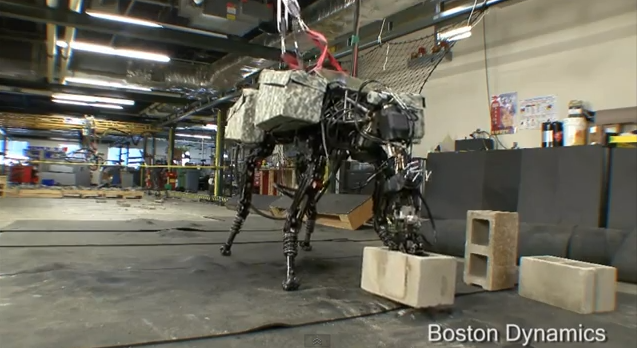
Our loyal readers might be familiar by now with Boston Dynamics, the local Robotics company creating with remarkable behavior: mobility, agility, dexterity and speed, the most advanced robots on Earth. That includes the "BigDog", one of a few models utilizing the company's LS3 - legged squad support system - technology. But what happens when you add a brick throwing arm to those legs? Uh-Oh...


Yeap, you heard me right. Rise of the machines! 😀

"BigDog" now handles heavy objects and can fling them, using human motion as a model. The mechanical dog is over a meter tall and weighs more than 100 kilograms (which is more than the average man), and can throw using its whole body, 35lbs of concrete blocks across a room (a bit more than 17 ft). The company has been steadily improving “BigDog” for years with funding from the Army Research Laboratory (RCTA) and seems to have high hopes for this latest advance...


"The goal is to use the strength of the legs and torso to help power motions of the arm. This sort of dynamic, whole-body approach to manipulation is used routinely by human athletes and will enhance the performance of advanced Robots. Boston Dynamics is developing the control and actuation techniques needed for dynamic manipulation", a Boston Dynamics spokesperson said.


“There are a wide variety of applications, both military and civilian, where strong and dexterous manipulation would be needed,” another spokesperson added. “Think of anything a person does now in the field, such as clearing ruble, fighting a fire, digging up an IED, etc. Rather than focus on a specific mission right now, the RCTA program is focused on core functionality that will be useful for many applications.”


You might say it is hard to imagine any real world practical applications for this project. Actually almost everything has a real world practical application, especially if imagination flows without bounds. Moreover, in this case, it is not even hard to imagine! How about: close quarter combat, tear/rip the enemy (human or other robot) apart or throw the enemy somewhere to be terminated, rescue excavation (after an explosion, mine collapse, bombing, earthquake etc.)?

The problem though is that when we create things for destruction, they get used for destruction. What do you think? Let us know in the comments below. 

Subscribe on our Daily Newsletter to get free updates straight to your inbox! If you want to get in touch, then contact us by using this form. 

*by andreascy*

Introducing BodyCom Technology


Description : 

Microchip Technology introduced the BodyCom system, a new short-range wireless connectivity technology that uses the capability of the human body to transport a few signals, providing intuitive, simple, and safe communication between two electronically compatible devices. 


Communication between BodyCom system devices occurs when they are within a few centimeters of the human body: a simple proximity or touch detection can establish a BodyCom system connection.


The BodyCom system was implemented with the following priorities:

     • Very low consumption, especially for the Mobile Unit

     • Fast system response

     • Stable and Robust communication with Fault detection

     • Limited field of action (as little as a few centimeters) to allow an identification when the
        touch action takes place from whoever wears the Mobile Unit

     • Low cost and complexity


The signal transmission uses capacitive coupling between the human body, the Base Unit and the Mobile Unit (see Figure 1). 


Figure 1: BodyCom System Working Principle

Because of this, the signals are more attenuated at low frequencies than at high frequencies, requiring the signals that are transmitted to have higher amplitude for lower frequencies. The Mobile Unit is a battery-powered portable device, and power consumption is a priority, while the Base Unit can deliver more power.

On the video, Applications Engineer Chris Tucker, makes an introduction to BodyCom Technology utilizing the BodyCom Development Kit demonstration.


For more details check out the AppNotes. 

Subscribe on our RSS feed and Daily Newsletter for more updates straight to your inbox. Discover also other related articles on this section.

*by andreascy*


🦾 Stay Motivated

🚀 Tesla Roadster Flies

▶️ Just Press Play

⭐ Leading ShipYard's Leaderboard

🚩 Milestone Unlocked!

🏅 Win-Win