7 Reasons to Consider a Home Gym

If you think of picking up better health habits and don't like crowded gyms, consider setting a home gym catered to your needs.

5 Top Picks for Christmas Holiday Like a Fairytale

If you imagine Christmas holiday this year being like a fairytale, you should consider visiting these hidden gems!

7 Fashion Accessories To Lift Up Your Style Quotient

Get heads up on the trendiest as well as classic fashion accessories that would elevate your style to another level.

Sensibo

Showing posts with label Touch. Show all posts

Trending Tech Accessories Taken for Granted

Description :

It’s the year 2015. No flying cars, moon base, or teleportation technology. Anyone familiar with the 20th century’s pop culture projections of the future are a little disappointed. Alas, not everything tech we hoped to exist by now has failed to appear. When it comes to personal and personalized gadgets and gizmos available to 21st century consumers, the human race has done pretty well for itself. The digital revolution has helped everything from touchscreens to voice command make the leap from fiction to reality. We haven’t sent someone to Mars yet, but we can simulate it via downloadable app. 

Trending Tech Accessories Taken for Granted

For anyone bummed out about the chances of a working hover board appearing in their lifetime it’s time to appreciate what you do have. Here’s a list of impressive technology either ten feet away from you right now, or five years away from being ten feet away from you:

Headphones/Earbuds 

Ear gear has been around for a long time, no lie. The recent fashion flare-up involving “high quality” headphones illustrates how this taken for granted technology has come a long way. Not too long ago it exhausted a part-time paycheck or two to acquire headphones capable of reproducing great sound without letting everyone around you know what’s on the playlist. These days we’re able to isolate ourselves inside an album, movie, or viral video while riding packed public transit for less than $50 for a good pair of earbuds. Or you can opt for the $500 pair of headphones if you want...the technology is impressive either way.

Flash Drives

Like portable personal audio, the ability to physically transport digital data is nothing new. And it may even seem old-fashioned thanks to the cloud. But once again, we’re failing to marvel at one of the more magnificent inventions of our time. In terms of data volume, physical size, and versatility, nothing beats the flash drive. Not to mention they’re tangible, and thus have become a bit of a fashion accessory. Thanks to things like 3D printing people can now buy flash drives in bulk from companies capable of building them into custom shapes and figures. The result is an array of normal everyday objects capable of being hidden data mines. That’s futuristic for you.

Smart Stuff

It seems like only yesterday we were flipping open our cellular phones, winding our watches, and owning a dozen different other pieces of technology to do an equal number of tasks. The iPhone debuted eight years ago and we’re already over the all-in-one, touch-operated, voice-activated, pocket sized computers we carry in our pockets and purses. Now we have the dawn of the smartwatch; a little anticlimactic considering the wonders of the smartphone, but the stuff of science fiction nonetheless.

Drones

Does anyone appreciate the potential of drone technology? Maybe because the consumer drone industry is still in its infancy, but that’s partly because consumers aren't taking advantage of this amazing technology. We associate drones with spooky government stuff, and that’s a legitimate connection, yet drone technology can be so much more. It can be used to remotely chaperone children walking to school by themselves, or deployed to monitor a stolen car. We hear the word “drone” and picture a faceless killing machine, but the ability to essentially combine RC and smart technology together is a wonderful thing for society, whether we know it now or not.

We’re well into the 21st century now. Glance around and it doesn't really feel like it, but looks can be deceiving. Humans are easily bored and constantly eyeing the next big thing. Every once in awhile we need to stop and appreciate the technological gifts we’ve been fortunate enough to live to experience. For billions of people they were only the stuff of dreams.

CHECK ALSO: 10 Gadgets that Will Make your Life so Much Easier

Thanks for reading! Looking for feedback.

*by andreascy*

Top 5 Things Every Mobile Gamer Must Have

Description :

With phones and tablets edging ever closer to sixth gen console quality, it's not surprising that mobile devices have become many people's go-to gaming machines. High-end graphics are only one piece of the puzzle, though. Better-quality audio, boosted speed and enhanced touch-screen responsiveness have all contributed to mobile's rise in the gaming sphere. A sphere, it should be noted, that will likely be worth $100 billion by 2017 with a majority of those dollars devoted to mobile gaming.

Top 5 Things Every Mobile Gamer Must Have

Gamer is quickly coming to mean something very different than it did once upon a time, thanks to changing demographics (women are now the largest video game playing group) and a flood of all-ages titles. But even players who gravitate toward Monument Valley versus titles like Mirror's Edge can appreciate the need for externals. To make mobile your main gaming machine, it helps to have these five things:

1. The Right Device 

Many of today's mobile games have been designed to make use of multiple cores, so a device with a quad- or dual-core processor is a must. More importantly, a device with a quad- or dual-core processor can “future proof” your phone or tablet, i.e., ensure that it can play the new and better games of tomorrow. Multiple cores enhance a device's ability to deliver the kind of impeccable graphics, speed and sound that serious gamers expect and even casuals want. 

2. An External Controller 

Phones and tablets put amazing games into your pocket for anywhere play, but the feel of touch screen controls can leave a lot to be desired. The MOGA Pocket Controller is a serious win for gamers who love the feel of physical buttons and a real steal at about $30. That includes the controller (which looks like it came out of an Xbox One box), a case, tablet stand and the MOGA pivot app with its library of games like GTA and Call of Duty. Thanks to a comfortable rubberized grip and ergonomic wire-free design, mobile gaming sessions can go longer. 

3. A Scaled-Down Sound Solution 

Patching into your wireless sound system is a fine way to overcome the limitations of tiny phone speakers at home but out and about tinny audio is the norm. Or was. The Mini Jambox is incredibly portable at just 6″ x 1″ by 2.3″ and 9 ounces, and the acoustic drivers and bass radiator provide audio that proves that bigger isn't necessarily better. 

4. Longer Game Play 

Big time mobile gamers know that even the baddest batteries can't stand up to a serious session, which means a battery backup solution is essential. The Evio PB108 Power Bank will keep you up and running, which is especially important when you're playing through titles that take time. The 10,500mAh battery takes a while to charge up but once it's good to go, so are you.

5. Something Fun 

Don't let the overuse of the word serious fool you – games are still for playing and at least some of your accessories should reflect that! The Impulse Controller is a wireless mini gamepad with real physical buttons that clips on to your keychain. It's also a great way to find your lost keys, a camera trigger (goodbye, Selfie Stick) and a digital media controller that's compatible with virtually any device. There's also the Joystick-IT Arcade Stick – self sticking joysticks that attach to any touchscreen to give players that old school gaming experience.


There is always going to be a place for consoles in the gaming world. But as the mobile experience becomes richer and more satisfying thanks to must-haves like these, chances are good that place will grow ever smaller.

*by andreascy*

HTC One Max Vs. Samsung Galaxy Note 3

Description :

First came the smartphones, then the tablets, and now the latest fad is "phablets" - devices that sit somewhere between oversized phones and undersized tablets. 

HTC One Max Vs. Samsung Galaxy Note 3

License: Image author owned 

The latest phablet from Samsung, the Galaxy Note 3, has had tremendous success on the market, and now HTC is entering the scene with the HTC One Max. 

HTC One Max Vs. Samsung Galaxy Note 3

License: Image author owned 

Can it stand up against the Note 3? Let's look at the specifics and find out.

Size

When it comes to size, it all depends on whether you're more excited about the phone or the tablet part of the phablet. It makes a difference here, since the One Max is significantly larger and heavier than the Note 3. Samsung's device measures in at 5.95" x 3.12" x 0.33" with a weight of 5.93 oz, while the HTC is a whopping 6.48" x 3.25" x 0.41" and weighs 7.65 oz. If you're on the fence about whether to get a phablet versus a regular smartphone, you probably don't want to start off with the One Max. Its formidable size makes it fall much more solidly in the "tablet" category. If, however, you're looking more for a tablet that can call and text, the One Max's size won't throw you at all. Of course, the Max's 6" screen is a nice bonus when it comes to watching movies or reading text.

Internal Specs

When it comes down to the numbers, the Note 3 easily wins this race, with its 2300 MHz processor and ridiculous amount of RAM - a full 3 GB - trumping the One Max's 1700 MHz processor and 2 GB of memory. In practical use, however, most will not notice the difference. The HTC One Max has enough memory and processing power to effortlessly handle the average user's workload. The Note 3 will be heavily discounted at Sprint Black Friday 2013 sale on November 29. Given the impressive specs, the Samsung Galaxy Note 3 is a better buy for the holiday shopping.

Input Options

The Galaxy Note 3 was designed to be used with a stylus and even ships with one. This makes it easier to accurately access what you want. The HTC One Max has chosen instead a touchscreen method. Will most people miss the stylus? Maybe not, unless they've gotten used to it on a Note. What the One Max does have that is unique is its fingerprint sensor. Taking its cue from the iPhone 5s, the sensor sits on the back of the device, allowing you to securely unlock your phone with just a touch of the finger, rather than inputting a passcode or something more time-consuming.

Software

Both these devices are up-to-date with Android 4.3, the latest version of Google's Android operating system. Each phablet's manufacturer has put its own user interface on top of Android. Samsung's TouchWiz Nature UX 2.0 offers heavily-advertised features like S Pen functionality and Air Command, while HTC Sense 5.5 includes a feed reader on your homescreen and Zoes, a video clip recorder connected to the camera app.

Which Is Better?

The HTC One Max, in many ways, has just taken its popular HTC One phone and made it larger. The Galaxy Note 3 is more technologically innovative, has better specs, and better demonstrates why a phablet might be preferable to a smartphone. That's not to say the Note 3 is for everyone. The HTC One was an excellent phone and its larger counterpart has many of the same great qualities. If you're set on a phone-tablet combination, however, you can't beat the Note 3 for convenient phablet-centered features.

David Johnson loves to review gadgets and share money saving tips. He recommends buying a new smartphone during Sprint Black Friday sale to get the best price of the season. 

*by andreascy*

Microsoft Surface Pro Tablet Comes To Australia

Description :

Microsoft announces the arrival of its Surface Pro tablet in Australia. Users can choose from one of two options - either the 64GB one for $999 or the 128GB one for $1099. More than likely people in the Land Down Under are saying that it's about time.

Microsoft Surface Pro Tablet Comes To Australia

After all, Microsoft already sells the Surface Pro in the United States, Canada, China, UK, and other countries. However, Australians probably also could say that late is usually better than never. 

The same is possibly true of what people in Korea, Malaysia, Singapore, Russian, and Thailand would say when theirs arrive in June. Word has it that Japan will also finally receive shipments in the same month as some of the other Asian countries.

A Surface Pro Overview

Unlike most tablets, this one was made for both work and play in mind. In fact, this could possibly justify charging over $1,000 for the larger hard drive space. This device comes built with Touch Cover, Type Cover, HD AV and VGA adapters. It also features the Wedge Touch Mouse Surface Edition.

Surface Pro Versus Surface RT

Sometimes computer companies offer so many choices that deciding on the right device may not be easy. In this case, some consumers will find themselves having to decide to stick with the RT or to go Pro. The following lists show some major differences between the Pro and the RT:

The main Surface Pro specs are as follows: 

•  Thickness and weight - It is 13.5 mm thick and weighs about 903g. 
•  Price range - Microsoft will charge approximately $899 to $1099 for it. 
•  Screen resolution - It is an HD screen of 1920x1080 pixels. 
•  Surface - It supports up to 10-point input. 
•  Processor - This uses a third generation Intel Ivy Bridge Core i5 processors and 4GB of  RAM. 
•  Storage capacity - Users can purchase either the 64GB or 128GB model. 
•  USB and HDMI port - This one has the 3.0 USB slot as well as the Mini DisplayPort.
Here are the main Surface RT device specs: 

•  Thickness and weight -This device is 9.5 mm thick and weighs 686g. 
•  Price range - It costs approximately $600 to $800 
•  Screen resolution - It is 1366x768-pixels. 
•  Surface - This device supports up to 5-point input. 
•  Processor - This one uses the NVidia Tegra 3 quad-core processor with 2GB of RAM 
•  Storage capacity - Users can choose either the 32GB or the 64GB model. 
•  USB and HDMI - This one has the 2.0 slot and the micro-HDMI port.
Additional Surface Pro Features

Much of the features of the Surface Pro Microsoft tablet compare to the original Surface RT. For instance, both tablets have a front and rear camera of 729p, and this picture-taking tool is angled. That way, it will be level when the device is angled.

Both the Surface Pro and the processor RT also have Bluetooth capabilities, USB slots, headphone jacks, and an SDXC card slot. They are also both Wi-fi ready, and they also both are meant for carrying around no matter where a person wants to go with it.


The only decision that Australian users have now is to decide based on the facts which one is better. In the end, the choice is easier as long as they know their priorities.

*by andreascy*

Office Webinar : Demo of OneNote on a Windows 8 touch device


Description : 

OneNote is available for all kinds of devices : laptops, iPads, Windows Phone, Android...and now for Windows 8 touch devices. See how OneNote has been re-imagined in this recording of Microsoft Office 15-Minute webinar. Get the references and links for this webinar at http://aka.ms/touch123. 


The Help & How-to writers of Office.com hosts these free how-to tidbits. See how to watch these webinars live and participate in a Q&A session : http://aka.ms/offweb.


Discover other Microsoft Office and Office 2013 Webinars. Don't miss our Office Webinars E-Book and subscribe on our RSS feed for more. Let's connect also on Facebook and Twitter. We welcome you to contribute and join our discussions!

*by andreascy*

Apple's Many Stolen Ideas


Description : 

Apple's claim to fame is all the one-of-a-kind products that the company has created. Unfortunately, a lot of that simply isn't true. Steve Jobs was quoted as saying "Great artists copy. Great artists steals." in 1996 and it appears that this quote is perfect at describing his company.

For example, the iPhone was thought to be the first phone with touch screen technology when it was released. In reality, touch screen was invented in 1965 by FingerWorks and then bought out by Apple. The Samsung F700 was also released around the same time as the iPhone, and while the iPhone wasn't an exact copy, the two shared suspiciously similar designs.

Apple's iPad is also said to be a stolen idea. In 1981, Roger Fidler showed Apple engineers a prototype of a computer that he was designing. The computer was a flat screen that looks just like the current version of the iPad. Even if Apple didn't steal Roger Fidler's idea, Microsoft created their own version of the iPad, called MS Tablet PC, years before the iPad was created.

Apple: They Didn't Build That!

Source: BestMastersPrograms.org

*by andreascy*

Microsoft Research: Pen-and-Touch Interaction for Touch-Screen Displays of All Sizes

Description : 

This video shows a demonstration of in-place commands that work on direct touch displays.

Microsoft Research: Pen-and-Touch Interaction for Touch-Screen Displays of All Sizes

Michel Pahud walks through some in-place command work done at Microsoft Research including pen and touch with toolglass bimanual techniques. In-place commands are menus that appear next to the finger. 

Microsoft Research: Pen-and-Touch Interaction for Touch-Screen Displays of All Sizes

They can work on small displays like slate, but also on very large displays so the user doesn't have to reach for the menu.


Please send your comments and suggestions and also share your ideas with us. Keep updating yourself by following us on Twitter. 

*by andreascy*

Live2D - Interactive 3D animation of 2D images


Description : 

Live2D, developed by Cybernoids and presented by DigInfoTV, is the world's first drawing technology to enable 3D rendering of 2D images. This technology supports a variety of portable consoles and smartphones, and Live2D is already being utilized for games that take advantage of the unique characteristics of hand drawn artwork. 


"In 3D, the unique attractions of 2D art like Osamu Tezuka's can't be rendered properly. But with Live2D, we've worked to enable smooth 3D motion using entirely the original 2D drawings. So, this system makes the graphics appear exactly as the creator intended."


"When the face turns sideways, you can show perfectly how the eyelashes and eyes move. You can also use the tools to work more easily and efficiently. This can be done in all kinds of ways, with all kinds of emphasis, depending on what the creator wants to do. This technology is an extension of drawing, so it works best if the creator has a good artistic sense."


The Live2D creation tools are available in two versions, supporting content creation using either polygons or vectors. A 3D engine is used to power the polygon based version, so it can achieve fast, fluid motion even on mobile devices.


Currently, Live2D is used mainly for dialog-type games with limited movement. But over the next year or two, Cybernoids aims for the tools to evolve to a point where the motions of the characters can be rendered through 360 degrees.


"We're aiming for this technology to be used worldwide, hopefully creating a market for revolving graphics in 2D, like with 3D. So, our goal is for this technology to become a de facto standard worldwide."


If you liked our article kindly share it to your social circles and comment below. Discover even more from DigInfoTV. 

*by andreascy*

A Rookie’s Guide To Choosing A Tablet


Description :

Let’s face it. There are just too many tablets available in the market today. While a lot of tech savvy’s are rejoicing, others find it frustrating to pick one that best suits their standards. 


Well, you’re in luck because for this post, I’m going to let you in on a rookie’s guide to choosing the best tablet you can buy. So don’t be too hasty boxing yourself on getting the newest iPad. Below are some tips to ease your tablet purchase experience.

Is it for work or play? 

Apart from some adjustments that you need to adapt to when using a tablet, you need to first qualify the need for one. Are you going to buy a tablet because you want entertainment to be within handheld reach? Or do you intend to use it for taking notes in a meeting or to document one?

While some brands guarantee their tablets to suffice any purposes, some are built to incline more on work than play. If you’re on the lookout for a device to help you out in the office, then a BlackBerry PlayBook is a wise choice. If you’re aiming to elevate your couch potato level, then have a go at the Sony S Tablet.

Consider the tablet model

Tablets come in different forms. Slate models are the common ones that use touch recognition and are more compact. Convertible ones are those that come with keyboards, similar to notebooks but with rotating screens. Hybrid models are tablets that combine both slate and convertible features. 

Whichever model you choose, ensure your lifestyle and personality are well compensated by it. 

Yes, size does matter

Tablets that have a 5-inch display are obviously more compact and easier to carry. Those with bigger sizes of screens are in need of greater security and safety. 

Consider the size carefully as it entails the effort of having to hold one for a long period of time. If you’re someone who doesn’t necessarily need a big one and will only use it for games and basic browsing, then settle for the more compact ones. If you’re one who’s quite picky with better screen quality, then a 10-inch is swell enough. 

Will you need a lot of space?

Another thing you need to ask yourself is whether or not you want a large storage space. Some have laptops and mobile phones they can store their information into. The ideal solution is to go for a tablet that has an 8GB memory for lighter files.

On the other hand if you need a tablet that will act as the main storage for all your files, then go for those that allow up to 64GB space. 

Availability of apps

Apple has over 200,000 apps that can be used with their devices. Some androids have well built-in apps but are struggling in the third party department. So assess if you need a tablet that can be loaded with a variety of apps or if you just need a more exclusive one. 

How much are you willing to spend?

Windows tablets can run up to $800 while some androids sell as low as $99. While you need to assess the features and functionality of a tablet, your budget should also be one of the factors you need to consider.

What you can do is compare prices online and see which the best deal for you is.

A tablet is one tech investment you wouldn’t want to miscalculate on. So make sure you know at the very least the basic standards of choosing one. From there, it’s going to be a lot easier and possible one of the best-delayed gratifications you can indulge in.

Samantha Nicole Samonte is a Content Specialist for Webcada, an SEO company in Singapore. She spends the rest of her time guest-blogging for various websites. 

*by andreascy*

Ocular's Future of Touch Presentation at 2012 SID Display Week

Description :

Ocular LCD: A Different Philosophy... A Different Kind of Company


Ocular LCD, Inc. headquartered in Dallas, Texas, is a leading supplier of touch panels and display products to the embedded technology industry. Ocular’s innovative technologies enable equipment manufacturers to quickly bring to market product solutions with leading-edge, touch-enabled display capabilities.


In addition to its products, extensive technical knowledge and 25 years of experience allows Ocular to work closely with manufacturers to design display capabilities that meet the unique requirements of their applications, including the demands of extreme environments. 


Ocular has a rich history of innovation and this spirit is part of the Ocular culture and continues today with the development of many patented solutions in touch panel technology, LCD displays and display system ruggedization techniques.


Today we' ll present to you the third annual Future of Touch and Interactivity Conference that took place on June 7th, 2012 as part of The Society for Information Display (SID) Display Week in Boston. Industry leaders were invited to discuss how touch and interactive solutions are shaping the display industry. 


David Nolte, Senior Vice President of Engineering at Ocular, presented during Session 1: The Future of Touch on the topic of projected capacitive touch panels and how they have advanced with larger sizes and simpler structures.


Read also :

Touch screen technology : How it works

*by andreascy*

Camitool Automatic Touch-Free Toilet Paper Dispenser

Description :

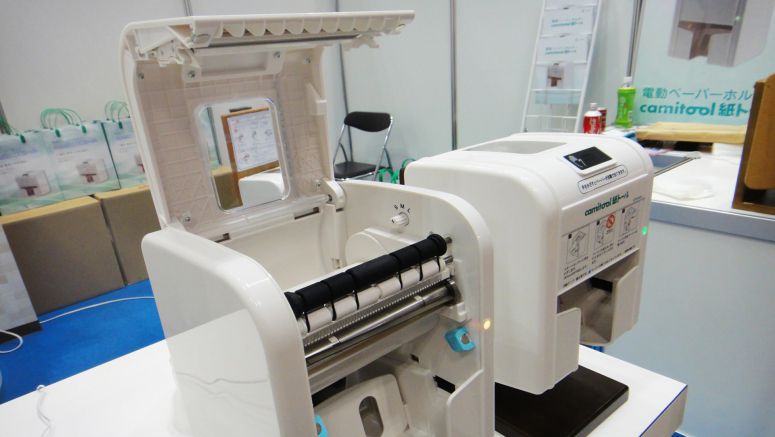
The Camitool is an electric toilet paper dispenser developed by Shikoku. When you place your hand near the sensor, the toilet paper is folded and cut automatically, and it can be taken without having to touch the dispenser.

Camitool Automatic Touch-Free Toilet Paper Dispenser

"We released the Camitool early this year. Currently, it's being used by hospitals, and in public buildings in Kagawa, where we're based."

The toilet paper length has three settings: 60, 90, and 120 cm, and the Camitool can be used with nearly all brands of toilet paper.

Camitool Automatic Touch-Free Toilet Paper Dispenser

Because the paper can be removed with one hand, the Camitool can be used by people with conditions such as rheumatism. It also offers a way to prevent infectious diseases from being transmitted in public buildings.

"We've been selling the Camitool to hospitals, and because there's no need to touch the lid, this dispenser is also an effective way to improve hygiene. It helps to conserve resources, too, because it only dispenses paper in specific lengths. So, the Camitool is a really useful product, even for people without any disability."

Camitool Automatic Touch-Free Toilet Paper Dispenser

"In the past there have been machines that dispense toilet paper, but the Camitool is different because it cuts the paper as well. The fixed blade here and the rotary blade here grip the paper, and by rotating it, the Camitool cuts the paper in a similar way to a pair of scissors."

"The plastic version is priced at 60,000 yen (US$750), and the wooden version at 95,000 (US$1,200) yen. Basically, we sell the plastic version for publicity purposes, while the wooden version is made to order."

Camitool Automatic Touch-Free Toilet Paper Dispenser

"Currently, we only offer toilet paper dispensers. But we're developing other types as well, so for example, we'd like to release paper towel dispensers, too."


That's actually not a bad idea. 😍

*by andreascy*

Samsung Galaxy S3, HTC One X Are Among The 5 Best Smartphones of 2012

Description : 

It is not that difficult for someone to name five top smartphones in the market. You guessed it right, Samsung Galaxy S3 and HTC One X are top on the list with the best smartphones of the year. Apple's iPhone 4S which was however launched last year made it to the list because of its high demand. 

Samsung Galaxy S3, HTC One X Are Among The 5 Best Smartphones of 2012

With increasing competition in Mobile Market manufacturers are coming out with astonishing devices to keep up with the others. Samsung, HTC and Nokia came out with wonderful handsets this year. Apple however lacks a new phone which is expected to come out later this year, however the iPhone 4S has managed to get a good place in the market because of its popularity. Below is the list of the best handsets to buy this summer.

Samsung Galaxy S III 

The Samsung Galaxy S III top on the list it sports a 4.8 inch 720x1280 Super AMOLED display, Android ICS withnew TouchWiz overlay, NFC, 2GB of RAM, 1.5 GHz dual-core processor, 8 megapixel rear camera, 1.9 megapixel front facing camera, 4G LTE and/or HSPA+ support, and 2100 mAh battery. 

Samsung Galaxy S3, HTC One X Are Among The 5 Best Smartphones of 2012

Some Extra features include Smart Stay where the sensor notes when you are looking at the display and keeps the display turned on during this time, Direct call that will initiate a call when you lift the phone to your ear during a text conversation, Smart alert that vibrates your phone when you come back to it if there are pending notifications, S Voice voice command software, enhanced sharing functionality, and more. 

For many analysts, the Galaxy S III is the best Android handset ever.Popularity of S3 can be gauged from the sales figures of the handset. In one month and two days after its official release (May 29, 2012) Samsung sold out more than 6 million units of the handset across the world. As per market analysts, Samsung may sell more than 20 million units of the handset in six months of its availability.

HTC One X

The One X is one of the best looking smart phones ever. With its quad-core 1.5 Ghz Nvidia Tegra 3 processor, 4.7-inch Super IPS LCD2 HD display and a thinner design running HTC Sense 4.0 on Ice Cream Sandwich this phone has a balance of looks and performance.

Samsung Galaxy S3, HTC One X Are Among The 5 Best Smartphones of 2012

It has a 8 mega-pixel camera with a fast shutter. It has 32Gb internal storage with no room for a microSD card slot. It comes with a 1800mAh battery which is unfortunately non-removable. You also get 25Gb of Dropbox space.

iPhone 4S 

The iPhone 4S is actually Apple’s 2011 phone. As far as specs and features are taken into account, the iPhone 4S is not as powerful as the leading Android phones of the day. 

Samsung Galaxy S3, HTC One X Are Among The 5 Best Smartphones of 2012

The iPhone 4S has only a crammed 3.5-inch display, an 8 mega-pixel camera, 1GHz dual core Cortex-A5 processor and 512MB of RAM. Also it has Siri, iOS's Virtual personal assistant which was a key feature for its success.

Nokia Lumia 900 

The Lumia 900 is a gorgeous looking phone running Windows Phone 7.5 Mango OS. It has a 1.4 GHz Scorpion CPU with Qualcomm APQ8055 Snapdragon chip, Adreno 205 GPU and 8-megapixel camera. 

Samsung Galaxy S3, HTC One X Are Among The 5 Best Smartphones of 2012

The handset boasts a 4.3-inch AMOLED capacitive touchscreen with a resolution of 480 x 800 pixels. Windows Phone 7.5 Mango, the latest version of the firmware from Microsoft runs the handset. Sadly it won't get updated to Windows Phone 8.

Nokia 808 PureView

The 808 PureView is the best camera phone ever made. The 808 PureView runs on Belle OS from Nokia. The PureView has grabbed the attention because of its 41 mega-pixel camera with features like Carl Zeiss optics, up to 4x lossless digital zoom, geo-tagging and others. 

Samsung Galaxy S3, HTC One X Are Among The 5 Best Smartphones of 2012

Besides this it also has an ARM 11 processor clocked at 1.3 GHz, 4 inches of AMOLED capacitive touchscreen with 360 x 640 pixels of display resolution, 16 GB of in-house memory, 1 GB of ROM and 512 MB of RAM.

Do you like this article? Follow us on Twitter and Facebook.

*by andreascy*

Dynamic Physical Buttons on Touch Screens : Tactus Technology

Description :

Hello lovelies! Not sure what you're after but i hope the rest of your day is good. Today we have some adorable and very interesting news coming out so please stay tuned!

Tactus Technology - A Bloody Amazing and Innovative Device of the Year

What if buttons could morph out of the surface of your device? What if you had a physical QWERTY on your touchscreen?

Dynamic Physical Buttons on Touch Screens : Tactus Technology

Crazy? Then take a good look on Tactus Technology. Man this is some Terminator 2 stuff. I can already see myself trying to pop them like a zit. :)

Dynamic Physical Buttons on Touch Screens : Tactus Technology

These guys developed a new tactile User Interface for touchscreen devices that does exactly that. That's right! World's first dynamic deformable tactile surface capable of creating dynamic physical buttons that users can actually see and feel in advance of entering data into the device.

Dynamic Physical Buttons on Touch Screens : Tactus Technology

You actually have to see it to believe it! It creates a keyboard you can actually feel on your tablet screen. Just like a real keyboard! 

Dynamic Physical Buttons on Touch Screens : Tactus Technology

I believe this is the next big thing for tablets, and is a solid half way step towards real haptic feedback. Enjoy the video:


Check out the Press release here. Learn more on Engadget. 

Share this story with friends, family, and the rest world. So, what are your thoughts on this? Let us know below in the comments. We always welcome constructive comments and allow any that meet our common sense criteria.

*by andreascy*

Introducing Taptic: A Touch Panel That Plays Sound Without A Speaker

Description : 

Haptic technology, or haptics, is a tactile feedback technology which takes advantage of the sense of touch by applying forces, vibrations, or motions to the user.This mechanical stimulation can be used to assist in the creation of virtual objects in a computer simulation, to control such virtual objects, and to enhance the remote control of machines and devices (telerobotics). It has been described as "doing for the sense of touch what computer graphics does for vision". Haptic devices may incorporate tactile sensors that measure forces exerted by the user on the interface. 

Introducing Taptic: A Touch Panel That Plays Sound Without A Speaker

Haptic technology has made it possible to investigate how the human sense of touch works by allowing the creation of carefully controlled haptic virtual objects. These objects are used to systematically probe human haptic capabilities, which would otherwise be difficult to achieve. These research tools contribute to the understanding of how touch and its underlying brain functions work.

Meet Taptic

HiWave Technologies (Former Tectonic Elements and as of now Tectonic Audio Labs) has launched a touch feedback platform for control panels planned to be integrated into home appliances. 

The platform allows replacing button controls with flat control panels that still have the familiar feel of a mechanical key press. The key benefit of haptic technology is that panels can be firmly fixed or integral in the appliance, with no need for moving parts. This reduces cost, increases ruggedness and product lifetime, and allows the entire unit to be wiped clean.

Introducing Taptic: A Touch Panel That Plays Sound Without A Speaker

The manufacturer’s Taptic demonstration platform uses third-generation haptic technology. It includes two HIHXC9C005-8 haptic actuators, which attach to the back of a flat printed touch interface panel, and a HiHS9002 haptic controller IC. It can work with both capacitive and resistive touch panel technologies. The actuators generate precisely localized acoustic waveforms on the panel to replicate the feel of a mechanical keypad and, if desired, simultaneously overlay audio cues. 

The haptic feedback responses can be selected and tuned by both the user and the manufacturer to replicate a wide range of button press sensations. The operating frequency range is over an octave for true wideband haptics and up to 15 kHz for audio playback. A range of audio outputs - from simple pings and clicks to MP3 files containing spoken instructions and music - can also be generated without additional speakers by using the touch panel as the sound emitter.

That was it for today. Feel free to share our article with your friends and help us spread the word out of mouth. 😊

*by andreascy*

🦾 Stay Motivated

🚀 Tesla Roadster Flies

▶️ Just Press Play

⭐ Leading ShipYard's Leaderboard

🚩 Milestone Unlocked!

🏅 Win-Win