
Marketing & Design

Marketing Design Tips and Trends For Success

With website design impacting 94% of first impressions, discover key web design tips and modern visual trends to keep visitors engaged.

Read Full Story →
Cybersecurity

Mobile App Security Threats To Plan For

Learn how hackers target mobile apps and how multifactor authentication, encryption, and code obfuscation protect user data.

Read Full Story →
Health & Fitness

7 Reasons to Consider a Home Gym

If you think of picking up better health habits and don't like crowded gyms, consider setting a home gym catered to your needs.

Read Full Story →
✦ Prime Full-Width Placement • 1450×150 Starting at €99/mo
Buy Ad Space Here

Put your brand, SaaS, or product front-and-center above our daily news feed on THE OFFICIAL ANDREASCY.

Showing posts with label Themes and Skins. Show all posts

PowerPoint Templates: The Secret for an Amazing Presentation

Description :

Microsoft PowerPoint has been the most powerful, helpful and successful presentation programs for more than two decades. It’s an easy to use program which helps you add that much needed visual kick to your work to awe and thrill your audience by giving an awesome presentation. PowerPoint helps you add a new visual dimension to your otherwise spoken presentation, and this visual dimension helps in not only simplifying a presentation so that it’s easily understood by your viewers or listeners but also by making it more interesting. 

PowerPoint Templates: The Secret for an Amazing Presentation

Various templates are utilized in Microsoft PowerPoint for creating a presentation. A template is a pre designed presentation slide with its own graphics, colors, backgrounds, designs and fonts. A user then just needs to add the information regarding his presentation on the specific template that he has chosen. Templates offer convenience and help save a lot of time by letting a user focus on creating the presentation rather than creating both, the slide and the presentation. But if you want your presentation to have a specific style then it’s best to create your own slides as that offers the maximum flexibility. Templates are available in various designs and themes like nature themed PowerPoint templates or educational, business specific and many more, so you can choose one specific to your needs. 

There are many benefits of using PowerPoint templates for creating your presentations:

1. Suitably Designed 

The biggest benefit of using a template is that you can find one suitable for your presentation. Downloadable PowerPoint templates on the Internet are usually professionally designed and come in a variety of different themes like nature PowerPoint templates, educational templates, abstract, medical and many more. So it’s easy to find one which is suitable for your presentation. 

2. Time Saving 

PowerPoint templates help you save a lot of time so that you can focus all your attention on creating great content. Templates are specifically designed with various empty charts, graphs, tables and much more, so all what you need to do is fill in the required information. And Voila! You have a great presentation with you. It’s that easy and helps save a lot of time. 

3. Consistent Design 

PowerPoint templates are designed in a consistent manner, so you have an opening page, a title page, various graphs, charts and an ending page. So it provides ease of usage to a user with its consistent and professional design which might take quite some time for an inexperienced user to create. 

Although Microsoft PowerPoint offers many benefits, there are certain disadvantages too. One of which is that a PowerPoint presentation is rendered certainly useless if you don’t have access to a projector and you have to display it to a large audience. So that should be kept in mind before creating a presentation. 


A quick Google search about PowerPoint templates shows us the amount of websites offering free templates in various themes, so you should research well before finalizing one!

As always, we’d love to hear what you think. Go nuts in the comments! If you have any questions for the team then please feel free to use the contact form.

*by andreascy*


How to Change Your IPhone Wallpaper

Description :

IPhone is a palmtop smartphone which has combined the camera phone, personal digital assistant, and media player and wireless communication equipment. It was published by Steve Jobs in Mac world on January 9th in 2007 and listed on the stock market on June 29th in 2007.

How to Change Your IPhone Wallpaper

IPhone is a 4 frequency channels GSM mobile phone. It supports EDGE and 802.11 b/g wireless Internet access, and also supports email, mobile phone, SMS, Internet and other wireless communication services. At 6 p.m. of June 29, 2007, the first generation of iPhone was published in USA. On July 11, 2008, iPhone 3G was published by Apple Inc. At 1 a.m. of June 8, 2010, Jobs introduced iPhone 4. Then on October 5, 2011, iPhone 4S was released. And In the morning of September 12th, 2012, iPhone 5 was published.

ITunes is an application program of digital media player. It's a free application program available for Mac and PC users. On it, you can manage and play your digital music and videos. It was launched by Apple Inc. on January 10th, 2001 at the Macworld Expo in San Francisco. It can automatically download your purchased software applications on all your devices and computers. It is also your virtual store which can meet all your entertainment needs at anytime and anywhere.

ITunes can manage the content of digital media player on the popular Apple computer, iPod, iPhone and so on through an interface. Additionally, iTunes can be connected to the iTunes Store to download the purchased digital music, music videos, TV shows, iPod games, all kinds of Podcasts and films.

You can do many things with iPhone and iTunes. Now some fresh iPhone users still don’t know how to change iPhone wallpapers with iTunes. So today I will explain how to do it with iTunes. The steps are very easy.

1. Download a wallpaper. Then put it in a new folder on the desktop.

2. Connect your iPhone to computer. Then run the iTunes. Select your device on the left menu bar. Then click on the Photo option which is on the top of the right interface.

3. Check the Sync Photo and Selected folder options. Then click Select folder on the drop-down menu and select the new folder in which you put the wallpaper in the pops up dialog window.

4. Click Apply to start Sync.

5. When the above steps finished, this wallpaper is on your iPhone. Then please go to the home screen and click on Setting, choose Brightness & Wallpaper.

6. In the Brightness & Wallpaper, tap on Wallpaper.

7. Then you will see all the photos in your iPhone. Select the photo you download just now and click Set.

8. Then you will be remained to Set Lock Screen, Set Home Screen or Set Both. You can choose anyone of them.

9. Now your iPhone wallpaper is changed.

Please be careful when you synchronize photos with iTunes as photos always get lost easily under such operations.


Liked this post? Don't miss a single word! Complete the form and we will send you articles just like this every day, week or month.

*by andreascy*

Get Windows 8 RTM Startscreen SDK for XP, Vista and 7

Description :

We have seen many transformations to the Windows Operating System, and each one has its own beauty and impresses with its own applications. 

Get Windows 8 RTM Startscreen SDK for XP, Vista and 7

Microsoft as we all know, has released Windows 8 RTM (Build 9200), with lots of new features, GUI changes and interesting enhancements including Boot & Login screen, Start menu, Ribbon in Explorer, Metro Theme & Apps etc. You can take a look at all these new features in this detailed review.

Get Windows 8 RTM Startscreen SDK for XP, Vista and 7

If you are still using Windows XP, Vista, 7 or even older Windows 8 versions, and you don't want to install this latest OS, but still want to enjoy some of the new features, here are the interesting news for you: 

Get Windows 8 RTM Startscreen SDK for XP, Vista and 7

Our friend PeterRollar, who is well known for his amazing and famous Windows transformations, released "Windows 8 RTM Startscreen SDK" that you will definitely enjoy.

Get Windows 8 RTM Startscreen SDK for XP, Vista and 7

It's about time to bring this new Windows feeling to your old and perhaps boring OS and desktop. All this with the help of AveDesk 1.3, an application which makes desktop prettier and more usable. As you can see in the above screenshots, the change looks very close to Windows 8 RTM, so Peter has made a great work with his skills, that might worth your attention.

"This is probably the most complete and most similar transformation from older Windows to Windows 8 you can find in the web."

Why SDK (Self-Development Kit)?

"Because you can use it as it is, or modify it to your likings. Build your own personal startscreen if you want."

Windows 8 Versions already included in the pack:

- Developer preview

- Consumer preview

- Release preview

- RTM

*Basic knowledge of manual customization needed. 


So what are you waiting for? Check it out and let us know what you think. Share this post with your friends and help them and others, to have some fun too. 

Subscribe to our Newsletters for more updates! 

📧

 ⇛ 

📰


*by andreascy*

The Cleanest Themes for Nokia C3-00, Asha 200, Asha 201 & Asha 302 (2)

Description : 

Cyogesh creates beautiful themes for Nokia C3-00, Asha 200, Asha 201 & Asha 302 mobile devices. You can learn about the 1st pack release here.

The Cleanest Themes for Nokia C3-00, Asha 200, Asha 201 & Asha 302 (2)

Today we' ll present to you the 2nd part of "The Cleanest Themes" series, designed for your full experience and enjoyment. These themes are not just amazing! They feature some cool custom icons, great color combinations, detailed and unique widgets, influencing wallpapers and much more elements.

Below you will see for each theme, their previews and their download links, available for free and for purchase.

Color Plates Exceptional

The Cleanest Themes for Nokia C3-00, Asha 200, Asha 201 & Asha 302 (2)

Not Available

Deep Black

The Cleanest Themes for Nokia C3-00, Asha 200, Asha 201 & Asha 302 (2)

Not Available

Halftone Retro

The Cleanest Themes for Nokia C3-00, Asha 200, Asha 201 & Asha 302 (2)

Not Available

In Motion Series

The Cleanest Themes for Nokia C3-00, Asha 200, Asha 201 & Asha 302 (2)

Not Available

Incredible India

The Cleanest Themes for Nokia C3-00, Asha 200, Asha 201 & Asha 302 (2)

Not Available

Pure White

The Cleanest Themes for Nokia C3-00, Asha 200, Asha 201 & Asha 302 (2)

Not Available

Stripes Green Series

The Cleanest Themes for Nokia C3-00, Asha 200, Asha 201 & Asha 302 (2)

Not Available

Grass Clock Series

The Cleanest Themes for Nokia C3-00, Asha 200, Asha 201 & Asha 302 (2)

Not Available

Windows Green Check & Blue Check

The Cleanest Themes for Nokia C3-00, Asha 200, Asha 201 & Asha 302 (2)

Not Available

Feel free to share this topic on your social profiles. Let others to learn about these great themes too!

We hope you liked our post. Please send your comments and suggestions, and also share your ideas with us. To keep updating yourself with the latest themes, make sure to follow us on Twitter and on Facebook.

*by andreascy*


The Cleanest Themes for Nokia C3-00, Asha 200, Asha 201 & Asha 302 (1)

Description : 

Hello friends! Today we are giving you the 1st pack of some very special, simple and beautiful themes, made by cyogesh, for Nokia C3-00, Asha 200, Asha 201 & Asha 302 (320×240 screen resolution) devices.

The Cleanest Themes for Nokia C3-00, Asha 200, Asha 201 & Asha 302 (1)

They were designed for your full experience and feature some cool custom icons, amazing color combinations, detailed and unique widgets, influencing wallpapers and much more elements, in such a manner, that you will be able to see and enjoy every detail. So, what are you waiting for? 

Below you will see the theme's previews and their links (Available for free and for purchase). I bet you'll love the artwork!

Winter Snow

The Cleanest Themes for Nokia C3-00, Asha 200, Asha 201 & Asha 302 (1)

Not Available

Grunge Animated

The Cleanest Themes for Nokia C3-00, Asha 200, Asha 201 & Asha 302 (1)

Not Available

3D Fireworks

The Cleanest Themes for Nokia C3-00, Asha 200, Asha 201 & Asha 302 (1)

Not Available

Ubuntu Pink

The Cleanest Themes for Nokia C3-00, Asha 200, Asha 201 & Asha 302 (1)

Not Available

Coffee Basic Free & Starter Free

The Cleanest Themes for Nokia C3-00, Asha 200, Asha 201 & Asha 302 (1)

Not Available

Stripes Blue Ultimate 1, 2, 3, & Pro

The Cleanest Themes for Nokia C3-00, Asha 200, Asha 201 & Asha 302 (1)

Not Available

We hope you liked our post. Please send your comments and suggestions, and also share your ideas with us. To stay informed, please follow us on Twitter and on Facebook.

*by andreascy*

Perfect Mozilla Firefox Skin Packs Collection

Description : 

Mozilla Firefox has long been the head of the Mozilla browser family and provides the freedom that helps you express your style with beautiful custom skins. Have a look on some of the best skin packs that make Firefox so popular.


If you like these themes then make sure to hit that like button! Please don't forget to like also our fan page and show your love like always! 

Check also : 


*by andreascy*

Themes for Windows Phone

Description :

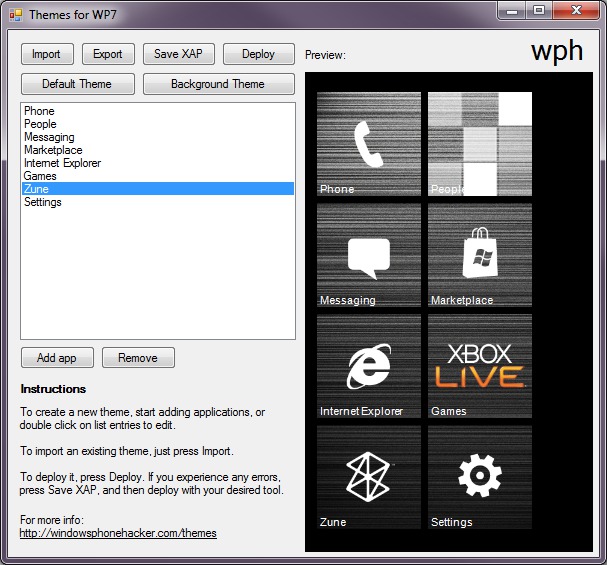
Here it is folks! All the releases of the Themes for Windows Phone application from Windows Phone Hacker. 

Themes for Windows Phone

These releases comes with all the goodies and all the features below.

Features 

- Customize any tile (system or third party, including Marketplace) 

- Use your image as a background for the tiles 

- Use an accent color for overlay transparency 

- Import themes 

-Export themes 

A bundle of joy with easy personalization ;) 

Requirements

- A developer unlocked device (no interop needed) 

- Mango 

Instructions 

Download the file from the link given below, run ThemeConfig, and start customizing! 
I strongly encourage you to watch the following video before continuing, as it will give you a rundown of how it works.


Download Link: V.2

Don't forget to share this post with your friends. Show your support and subscribe on our RSS feed for future updates. Do not miss also our Trending News and Tweets for today and, of course, our Daily updates on Scoop.it.

*by andreascy*

Perfect Google Chrome Skin packs Collection


Description : 

Below are some of the latest released Google Chrome skin packs, made by Hattjmh. They work also for Chromium and SrWareIron. Simply drag and drop the desired .crx file into your opened browser window to make the installation. 

Metro skin pack :


Aero skin pack : 


Carbon Fiber : 


Batman Arkham City : 


Joker : 


Winter pack : 


Summer Pack : 


Fall Pack : 


Spring Pack : 


After Hours pack :


If you like those themes check also :


*by andreascy* 


🦾 Stay Motivated

Editor’s Picks

Editor's Picks 01 / 03
Marketing Design Tips and Trends For Success
Marketing & Design

Marketing Design Tips and Trends For Success

With website design impacting 94% of first impressions, discover key web design tips and modern visual trends to keep visitors engaged.

Read Full Story →
Mobile App Security Threats To Plan For
Cybersecurity

Mobile App Security Threats To Plan For

Learn how hackers target mobile apps and how multifactor authentication, encryption, and code obfuscation protect user data.

Read Full Story →
7 Reasons to Consider a Home Gym
Health & Fitness

7 Reasons to Consider a Home Gym

If you think of picking up better health habits and don't like crowded gyms, consider setting a home gym catered to your needs.

Read Full Story →

🌀 Quantum Helium Unleashed

Ideas In Motion

Cybersecurity

Mobile App Security Threats To Plan For

Learn how hackers target mobile apps and how multifactor authentication, encryption, and code obfuscation protect user data.

Read Full Story →
Health & Fitness

7 Reasons to Consider a Home Gym

If you think of picking up better health habits and don't like crowded gyms, consider setting a home gym catered to your needs.

Read Full Story →
Marketing & Design

Marketing Design Tips and Trends For Success

With website design impacting 94% of first impressions, discover key web design tips and modern visual trends to keep visitors engaged.

Read Full Story →

▶️ Just Press Play

Beyond The Scroll

Health & Fitness

7 Reasons to Consider a Home Gym

If you think of picking up better health habits and don't like crowded gyms, consider setting a home gym catered to your needs.

Read Full Story →
Marketing & Design

Marketing Design Tips and Trends For Success

With website design impacting 94% of first impressions, discover key web design tips and modern visual trends to keep visitors engaged.

Read Full Story →
Cybersecurity

Mobile App Security Threats To Plan For

Learn how hackers target mobile apps and how multifactor authentication, encryption, and code obfuscation protect user data.

Read Full Story →

⭐ Leading ShipYard's Leaderboard

🚩 Milestone Unlocked!