

Marketing & Design

Marketing Design Tips and Trends For Success

With website design impacting 94% of first impressions, discover key web design tips and modern visual trends to keep visitors engaged.

Read Full Story →
Cybersecurity

Mobile App Security Threats To Plan For

Learn how hackers target mobile apps and how multifactor authentication, encryption, and code obfuscation protect user data.

Read Full Story →
Health & Fitness

7 Reasons to Consider a Home Gym

If you think of picking up better health habits and don't like crowded gyms, consider setting a home gym catered to your needs.

Read Full Story →
✦ Prime Full-Width Placement • 1450×150 Starting at €99/mo
Buy Ad Space Here

Put your brand, SaaS, or product front-and-center above our daily news feed on THE OFFICIAL ANDREASCY.

Showing posts with label Reviews. Show all posts

New Able2Extract Professional 14: Sign PDFs & Convert with AI

Description :

At https://officialandreascy.blogspot.com, the editorial team likes to keep tabs on the software they review, to keep giving you the latest and the best out of the tools we showcase. It’s about helping you work digitally and more productively.

New Able2Extract Professional 14: Sign PDFs & Convert with AI

In this case, it’s all about working efficiently with PDF documents and for that, we’ve got an update on Able2Extract Professional, the PDF suite we’ve reviewed before that lets you fill and edit PDF forms, and complete a range of other PDF tasks. 

The new advanced features in this latest version, are opening users up to working better than ever with PDF files. Here’s a look at the newest major features.

Sign PDFs With Electronic And Digital Signatures

Nowadays, when your workload is completely done by computer, the hard copy tasks you normally performed physically, like signing documents, are now done digitally. The new Able2Extract Professional 14 now includes the ability to add electronic and digital signatures to PDF files with a few clicks. 

New Able2Extract Professional 14: Sign PDFs & Convert with AI

Electronic image signatures are easily inserted by typing them in, drawing them out or importing a signature image. Digital cryptographic signatures are added by signing a PDF, and then attaching a digital certificate to it. All of this is done through a convenient side panel, no other application needed.

This feature, fills the growing demand for highly secured documents. It’s a valuable addition to the file permissions, encryption, and protection passwords, Able2Extract Professional can already add to PDF documents. 

Instantly Verify Digital Signatures

To complement the ability to sign PDFs, you can now also verify digital signatures. Able2Extract Professional does this in an extremely user-friendly way, allowing you to first visually confirm the status of a digital signature, with a quick glance at a padlock icon in the tab of an opened PDF file. Secondly, you can click on the digital signature in the side panel, to view the signature’s information. This lets you know if the PDF was altered after being signed.

New Able2Extract Professional 14: Sign PDFs & Convert with AI

Needless to say, knowing that the PDF you have, hasn’t been altered is a must in this day and age of data breaches and electronic documents exchanges. If your work is based on a lot of confidential and important files, you’ll be glad to have this feature.

AI-Powered PDF to Excel: Smart and Master Templates

Known for its Custom PDF to Excel conversion, Able2Extract Professional has long since given users the ability to manually adjust rows, columns and table structure selections to produce accurate conversion results in to Excel. Believe it or not, the developers have improved upon the feature with artificial intelligence technology. 

This AI technology, lets you train custom Excel templates with a sampling of 5-10 PDF files that contain the selected table structures you want out of a PDF document. These trained Smart templates can then be used by Able2Extract, to automatically select all the similar tables in a PDF file on its own. After you load it, a click on the Convert button will convert all those same tables into a single spreadsheet. 

New Able2Extract Professional 14: Sign PDFs & Convert with AI

AI-powered Master (Batch conversion) templates are similar in that you train them on PDF samples, but the difference is that you can also harness the power of a batch conversion with them. Just train an Excel template in Batch mode and then afterwards, you can apply that Master template to the applicable PDFs you line up for a batch conversion. The result is, an automatic and customized PDF to Excel batch conversion job. 

Our Verdict

We were more than impressed with the capabilities of the software’s last version, and have to admit that this version is miles ahead of that. This tool is excellent at innovating and improving upon the PDF features it already has to offer. 

If you liked everything we covered about Able2Extract Professional before, you’ll love this latest version. Again, you can test out the above features for yourself with a 7-day free trial.

*by andreascy*

How to Fill and Edit PDF Forms with Able2Extract Pro 12 [Sneak Preview]

Description :

A few years ago, THE OFFICIAL ANDREASCY editorial team featured the Able2Extract PDF Converter and presented the multiple benefits of owning a similar software program. At the time, it was the first cross-platform PDF conversion software compatible with Windows, Linux and MacOS. Since then (we tested and reviewed the version 8), Able2Extract Professional has grown into a full-blown PDF solution that not only converts PDF to other file types, but also creates, annotates and edits PDFs on the spot. 

How to Fill and Edit PDF Forms with Able2Extract Pro 12 [Sneak Preview]

PDF annotations and advanced editing files without conversion seem to be the most interesting recent additions and productivity boosters when it comes to working with PDFs. Using PDF annotations, for example, you can easily highlight your PDF content or add custom watermarks to your files. And, of course, direct editing of PDF content is the holy grail of efficient PDF file management.

Few days ago, we have learned that the developer is about to release the newest, updated version of the software with lots of new features and enhancements. These include adding customized bates numbers to PDFs, even faster conversion of multiple PDFs at once, and, most notably, PDF forms filling and editing. 

Interactive PDF forms allow us to minimize the usage of paper and save time on scanning various paper forms that we need to submit elsewhere. That is exactly why we wanted to be the first ones to actually test and demonstrate how you can complete and modify PDF forms with Able2Extract Professional 12 that is about to be released on December 6th 2017. 

So, without further ado, here is the detailed tutorial on filling and editing PDF forms.

How to Fill Out PDF Forms

To start completing a PDF form with Able2Extract, just open it in the software using the Open icon on the command toolbar, or hit Ctrl+O on your keyboard.


As soon as you have your interactive PDF form opened in Able2Extract, you are ready to interact with it. Click on the field and start entering your information. Input text into text fields, select multiple items on list boxes, specify your options in combo-boxes and checkboxes, and click on push-buttons.

How to Fill and Edit PDF Forms with Able2Extract Pro 12 [Sneak Preview]

If you make a mistake while you are completing the form, you can go back to any given field and make desired edits. 

Once you’ve completed the form, save it to your hard drive or submit. To save a form, click on the Save icon you can also find on the toolbar (or, if you prefer to use the keyboard, then CTRL+S will do the trick). Next time you open the same PDF form, it will contain the information that you entered in Able2Extract. Of course, should you prefer to save one blank copy on your hard drive, save the completed form using the Save As option on the File menu. 

How to Fill and Edit PDF Forms with Able2Extract Pro 12 [Sneak Preview]

How to Edit PDF Forms 

The latest version of Able2Extract comes with an integrated PDF form editor. Thanks to this advanced capability, you can not only fill out PDF forms but also easily modify them. For example, insert an additional text field or add a new combobox. Or, maybe just add a new item or delete the existing one from the combobox already present in the PDF form. 

It’s really easy, but here is the quick how to guide to editing PDF forms. 

Open the PDF form in Able2Extract as already described. Then click on the Edit icon also easily recognized on the main toolbar to switch to the PDF editing more. 

On the right side, you will see the Edit PDF side panel. Further to the right, you will see two small tabs. You will need to click on the PDF form tab that is just below the tab you are currently in (see the screenshot below):

How to Fill and Edit PDF Forms with Able2Extract Pro 12 [Sneak Preview]

Having done that, you will see the Edit PDF form side-panel with two main sections: Form Fields and Properties.

How to Fill and Edit PDF Forms with Able2Extract Pro 12 [Sneak Preview]

As you can see in the screen capture above, you can add six different form fields (from the top left row to the bottom right row): text box, combobox, list box, checkbox, radio button, action button. And you can also delete any form field (just select it by clicking on it). 

To add a form field, click on it and drag onto the page. 

Note that for each form field that you add, you can define properties like name, font, font size, background or border color, line width and border style. You can also specify that a certain field be Read-only or Required by checking the appropriate box in the Properties menu. 

Clicking the More button, you will have the option to define additional properties for the specified PDF field. Let’s take, for example, the text field. You can customize the default text, specify that the field be multiline, turn off the spell check for the entered text and more, as you can see on the image below.

How to Fill and Edit PDF Forms with Able2Extract Pro 12 [Sneak Preview]

Obviously, there are multiple options for customizing and editing your forms. You can create complex PDF forms with Able2Extract. 

Having created your PDF form, save it. Optionally, you can go back to the convert mode by clicking on the Convert icon found on the toolbar and complete the form you have just made. Then proceed to saving. 

Conclusion

Our verdict is the Able2Extract Professional’s form filler and editor work really well. Of course, most people will probably use it to complete PDF forms and submit it to servers. But the real power lies in its PDF form editing functionality. Users who often prepare and work with PDF forms will probably best recognize its potential and appreciate it. 

As noted at the beginning of this review and tutorial, Able2Extract Professional 12, with form filling and editing will be released on December 6th, 2017. So, if you want to try it for yourself, it will from that date be available for download here. Trying it is free for 7 days -- just about enough to play with and test all (or most) of its features. 

*by andreascy*

Why Are Comply Foam Headphones So Popular?

Description :

Many gamers and music fanatics prefer the use of over-ear headsets or silicon-based inner earbuds because of the high-quality sound on offer. However, such headphones don’t always provide the ultimate experience for several reasons, one of those being the fact they are often uncomfortable during prolonged use. 

Why Are Comply Foam Headphones So Popular?

Comply foam ear-budded headphones are becoming more and more popular because they’ve been able to solve the problems other headphones haven’t had a chance to. Here are a number of reasons why consumers are now looking toward comply foam earbud headphones for their listening requirements.

1. Comply Foam Headphones Help Isolate External Noise

Many gamers and professionals who use over-ear headphones have access to quality sound, but they don’t always get that quality sound because of external noise that can often interrupt the overall listening experience. With comply foam earbuds, you don’t get that problem because they put sound straight into the ear and prevent any external noise from entering. Comply foam based headphones have been around for years now, but it’s only been within the last few years where consumers have really seen the benefits they provide. 

2. Comfortable Experience

Gamers and music listeners often use headphones for longer periods for their entertainment purposes, but they regret it soon afterward because their ears feel sore. That problem goes away with comply foam earbuds – the soft solutions help improve comfort so consumers can take advantage of them for hours upon hours without experiencing any soreness. Take a look at complyfoam.com to see the comfort benefits such headphone solutions provide. 

3. Durable & Reliable

Bulkier over-ear headphones don’t tend to last long because they’re fragile and are usually only made out of plastic. Comply foam based headphones are compact, simple, and very durable. They do come at a cost, however, but they can always be relied upon to last for years. Therefore, they are a much more cost-effective solution than some of the other headphone solutions on the market. 

4. Flexibility

One of the biggest benefits of comply foam earbuds: they’re very flexible. Everyone has different sized/shaped ears and many headphones on the market don’t provide enough flexibility. However, not only are comply foam earbuds great at isolating external noise, providing a comfortable experience, and last for a long time, but they’re very flexible and provide comfort for different ears of all shapes and sizes. So, if you can’t find a set of headphones that can cater to the needs of your ears, consider comply foam tips today for the ultimate experience that is almost guaranteed to provide comfort.

Conclusion 

Granted, many of the other headphones out there can provide excellent quality sound and comfort, which might suit gamers looking for more out of their experience. Others also provide the over-ear experience which is something music listeners often prefer. However, with comply foam making strides in producing high-quality sound, comfort, and flexibility for all consumers, it could only be a matter of time before comply foam is one of the biggest players in the headphone market.

Thank you all for checking out my articles! Can I help you in some way or another? Let me know below and I’ll be glad to give you a hand!

*by andreascy*

Thinking About Buying a Hoverboard? Read This First!

Description :

The hoverboard has grown in popularity because it's easy and fun to use. You can ride one to get to where you're going faster than you could by walking, and since it's smaller than a bike, it's convenient for those who want to try to take it out on city streets. 

Thinking About Buying a Hoverboard? Read This First!

The board gets its name because the wheels on most of the boards are slightly under the edges, giving the appearance of the person floating above the ground. Most boards have two wheels, but there are also solo wheels. You can find hoverboards online and in many retail stores. When you start searching for boards, you'll find a number of designs depending on exactly what you want to stand on while you're moving from one place to another as some do offer more space for the feet. Most boards have a small motor that is connected to each wheel. This allows you to move each foot by itself instead of traveling with both feet in place, similar to a skateboard. 

CNN has named the IO Hawk hoverboard "one of the coolest pieces of technology." Other companies have jumped on board with the craze and developed their own styles. You've probably seen the boards on awards shows and demonstrated in retail stores. They are popular in other countries besides the United States. Several musicians and actors have been seen using hoverboards. They have been used in music videos and movies in the past several years. 

Choosing the Best Board

There are a few things that you can do to discover the best board for your body and skill level. Among the best on the market are the Segway miniPRO and the Jetson V6. Taller wheels on the Segway allow for traveling over a variety of terrains, where a standard hoverboard usually has wheels that are closer to the ground that keep you on sidewalks and streets. There are sensors on the board that will slow you down if you're going over terrain that is hilly or that could cause injuries. A steering bar that comes to the knees on the miniPRO allows for easy control of the board. One of the features of the Jetson is that it's stable and has a wide base. The board also has an app that goes along with it so that you can see various details of the product and your usage. 

Shane Chen is known for patenting the design of the hoverboard. The design of the boards is essentially the same no matter what brand you get. There are pressure pads on the boards that have two wheels, activating the motor that is associated with the coordinating wheel. There are also speed sensors that activate the board as well. When you look at each board that is on the market, the thing that will set them apart is how they feel while riding and the experience of the rider. Two boards that are the exact same might not deliver the same ride for two people because one is more experienced than the other. When looking for a board, you want to find one that has the best sensitivity for your feet. You should feel comfortable while riding the board instead of feeling as though you might fall off, which does take some practice. The research group at Reviews.com recently took on the challenge to find the best boards available. Their methods used to find the best boards can also be used if you are looking for something for yourself. 

Back in 2015 there were reports of hoverboards exploding or catching on fire. One of the first things that the group did was to eliminate the boards that gave any indication of exploding or that had the potential to explode, which is something that you want to look for when selecting your own product. The board that you choose should be certified and put through a detailed electrical test to determine if it could explode. Although there is nothing that will guarantee 100 percent safety, these tests should put you at a high safety percentage while riding. 

After choosing a few boards to try, you want to ride each one inside the home or inside a building, such as your office building at work. You want to use safety gear at all times if possible, especially when first starting out. Figure out the proper way to get onto the board and how to get off. You might need some kind of secure device beside you the first few times you get on and off, but once you're able to mount and dismount with ease, it's like riding a bike. Most people will be a little off-balance while they ride for the first few times. It takes practice to get to a point where you can ride a hoverboard like a professional. It's possible that there will be a crash or two, but it's important to learn from the mistakes that you make so that you know how to ride the next time. 

One of the things that you need to look for if you plan to ride your hoverboard for long periods of time is the battery life. Some boards just don't have a battery life that lasts longer than a few hours while others will last half a day or longer. The Segway miniPRO is a board that has the longest battery life out of several that the research group tried. 

When you look at the hoverboards in front of you, you might notice that they look almost exactly the same except for the brand name. There could be differences in the pattern on the outside of the board or the type of tread on the wheels as most boards have the wheels on the outside area of the board. Some boards have the same robotic voice that tells you what to do or that offers tips on how to use the device. They will likely have the same kind of app to use. Hoverboards are similar in appearance because most of the companies that make them are in China. When the boards are made, they are picked up by outside companies, and a new name is put on each one. 

Another aspect to consider when you're getting a hoverboard is the price. Most are in the $500 to $700 range for a sufficient board that will do everything that you want and has the appearance that you desire. However, Don’t buy cheap, uncertified boards. Though many online merchants list boards that look like our top picks at dirt-cheap prices, we advise caution. These boards are often uncertified knockoffs that haven’t undergone safety tests. While the exterior of the board may appear similar, the lithium-ion (Li-ion) batteries are sometimes replaced by cheap, dangerous counterfeits that may catch fire.

Once you have mastered using the hoverboard inside, it's time to see if you can ride it outdoors. Stay on a flat surface to start with so that you're not navigating hills and slippery areas. You should also try to find a place that doesn't have many people or cars until you feel better about being on the board. A park is a good place to go or an empty parking lot. After you have mastered flat surfaces outside, you can move on to the terrain that you might encounter during the day, such as sidewalks that have rough patches or even grassy surfaces to see how well the tires would do on a surface that isn't paved. 

When you're choosing the best hoverboard, you want to find one that handles a variety of road situations. You want to get a board that can stop quickly and easily. Some boards are better suited for riding indoors, so you need to look at the features and specifications of the boards that are available to see which ones are meant for riding outside. A true off-road board will usually have larger tires with thicker tread on them and feel a bit more comfortable while you're riding compared to a board that is only meant for riding inside. 

The best board that is recommended for general commuting is the Segway miniPRO. It can be used inside or outside and is a better option if you plan to use it on a daily basis. The tires are filled with enough air to absorb the shock that you put the board through while riding. There are wide foot pads that make the board comfortable to be on for a few hours at a time. This is a hoverboard that does well with going up hills and going over surfaces that are cracked or that are littered with small pieces of debris. It does have quite a bit of speed to it as well. The Segway has a few features that other boards don't offer. You can set the lock mode in place so that an alarm will sound if anyone other than the person who operates the app is on the board. You are required to use an app with this board, but it does mean an added bit of security. There are speakers built into the board. 

The Jetson V6 offers several details that make it among the best on the market. It's lightweight and offers a smooth experience for even the novice rider. Wide fenders on the sides of the board allow for easy maneuvering whether you're inside or outside. The larger fenders also provide a bit more stability and security while you're riding. Turning while on the board seems almost automatic and is smooth. It does do best on flat surfaces instead of surfaces that are rougher. The frame is made of plastic, which makes it easy to pick up and carry with you wherever you want to go during the day. 

If you plan on being outside on the grass, then you want a board that has larger wheels so that you have more support. Read all of the description and reviews online and any information that comes with the board so that you're operating the device properly and safely. Look at the weight limits of the board as some are designed for younger or lighter riders. However, most boards will support the weight of an average man. Children shouldn't ride hoverboards if they are under 12 years old, and if they are under this age, they need to be monitored at all times and wear the proper safety equipment while riding. 

Also, be aware of where you live because hoverboards are illegal in some areas. They have been banned at college campuses, malls, airports, and certain roads in several states and countries. Know local laws before riding in public.

Safety Tips

There are a few safety tips that you want to remember while you're riding. Any device that has wheels has the potential of causing an accident of some kind. Even if you use the board properly, there's always a risk. This is why you need to wear everything from a helmet to knee pads so that the body is protected. Watch your surroundings so that you can clearly see if there is anyone walking behind you or near you or if there are any cars in the area if you're on the street or in a park. You also want to wear a shoe that has grip. 

When you mount the board for the first time, check to see that it has a self-balancing setting. This will help to keep the board still while you're putting your feet on the pads. The panels on the sides of the board should be level, and you want the wheels to gently respond to any type of pressure that they are given. Use your dominant foot to get on the board before putting the other foot in place.

Conclusion

Hoverboards can be a lot of fun, but do your research before you purchase one and exercise appropriate safety precautions when riding one.


Really appreciate your long-standing support! Big thanks! 💓


(DISCLOSURE: This page contains affiliate links. If you purchase a product through one of them, I will receive a commission (at no additional cost to you). I only ever endorse products that I have personally used and benefitted from personally. Thank you for your support!)

*by andreascy*

How to Convert PDF to CSV With PDF Converter Elite

Description :

Good Day my friends! What is everyone doing today? 😊 

It’s been a while since we’ve published an article, and that’s because we want to make our website the best it can be. Things are on the move for us here at THE OFFICIAL ANDREASCY... we're currently in the building phase of our new and refreshed site, designed in a more dynamic way that works for you. Hopefully, it will be of value so please follow our social pages for updates. 

Let's get to the point! CSV files are often exploited in circumstances when users require large quantities of data exported from specific databases. The CSV (Comma Separated Value) raw data spreadsheet resembles an Excel file (it has the same structure of rows and columns), but the thing that differentiates it the most from .xslx files is its universal formatting. Because of that formatting, a .csv file can be seen on every device and computer, no matter what operating system is installed on the machine at that given time. 

This absolute viewability is an extremely rare feature that very few formats have, and because most people don’t know this amazing feature of the CSV, they often rely on transforming the CSV file to PDF before sending it to coworkers and collaborators.

How to Convert PDF to CSV With PDF Converter Elite

The PDF is a much more popular format which also has the ability to be seen perfectly on every OS/device, but its main function is to convert other formats (like MS Office files, Autocad, Publisher etc.) to PDF, ensuring that the recipient will be able to properly observe them. The PDF however has a slight downside to it, because it cannot be edited easily.

In the event where you have a CSV file stuck in an uneditable PDF, a user needs to extract all the data from the read-only PDF with a specially designed software which can then rearrange all that data back to CSV form, making it fitting for edition once more.

In light of all this, we wanted to share with you a program that performs this type of operation with acute precision.

How to Convert PDF to CSV With PDF Converter Elite

PDF Converter Elite 5 users can choose from two available options for PDF to CSV conversion; the classic automatic option, and the custom advanced one, which offers more complex editing options. So let’s show you how it’s done.

Basic (Automatic) Conversion

Once you’ve opened the PDF in question by going to the Open button, in the upper part of the screen you’ll find the CSV button.
How to Convert PDF to CSV With PDF Converter Elite

When you click on it, an additional window will open on the right side, next to the preview of the document.

How to Convert PDF to CSV With PDF Converter Elite

In the Select area, you can select specific parts of the document to convert. You can use either your mouse (to drag it across the desired part of the page), or select the page range (just type the number of the first and the last page, with a “-” in between). There is also a Select All Pages option, if you want to convert the whole document.

By clicking on the Settings button, you can adjust the type of analysis (the full analysis option is set up by default).

How to Convert PDF to CSV With PDF Converter Elite

Complex (Advanced) Conversion

The first part is the same, open a PDF file, click the CSV button and select the area of the document. When you’ve selected the parts of the document you want to convert, click on the Advanced Options button.

How to Convert PDF to CSV With PDF Converter Elite

On your document you’ll see that the green lines will appear, and they allow you to manually decide how your future CSV file will look like.

How to Convert PDF to CSV With PDF Converter Elite

In the advanced bar you have numerous detailed options, where you can add/delete tables, rows and columns. Each table, row and column can be manually moved to the exact location you require, and click on the preview button to preview how it’ll all look once the file is converted. 

In the Tables section, click the Add button to add more tables, or Delete button, to remove a table. If you change your mind and want to try from scratch, click on Replot. 

If you want to add columns or rows, click on the appropriate button and then click on the document area you wish to add the column/row. The green line will appear upon clicking and you will be able to move it across the document.

You can also choose to apply these new changes to either that specific page, or if you find it more convenient, the entire document can have that exact layout. If you want to apply the changes to the current page only, just tick that box. If you want to apply these changes to multiple pages, check Page Range section, you will find it at the top of that sidebar, as shown on the image below.

How to Convert PDF to CSV With PDF Converter Elite

This program has a 7 day free trial period, and it offers many other conversion types including Word, Excel, PowerPoint, AutoCad, Publisher, HTML, Image and OpenOffice, so whatever kind of PDF you need converted, you’ll have a handle on it.


We hope you found this article informative and useful, and the next time you need to convert a PDF to CSV, you’ll overcome that issue with ease.

*by andreascy*

How to Convert PDF File to JPG Format for Free

Description :

More than 20 years after its creation, the PDF format is still the most used way of packaging text and images into shareable documents and files. However, if you wish to edit your PDF content, (to export images, for example) you’ll need to get some help, most often in the form of productivity software. The biggest culprit for that: The PDF format itself, which does not allow you to manipulate it easily. 

How to Convert PDF File to JPG Format for Free

Now, there are two options in situations like these. One is to find and buy an expensive PDF conversion software which can easily convert your PDF to an editable file type. The second option is to find a dependable online converter that can do the exact same job. As you might imagine, one of those solutions involves spending a couple of hundred euros and one doesn’t. Can you guess which is which? Bingo! Long live the free online tools. 

Today, we are going to use one brand new PDF to JPG converter (from a reputable company) to show you just how easy it is to transform PDFs into images in 2017. 

Before we go on to the tutorial, here is a list of that tool's features: 

● Unlimited number of conversions

● Conversions are instant

● Completely free

● No ads

● No downloads

● No need to leave your email 

● No limitations on the file size

As you will see, it also has a simple and intuitive interface that anyone can understand. So, without any further ado, here is how to convert PDF file to JPG:


Click on the upload button and select the PDF file from your computer. 

How to Convert PDF File to JPG Format for Free

2. Press Convert and Let The Tool Do Its Job 

Using this app, you can convert almost any PDF file can be converted, large or small, basic or complex.

How to Convert PDF File to JPG Format for Free

3. Your JPG is Ready

Once the progress bar loads up, click the download button to download your JPG file. 

How to Convert PDF File to JPG Format for Free

The conversion quality is spot on and the converted files are delivered in a zipped folder. As for your document security, Investintech claims that once you download your document, both the PDF and the JPG files are deleted from their servers.

So, there you go guys. A quick little tutorial with a tool that can save you a lot of time when the going gets tough. Check it out and leave your thoughts in the comments below. 


We want to hear from you, your feedback is so important to us! Do you like the content of this article? What do you think about our website? Be a good friend and let us know.

*by andreascy*

Ways That Tech Can Help When You Have to Move on Short Notice

Description :

Hi all and Happy New Year! We can’t believe it’s 2017! Hope everyone is getting caught up and settled in after the holidays. 

So you just found out you have to move ASAP. Be it for a new job or unfortunate eviction, the short notice skyrockets your stress levels and panic begins to set in. But have no fear, technology is here. 

Ways That Tech Can Help When You Have to Move on Short Notice

Take control of a short-notice move by taking advantage of all the technology at our finger tips. Here are some key ways tech can save the day. 

1. Apartment Hunting Websites

Say you’re looking for apartments for rent in NYC, currently live in California and don’t have time or the means to travel last minute to find a place. Apartment hunting websites like ForRent let you filter housing requirements and provide extensive information on multiple options that fit what you’re looking for. You can also get a virtual tour of each unit so it feels like you’re there even from afar. 

2. Google It

If you’re moving to a new city and want to get a feel for what it’s like to live there, typing in a good ol’ Google search can give you exactly what you need. Search “Living in…” or “Moving to…” and the World Wide (wonderful) Web will list endless articles and the inside scoop on a particular city. That way you’re prepared to transition from transplant to local as soon as you get to your new city. 

3. Virtual Moving Guidance 

If there’s a need, there’s an app for it. The MoveAdvisor app helps you through a move by taking inventory and helping you visual where you’ll put your items in a new home. It can additionally provide weight estimates for your moving items and lists reputable moving companies near you. A timeline feature further provides a framework for all the work that must be done in a short amount of time. 

4. Match for Roommates 

If you’re in need of a roommate and don’t know where to start, you can use mobile apps like Roomi. It’s like the Tinder of roommate matching. You get the details potential roommates and swipe through various profiles to ultimately match with the one for you. Finding roommates on sites like Craigslist can often be very successful too. With instant communications like email, you can efficiently start a conversation with someone who’s also in need of a roommate and discuss what they’re looking for in a living partner.

5. Mapping Out a Floor Plan

If you’re in a crunch trying to decide what needs to be kept during a move or tossed, you can use mobile applications like Magic Plan to map out where items will go in your new home. It aggregates 3D floorplans and does the measuring for you so you can automatically see where everything will fit. 

6. Mobile Moving Service Fulfillment 

Moving service apps make the process of finding, hiring and paying movers easier and more efficient. You can use Dolly, a mobile app that helps you book reliable movers, coordinate timing and details of the move and pay for those services all on your phone. You don’t need to lift a finger, besides the one that’s used to tap your phone for services. 

7. Sort the Stuff

One of the most stressful parts of moving is organizing everything there is to move and keeping track of it. Sortly is a mobile application that easily organizes all your stuff by taking pictures of items, categorizing them and allow you to search for them via the interface. It provides visual hierarchies of everything you own in tidy folders and also creates QR labels for boxes that can be scanned and identified in the sea of brown boxes. You’ll immediately know which room to put boxes in as soon as they are unloaded from the truck.

Final Thoughts

Technology can be the biggest gift to anyone moving on short notice. Utilize the various moving apps that assist with organization and coordination, and use the internet to access information. These tech tools will give you the greatest advantage to moving on short notice and convenience that’ll directly decrease a potentially stressful time.


With a new year comes a fresh start. Cheers to an epic 2017! 

*by andreascy*
Cherami Cards: A Fun New App for Creating Online Cards

Description :

There are many sites for personalizing greeting cards and sending them to friends and colleagues for birthdays, holidays, special occasions, etc. However, the personalization process on many of those sites comes down to simply inserting a line of text into an already created image or animation. Those solutions are great when we don’t have much time for original design, but we still want to show we’re thinking of someone.

Cherami Cards: A Fun New App for Creating Online Cards

On the other hand, there are web apps such as Cherami Cards that help people fully customize their online cards, which can make the recipient feel really special. Though this piece of software is not about boosting productivity or revolutionizing any industry, like some powerful programs that we can’t live without, Cherami can be a very handy partner in “boosting relationships” and stirring someone’s emotions. 

Let’s see how it works, and then we can give you some tips on how and when to use it. 

The Basics of Using Cherami 

Head over to Cherami Cards to make your own card. Officially, there is only one type of e-cards that the app lets you create. Those are love cards. However, very soon there will be more online cards categories, such as holiday, humorous, inspirational cards and more. 

Cherami Cards: A Fun New App for Creating Online Cards

You’ll be prompted to start the creation process by selecting a shape. All current versions of card shapes can be seen on the left side of the screen. If you inadvertently click on some other option, you can always go back to the Shape category by clicking on it on the top “wheel of options.” 

Cherami Cards: A Fun New App for Creating Online Cards

Once the card shape has been carefully selected, you can do the same with other design options, such as Background, Border and Graphics. Go to each section and play with different possibilities. For example, in the Background category you can choose between different background patterns (transparent or solid) as well as pick a color for your background by clicking on the color wheel.

Cherami Cards: A Fun New App for Creating Online Cards

Similarly, you can choose a pattern for your border and its color. Of course, you don’t have to apply any border if you don’t want to.

The graphics category currently has a limited selection of illustrations, but if you’re sending a love e-card, you’ll certainly find what you’re looking for.

Cherami Cards: A Fun New App for Creating Online Cards

However, if your online card is not meant to inspire romantic feelings but serve some other purpose (e.g., scare your friends for Halloween or send thanks for Thanksgiving), then we suggest you click on the Media category and then on the Upload Image option. This will let you upload any photo you want from your computer, such as bats, pumpkins or any appropriate image.

When you click on the Upload Image, you’ll be able to browse through your folders to find the photo. Once you click on it, Cherami will let you crop it in the shape you prefer.

Cherami Cards: A Fun New App for Creating Online Cards

Just click on the Apply button that will appear below, and your image will be placed on your online card.

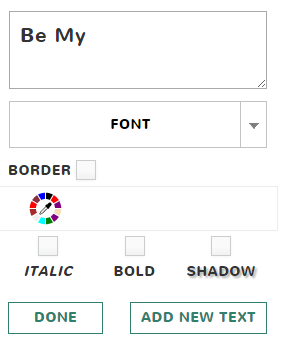
Finally, click on the Text option and write something cute, witty or wise to make your card even more interesting and original. You can then play with font, text color, etc.

Cherami Cards: A Fun New App for Creating Online Cards

And here’s what we created in a few minutes, but of course, you can do better!

Cherami Cards: A Fun New App for Creating Online Cards

Now click on the Save button in the upper right corner, and then choose whether you want to share, edit or create a new card. If you click on the Share option, you’ll be able to share your romantic e-card on social networks, or send it to someone special via email. Of course, you’ll need to create an account with Cherami in order to do that. 

And the best news goes last: Cherami Cards is a completely free service, so you can create as many cards as you like whenever. In a week or two the mobile view of the tool will be complete, so users will be able to use the service from their mobile devices as well. 

Use Cherami to cheer someone up, remind them that you’re thinking about them, wish them a happy birthday or without any reason whatsoever. That’s what love, friendship and Cherami Cards are about!


Hit share if you like this article.

*by andreascy*


Image to Word App: How to Convert and Edit Your Receipts

Description :

How Fast Do you Lose Track of Your Cash?

Do you find it hard to keep track of your daily spending? Many people often have problems with handling their finances, day-to-day spending and taking care of their bills, so they turn to technology for help. Ask any millennial and they will tell you the importance of managing your cash in today’s world… There just isn’t any money we are ready to give up that easily!
Image to Word App: How to Convert and Edit Your Receipts

If you are an avid fan of money, you should consider using technology to help you save your money. There are many useful apps that can provide the same user experience as if you were reading out the receipt just handed to you. One such app is Image to Word, a mobile app converter that will help you track your spending. This app allows its users to take a photo of their receipt, or a screenshot of an image, and convert it to the easily editable MS Word file. The apps developer Cometdocs has recently released a bunch of new apps, among which this was one of them, if not even the most successful of all apps in this past release.

Money in the Bank, Tracking Ain’t Easy!

Well, not really in the bank since you are spending it, but at least this way you will know how to track it. Here are some of the standout features that make Image to Word one of the best converters on the market:

- Great conversion quality and absolute data recognition

- Screenshots and complex tables are convertible too

- No limitations when it comes to file sizes and numbers

- Won’t drain your battery

- Very intuitive and easy-to-use

The app offers two ways of converting files: by choosing a file from your library, or taking a photo with your camera and then selecting to convert it.

Image to Word App: How to Convert and Edit Your Receipts

If you click on Photos, you will see a list of folders which are located on your device, and from there you can select any image you want to convert. If you wish to convert a screenshot of you receipt, or a photo you previously made, this is the option you need to select. If you click on Camera, the app will open your rear camera, with which you can quickly snap a photo of your receipt or maybe a newspaper. 

Once you’ve selected your file, the conversion will begin. The file being converted will appear on the main screen. You can also see all active and finished conversions on your main screen below the part where you choose between Camera and Photos. Those files are saved on your phone for future use, unless you choose to delete them by hand.

Image to Word App: How to Convert and Edit Your Receipts

The converted file will be in .docx format, which is the primary format for editing text in many apps, mainly MS Word. By clicking on your converted file, you will see a preview of your new file and you can export it to the app where you wish to edit it by clicking on the Share button in the bottom left corner. The app will then open a list of suggested apps to use, as well as all previous editing apps you used.

Image to Word App: How to Convert and Edit Your Receipts

If you are having trouble using the app, click on Options and then click on Guide for better results for a few quick tips. This guide will take you through the app and show you the proper way to take a photo of your receipt, or how to make a screenshot suited for conversion.

Image to Word App: How to Convert and Edit Your Receipts

From there you can also rate the app, stop all conversions or contact customer support in case you have issues with using the app. Also, by clicking on Settings in that same menu, you can allow and deny Image to Word access to certain parts of your iPhone/iPad, such as the Photos and Camera, as well as managing the notifications you get from this app.

With this app you shouldn’t have anymore trouble tracking your receipts because now you can have them all stored in your phone. While this app is very popular among iOS users, Image to Word is also available on Android so feel free to try it out, and let us know how much it helped you in managing your finances.


If you enjoyed our post kindly leave us a like on Facebook.  Hope you will come back soon!

*by andreascy*

How to Edit Bank Statements on a Mobile Device

Description :

Nowadays, managing your finances has never been easier. All documentation and information can be transferred online and you are just a click away from getting your job done. No more piles of documents, waiting in lines and dealing with “kind” bank workers. That’s history. Now you can work with your bank statements directly from your mobile device.

How to Edit Bank Statements on a Mobile Device

Unfortunately, the digital world isn’t perfect. It comes with imperfections and mistakes, as any other system. These things happen, it’s inevitable. But is there anything we can do about making bank statements easier to work with? Something like an eraser or an editor for PDF documents, since bank statements are usually in this file format?

Good news! There is an awesome app that will help you fix your bank statements quickly and efficiently.

PDF to Excel converts PDF bank statements into editable Excel spreadsheets on iPhone or iPad. It’s a free app that offers great conversion quality. Its very useful feature for all of you who usually communicate with your bank via e-mail and store files online is the option of converting Gmail attachments and files stored on Dropbox, Box, and OneDrive accounts. This is really convenient when you need to handle financial documents online, on the go.

How it works

PDF to Excel is very simple to use. Just follow these instructions to convert your bank statement:

1. Select a file you would like to convert.

How to Edit Bank Statements on a Mobile Device

2. Click on the Share button in the top right corner. 

How to Edit Bank Statements on a Mobile Device

3. After finding PDF to Excel app in the OPEN IN menu, tap on it.

How to Edit Bank Statements on a Mobile Device

4. Just wait a little bit and you will find your converted file within the app.

After you get the converted file, you will need MS Office or any other Office related app that opens Excel files.

Overall

Now your bank statement is editable and you can make all the necessary changes.This is also applicable for invoices, receipts or any other PDF tables that require modification. 

The only thing left is to download PDF to Excel and go back to peaceful finances management. Maybe this will increase your income, who knows?


Connect with us on Twitter. We'd love to share updates with you.

*by andreascy*


🦾 Stay Motivated

Editor’s Picks

Editor's Picks 01 / 03
Marketing Design Tips and Trends For Success
Marketing & Design

Marketing Design Tips and Trends For Success

With website design impacting 94% of first impressions, discover key web design tips and modern visual trends to keep visitors engaged.

Read Full Story →
Mobile App Security Threats To Plan For
Cybersecurity

Mobile App Security Threats To Plan For

Learn how hackers target mobile apps and how multifactor authentication, encryption, and code obfuscation protect user data.

Read Full Story →
7 Reasons to Consider a Home Gym
Health & Fitness

7 Reasons to Consider a Home Gym

If you think of picking up better health habits and don't like crowded gyms, consider setting a home gym catered to your needs.

Read Full Story →

🌀 Quantum Helium Unleashed

Ideas In Motion

Cybersecurity

Mobile App Security Threats To Plan For

Learn how hackers target mobile apps and how multifactor authentication, encryption, and code obfuscation protect user data.

Read Full Story →
Health & Fitness

7 Reasons to Consider a Home Gym

If you think of picking up better health habits and don't like crowded gyms, consider setting a home gym catered to your needs.

Read Full Story →
Marketing & Design

Marketing Design Tips and Trends For Success

With website design impacting 94% of first impressions, discover key web design tips and modern visual trends to keep visitors engaged.

Read Full Story →

▶️ Just Press Play

Beyond The Scroll

Health & Fitness

7 Reasons to Consider a Home Gym

If you think of picking up better health habits and don't like crowded gyms, consider setting a home gym catered to your needs.

Read Full Story →
Marketing & Design

Marketing Design Tips and Trends For Success

With website design impacting 94% of first impressions, discover key web design tips and modern visual trends to keep visitors engaged.

Read Full Story →
Cybersecurity

Mobile App Security Threats To Plan For

Learn how hackers target mobile apps and how multifactor authentication, encryption, and code obfuscation protect user data.

Read Full Story →

⭐ Leading ShipYard's Leaderboard

🚩 Milestone Unlocked!