7 Reasons to Consider a Home Gym

If you think of picking up better health habits and don't like crowded gyms, consider setting a home gym catered to your needs.

5 Top Picks for Christmas Holiday Like a Fairytale

If you imagine Christmas holiday this year being like a fairytale, you should consider visiting these hidden gems!

7 Fashion Accessories To Lift Up Your Style Quotient

Get heads up on the trendiest as well as classic fashion accessories that would elevate your style to another level.

learndirect flexible online learning

Showing posts sorted by relevance for query developing applications. Sort by date Show all posts

Microsoft’s Discovery of the Decade: ‘The Nadella’

Description :

Satya Nadella has been working as the CEO of Microsoft for two years now. Throughout the past two years, he has revolutionized Microsoft. Therefore, people even describe Nadella as the Microsoft’s Discovery of the Decade. The main objective of Nadella is to drive the company forward along with a cloud and mobile focus. The decision he took has created a significant impact behind the success of the software giant. 

Microsoft’s Discovery of the Decade: ‘The Nadella’

Microsoft got the opportunity to feel fresh throughout the past few years under the guidance of Satya Nadella. Some people say that Nadella is running the Steve Ballmer’s Microsoft.Under the guidance of Nadella, Microsoft paid special attention towards protecting Windows. Windows Vista came out during the Ballmer’s period and it was not a success. Even though Vista took a long time to hit the market, the company was not able to cater the expectations of the users. It also created a negative impact on the mobile platform of Microsoft. This fact played a major role behind the popularity of iPhones over Lumia.

As we can see, the plans created by Ballmer are not perfect. However, Nadella has executed some of the plans that were created by Ballmer. He takes a whole new approach when executing these plans in order to deliver positive results to the company. Taking Microsoft Office for iPad can be considered as a perfect example.

The strategic vision of Satya Nadella has contributed a lot towards the success of Microsoft throughout the past two years. Microsoft was there on every desktop, but it was not so popular on mobile devices. Nadella noticed the increasing popularity of mobile devices, so he took necessary measures to make Windows popular in the mobile industry. Therefore, Office was released to Android tablets, Apple iPads and even Raspberry Pi devices. At the moment, Office is a popular application that can be found in these devices.

Microsoft’s Discovery of the Decade: ‘The Nadella’

Nadella did not abandon windows. During the Windows 10 Technical Preview release, he said that he has very big hopes and aspirations on the Windows operating system. He dreams about having people want Windows to choose Windows. In addition, Nadella took necessary measures to give life to very capable versions of Microsoft Office. Office has been the greatest selling point of Microsoft throughout the past few years. 

Satya Nadella is a person who is equipped with a tactical vision. In fact, he does not make short term plans. He thinks few years ahead and creates the plans accordingly to deliver positive results with measurable outcomes. Moreover, he can be defined as a person who communicates very efficiently. He can convince his ideas to someone and grab another person’s ideas in an effective manner through communication. 

As you already know, Satya Nadella has guided Microsoft in the correct track under his leadership. The company has seen many different changes in its board level throughout the past two years. Ballmer left his position and Nadella did not discover any crocodile tears from the people who stayed with the company. Few months later, some other board members resigned and they were replaced by suitable candidates by Satya Nadella. However, the senior leaders did not change under the guidance of Nadella. Bill Gates is supposed to devote more time towards the success of Microsoft after his step down. However, it didn’t happen as expected and Satya Nadella got the responsibility of driving the company. Nadella was able to manage everything accordingly and he did not face any hassle. His excellent leadership qualities helped him throughout the difficult times. The secret behind the success of Nadella was that he took necessary measures to attract individuals and maintain an excellent inner circle. This helped the entire top management to stay away from frustration.

Satya Nadella is a person who identified the exact difference in between Windows Mobile and Windows Mobile. It seems a bit confusing. Windows Mobile is the name that is given to the operating system, which powers up Windows smartphones. This operating system can also be found in Intel and ARM based tablets. However, Windows Mobile has a bigger scope. As per Nadella, Lumia phones, Surface tablets, the Band and the HoloLens are expected to be a part of the Windows mobile ecosystem in the future. In addition, the CEO is extremely concerned about developing stable services and applications to be run on Windows mobile devices. In the world we live, people prefer to use their mobile devices over personal computers. However, Windows smart mobile devices are not popular among them, when compared to iOS and Android devices. Satya Nadella has the vision of making Windows mobile popular among smart device users who live in every corner of the world.
 
Microsoft’s Discovery of the Decade: ‘The Nadella’

Satya Nadella is also concerned about cross platforms. Once he stated that Microsoft will not be developing services and software for the platforms of other companies. Instead, he is concerned about developing applications that are compatible with cross-platforms and making them a part of the Microsoft’s DNA. 

Microsoft has started focusing on bundling after the supervision of Satya Nadella. Nadella wants to bundle up all the services and applications that are offered by Microsoft. The business apps developed by the software giant became very successful when they were packaged as the Office Suite. The release of Office 365 in many different suites can be considered as a great example to prove the above mentioned fact. 

Last but not least, Satya Nadella is concerned about being ahead of the customer demand. They have done big mistakes in the past by not paying attention towards the demands of the customers. Nadella has understood these issues and he has taken necessary measures to deliver a service that customers really need. Therefore, Nadella can be considered as the best discovery of Microsoft in the decade. 


So, what you guys think? Let us know down below in the comments. Please share and help spread the information! 

*by andreascy*

Augmented Reality and Its Applications for Education

Description :

Augmented Reality (AR) has had a tremendous impact on education during the past few years. 

Augmented Reality and Its Applications for Education

It started out as something really “cool” before developing into one of the most useful resources available for learners. 

What Exactly is Augmented Reality? 

Augmented Reality, which is also known as AR can simply be defined as the process of viewing or scanning a trigger image through a mobile device. This process would give life to a subsequent action. This action can be another image, a video, QR code, 3D animations, games or whatever you want it to be. Even a GIF image can be considered as an AR in action.


The Impact of Augmented Reality on Education

Imagine that you are a student who is sitting in a history class. The lesson you are going to learn is about Egyptian Temples. Augmented Reality has the potential to create a realistic 3D environment of the temple and you will be able to learn it in more of an interactive and appealing way without even leaving the classroom. You can view every corner of the temple and get a clear view of it. That’s the beauty of AR.

Augmented Reality can be used in education via many different methods. These include:

 Virtual Reality

Even though Virtual Reality mainly focuses on games, it can be used effectively in training and education as well. The immersive learning experience delivered by Virtual Reality has contributed a lot towards its popularity. A 3D immersive environment or a 360 degree video shot becomes useful when teaching new languages for students. A large number of learners will be able to get connected to the same virtual space as well which is particularly useful at a time of globalization and increased connectivity between countries via the internet.

 Virtual Reality Glasses

Virtual Reality glasses have also received a lot of attention in the recent past. More specifically, they have become particularly popular among students who are looking for a convenient method to learn marine biology. That’s because virtual glasses are in a position to immerse the students in a seabed environment and help them learn in an effective manner. This method of teaching is not associated with print books. A tablet is being provided to the student by the teacher and the student is asked to follow what appears on the screen. The students can then simply ask what animals are invertebrates and what vertebrates are. Then the students are asked to point them out by having a look. At the end of the lesson, the teacher would be able to know who has got it right and who has not.

 3D Objects and Motion Capture

Offering training on 3D objects is not an easy thing to do. People who learn about these objects will not be able to get a clear understanding until they interact with the objects. That’s where 3D Objects and Motion Capture comes into play. This method is based on motion capture technology where the students will be asked to reposition the 3D objects that they see.

 Virtual Learning Environments

Virtual Learning Environments involve a platform where students and teachers can come together and collaborate with each other through an intranet. Teachers can use this network in order to create and send homework for their students. In addition, students can complete the assignments and submit them over the network themselves. In this way it is possible for the teachers to have the homework submitted and gathered in an organized manner, as well as being able to access useful statistics at the end of the day. Virtual Learning Environments have changed how traditional class sessions are managed and are thought of as a revolutionary way of e-learning.

Feedback and Monitoring Through Augmented Reality

Feedback and monitoring holds a prominent place in the education system. Otherwise, teachers will not be able to figure out whether they reach the educational objectives or not. Augmented reality creates an ideal platform to achieve this traceability. For example, the teachers will be able to get a clear understanding of what content is mostly viewed by the students and what assignments are completed by them. This type of information can be used in order to make important decisions respective to the students’ learning styles and performance.

Here is a list of some useful applications based on Augmented Reality, which can be used to enhance the quality of education:


One of the most popular applications allowing to bring tagged images, objects and even physical locations to life. Using interactive digital content like video, animations and 3D scenes named Auras, Aurasma unfolds the amazing world of Augmented Reality with the ‘explore’ and ‘featured’ sections to retrieve the latest Auras. This app has been widely used in education since it allows the teacher and student to create their own interactive content. School displays come to life with this great tool!


This remarkable app created by NASA themselves and recently upgraded, as the name probably gives away, is more closely related to science or space teaching. Once you download Spacecraft 3D and print off the ‘markers’, it is possible to use your iPad’s camera to make a three dimensional spacecraft appear right before your eyes. There is also the option of taking a closer look to the structure of Rovers, Satellites and Telescopes while also looking at all angles of the technology since there are moveable parts on some of the crafts. These features can be quite engaging for children yet the app allows also to single handily bring a research lesson to life. Based on the content this app can be used in particular for students aged Key Stage 2 and 3.


Butterfly Fingers is one app that makes use of the Augmented Reality in combination with SEN. What the app does is that it places animated butterflies in the room while you look through the iPad’s camera. You might be stunned but this fluttering of butterflies can create a calming environment in the classroom especially when you have a very vivid student population. Importantly, the app does not require to be excellent in fine motor skills so it can be useful with children with special educational needs and all age groups.

4. Quiver

Whilst for many applications using AR, the user basically points the tablet’s camera at something and watch the effect, there is nothing physical about the endeavour. In contrast, Quiver is a fantastic app which allows you to physically customize the Augmented Reality object using coloring pages as triggers, and this video shows it in action. The way to do this is simply by downloading and print off markers which you can color and redesign yourself. Once the child (or adult) draws a picture and sketches its parts, pointing at the colored image using the tablet turns it into a three dimensional animation with moveable parts. There different markers, all enabling for creative and imaginative artistic learning. For example, the app can help a child visualize a character and stimulate more ideas for scripts, storyboards etc. 


One extremely favourable app is AR Flashcards. The app is rather simple: there is a card for each letter of the alphabet, featuring one animated animal for every letter. You therefore realize that immediately the app allow you to play with twenty six Augmented Reality animals. There are more exciting stuff to do though, like using a huge number of dinosaur flashcards available for free. This creates endless educational potentials, ranging from phonics teaching and early language development, to topic-related learning such as using the dinosaurs which are pretty popular among children. Embedding these flashcards in your classroom teaching can therefore help with story writing, artistic endeavours, research projects and so much more!


A very interesting Augmented Reality app by the colossus focused on learning about astronomy in a fun and engaging way. Google Sky Map allows you to directly identify stars and constellations using a smartphone camera rather than through a book.


A great educational game app to get elementary level kids to overcome their fear of Maths by learning, Fetch! Lunch Rush released by PBS KIDS uses printable cards as Augmented Reality pieces. Designed in 3D, the app uses the smartphone camera to place graphics in real-world surroundings. Specifically, there is a plot in the game where students help Ruff the Dog feed sushi to a movie crew by solving math problems. 


GeoGoogle is awesome when it comes to expanding students’ geography skills and help them measure distances to specific destinations, like latitude and longtitude by applying GeoGoogle to real-world surroundings. 

9. AugThat

One former teacher developed AugThat specifically targeting students that are not motivated to follow the classroom routine. Using the app's features, it is possible to create animated lessons in a variety of topics to engage students, including 360-degree virtual environments and 3-dimensional experiences.


One of the most quality apps created by DAQRI, a powerful AR developer, is the application Elements 4D. As the name implies, this app brings elements of the periodic table to life to allow students of elementary, middle and high school level, see chemistry in action. The app work by printing out and assembling blocks that are used as trigger images for an AR experience. There are also lesson plans available for integrating Elements 4D at the DAQRI's website.


Another amazing app by DAQRI, Anatomy 4D, allows teachers to design their own anatomy lessons by allows to view 3D images of the human body and heart. The app works by having teachers print off one of the target images and have students look at it through the app. This way they can learn about the different biological systems and bring the human body to life in a fascinating way, turning them "on" and "off" with the touch of a button.

12. Layar

This application employs Augmented Reality features to scanned print materials to enable a rich digital experience. Some of the app’s characteristics include seeing magazines come to life with videos on top of pages, browsing and viewing thousands of Geo Layers to find nearby stuff, enjoying interactice print with pop our content, and sharing your interactive print experiences without having to scan. Layar is thus one great app for use on a variety of learning projects. 

These are only a few Augmented Reality applications that are related to education. You can find a variety of similar applications that have taken the entire education system to a whole new level. Given this increased interest in Augmented Reality in the field of educational technology and technology enhanced learning, substantial empirical research has taken place in the past two decades to determine how this technology meaningfully engages students. 

Conclusion

The existing evidence so far suggests a variety of benefits from using Augmented Reality and similar immersive experiences during the lesson. More research however is needed before a conclusive argument is made, and what is certain, is that the use of Augmented Reality for educational purposes, like any other trending method, should be accompanied by a solid theoretical background while also addressing the individual needs of the particular classroom at hand.


Did you find this article interesting? Don’t forget to drop your feedback in the comments section below. Thank you for reading!

*by andreascy*

Microsoft Research : Automated Intelligence in Your Daily Life


Description : 

Over the last decade, technical and infrastructural developments have created a nurturing environment for developing applications of machine learning and reasoning - and for harnessing automated intelligence to assist people in the course of their daily lives.


Microsoft researchers continue to push the state of the art in applying machine intelligence to the daily lives of people through research in algorithms and technologies to discover knowledge from large-scale data. By building software that automatically learns from data, the goal is to enable applications to behave more intelligently and enable users to become more productive.


Read also other interesting stories from Microsoft Research. Share this topic with your social circles and subscribe on our RSS feed to stay updated with out latest news!

*by andreascy*

Finally Experience the Benefits of Developing Android Apps

Description : 

Reasons Why You Should Develop for Android 

The Android operating system thrives in what is known as open platform. That is to say, it has no commitment to any particular provider and/or manufacturer. This openness of the Android OS allows programmers to freely take advantage of the platform's capacity. Those programmers involved in Android app development will have their app on hand for millions of users throughout the world. Without doubt, the openness of Android permits it to expand on the market rather quickly.

Finally Experience the Benefits of Developing Android Apps

With the source code being easily accessible at http://source.android.com, providers and hardware manufacturers will be able to opportunely create and sell Android devices. There are no restrictions on totally exploring the source code to see how a certain task is managed. As an illustration, the open-source code lets phone manufacturers integrate features into some devices and generate custom user interfaces (UIs). As you develop apps, you will find yourself on the same playing field as other major developers. 

Getting a Share of the Market

Nowadays, a developer can go on to develop apps for this innovative flourishing market. Android is currently poised to surpass scores of other carriers in the industry marketplace in the months to come. The reality is that with numerous users, it has become much easier to write applications for downloading and use by potential customers.

The great benefit of the Android market stems from the fact that it places the app directly and conveniently into the users' reach. It no longer becomes necessary to go about prowling the Internet for an app to install. This can be done by going to the Android market, pre-installed on most devices where all apps can be accessed. It wouldn't be difficult to observe how an app's amount of downloads skyrocket in just a couple of days. 

Cross-compatibility Essentials

Cross-compatibility within this context refers to running Android on many devices with diverse screen dimensions and resolutions. Apart from being cross-compatible, Android possess the tools that could assist you in developing cross- applications. Thanks to a Google requirement, your apps can only be run on compatible devices.

To illustrate, if an app needs a front-facing camera, just phones having a front-facing camera will be capable of seeing an app in the Android market. This set-up is identified as 'feature detection'. It is important to note here that for an Android device to be certified compatible, certain hardware guidelines must be adhered to. It all boils down to ensuring that your apps are able to run on all devices.

RELATED ARTICLE: How Long Does it Take to Build an iOS or Android App?

Please share your thoughts in the comments box. Feel free to support our blog and make my day! Talk soon guys.

*by andreascy*

Asteroid Mining Mission Revealed by Planetary Resources, Inc.

Description :

Planetary Resources, Inc. announced today it's plan to mine Near-Earth Asteroids (NEAs) for raw materials, ranging from water to precious metals. 


Through the development of cost-effective exploration technologies, the company poised to initiate prospecting missions targeting resource-rich asteroids that are easily accessible. 


Resource extraction from asteroids will deliver multiple benefits to humanity and grow to be valued at tens of billions of dollars annually.


The effort will tap into the high concentration of precious metals found on asteroids and provide a sustainable supply to the ever-growing population on Earth.


A single 500-meter platinum-rich asteroid contains the equivalent of all the Platinum Group Metals mined in history.


“Many of the scarce metals and minerals on Earth are in near-infinite quantities in space. As access to these materials increases, not only will the cost of everything from microelectronics to energy storage be reduced, but new applications for these abundant elements will result in important and novel applications,” said Peter H. Diamandis, M.D., Co-Founder and Co-Chairman, Planetary Resources, Inc.


Additionally, water-rich NEAs will serve as “stepping stones” for deep space exploration, providing space-sourced fuel and water to orbiting depots. Accessing water resources in space will revolutionize exploration and make space travel dramatically more economical.


“Water is perhaps the most valuable resource in space. Accessing a water-rich asteroid will greatly enable the large-scale exploration of the solar system. In addition to supporting life, water will also be separated into oxygen and hydrogen for breathable air and rocket propellant,” said Eric Anderson, Co-Founder and Co-Chairman, Planetary Resources, Inc.


Of the approximately 9,000 known NEAs, there are more than 1,500 that are energetically as easy to reach as the Moon. The capability to characterize NEAs is on the critical path
for Planetary Resources. To that end, the company has developed the first line in its family of deep-space prospecting spacecraft, the Arkyd-100 Series. The spacecraft will be used in low-Earth orbit and ultimately help prioritizethe first several NEA targets for the company’s follow-on Arkyd-300 Series NEA swarm expeditions.


Chris Lewicki, President and Chief Engineer, said “Our mission is not only to expand the world’s resource base, but we want to increase people’s access to, and understanding of, our planet and solar system by developing capable and cost-efficient systems.”


“The promise of Planetary Resources is to apply commercial innovation to space exploration. They are developing cost-effective, production-line spacecraft that will visit near-Earth asteroids in rapid succession, increasing our scientific knowledge of these bodies and enabling the economic development of the resources they contain,” said Tom Jones, Ph.D., veteran NASA astronaut, planetary scientist and Planetary Resources, Inc. advisor.


Planetary Resources is financed by industry-launching visionaries, including Google CEO Larry Page and Ross Perot, Jr., Chairman of Hillwood and The Perot Group, who are committed to expanding the world’s resource base so that humanity can continue to grow and prosper :


Eric E. Schmidt, Ph.D., Executive Chairman of Google, Inc. (NASDAQ:GOOG) and Planetary Resources, Inc. investor: “The pursuit of resources drove the discovery of America and opened the West. The same drivers still hold true for opening the space frontier. Expanding the resource base for humanity is important for our future.”


K. Ram Shriram, Founder of Sherpalo, Google Board of Directors founding member and Planetary Resources, Inc. investor: “I see the same potential in Planetary Resources as I did in the early days of Google.”


Charles Simonyi, Ph.D., Chairman of Intentional Software Corporation and Planetary Resources, Inc. investor: "The commercialization of space began with communications satellites and is developing for human spaceflight. The next logical step is to begin the innovative development of resources from space. I'm proud to be part of this effort." 


The company’s advisors include film maker and explorer James Cameron; General T. Michael Moseley (Ret.); Sara Seager, Ph.D.; Mark Sykes, Ph.D.; and David Vaskevitch.


Founded in 2009 by Eric Anderson and Peter H. Diamandis, M.D., Planetary Resources, Inc. is establishing a new paradigm for resource utilization that will bring the solar system within humanity’s economic sphere of influence by enabling low-cost robotic exploration and eventual commercial development of asteroids. 


Full webcast :


Meet the team :


 For more information, please visit :


to be among the first to learn news about Planetary Resources.

For More Information :

Stacey Tearne
Planetary Resources


Natalie Mounier/Meghan Baker
Kirvin Doak Communications


*by andreascy*

Microsoft News : Download now Visual Studio 11 Beta and .NET Framework 4.5 Beta


Description :

Microsoft has released the Visual Studio 11 Beta with .NET 4.5 Beta for download.

What’s new in the Visual Studio 11 Beta? 

Plenty. One of the more significant changes that the Internet has been arguing about lately is the decision to suck away all of the color from the UI in order to increase focus on code. While the new monochromatic approach (that’s present in terms of both UI colors and iconography, which has also been simplified) is cleaner, it is quite bland and depressing. Surely they could have added some additional color to the mix without taking away from the focus on the code.


Beyond this user interface aesthetic change, they also introduced a variety of features and user experience improvements to help boost productivity while developing. Here’s a quick rundown of the main improvements :

Hubs : 

To improve the method of navigating through code, Visual Studio now has new versions of the Solution and Team Explorers. In the Solution Explorer hub, various tool windows – Class View, Object Browser, Call Hierarchy, Navigate To, and Fine References – were integrated into one explorer. Something similar was done with the Team Explorer.

Pivots : 

Following up on the aforementioned new "Hubs" feature, you are now able to switch the relationship or pivot without switching to another tool window.

Multi-Instancing : 

Multiple instances of the Solution Explorer can now be created, with each instance displaying something different/unique about the content at hand. So say, while browsing through code, a developer can duplicate the current instance of the Solution Explorer to maintain that active view.

Preview Tab : 

The new preview tab works to minimize the amount of windows created while working on a project; basically, every time a developer does something that would trigger a file to be opened as a "side effect", the file will be opened in the preview tab. You’ll be able to do anything to a file while it is inside of a preview tab, such as edit the content, or convert the tab into a "regular" tab by clicking a button, double-clicking on the file, or dragging the tab.


For a complete and detailed rundown, there are two posts on the Visual Studio MSDN blog that delve into the changes and new features, and provide an in-depth overview of how they work.

You may download the new Visual Studio 11 Beta through Microsoft here.


.NET Framework 4.5 Beta :

Now with .NET Framework 4.5, Microsoft .NET has been enhanced significantly to enable developers to be as productive as possible while building rich, reliable and high-performance software in managed code.


Following are some major improvements in .NET Framework 4.5 :

Languages : 

To help developers deliver responsive clients and scalable servers, the C# and Visual Basic languages now have built-in support for writing asynchronous code almost as easily as if it were synchronous. And to help developers tackle data-complex problems, F# integrates Type Providers to make data access trivial in F# programs and components.

Performance : 

The Common Language Runtime has been overhauled to provide better performance, in particular for server applications and services. With additions such as background server garbage collection, multicore background JIT compilation and profile-guided optimization, managed applications can now start faster and run with better throughput and lower latency.

Networking : 

With the proliferation of devices and continuous services in the cloud, .NET Framework 4.5 builds upon the high-quality networking libraries already available in .NET to further enable the development of increasingly connected applications. New support spans from modern HTTP libraries to WebSockets to support for contract-first service development.

Beyond such areas, many additions have gone into improving the .NET Framework end to end. There are improvements from regular expression processing to better support for compression standards, enhanced support for HTML5, developer productivity enhancements in Entity Framework, optimized mobile experiences through ASP.NET, and more, ensuring .NET Framework 4.5 has something new for all developers building for the client and the cloud.

*by andreascy*

Panasonic WiGig 1Gbps Wireless SD Memory Card Concept

Description :
Panasonic is currently developing applications for the new WiGig gigabit wireless communications technology. In this concept demonstration, a communications module which supports WiGig is embedded on an SD memory card.


Although Panasonic is still in the process of prototyping the WiGig-enabled SD card, the company demonstrated how it will be possible to transmit videos, photos and other local data from a wireless controller such as a tablet, to the displays mounted in the passenger seats of a car. At gigabit speeds, it will be possible to wirelessly transfer a full DVD video in one minute.
The tablet can also connect with the car's computer, so the user can easily see relevant information such as battery capacity and tire pressure.


Panasonic's WiGig implementation uses the 60GHz spectrum to transmit data at gigabit speed, but it is limited to a range of 1-3 meters. Due to this limited range, it will not take over from the current Wifi standard, but Panasonic is coming up with a range of situations where it can be used effectively.


Panasonic also plans to design a directional antenna, which will allow radio waves to be transmitted from the SD card slot, to effectively transmit data wirelessly. It is aiming for the commercialization of WiGig SD cards for in-vehicle use in summer 2013.


*by andreascy*

Next Generation GPS Satellites


Description : 

Global Positioning System (GPS) is accessible to almost everyone by the introduction of smartphones. We can know our position and can locate any place by using satellites. 

Currently, the device has some limitations, as if GPS is not available inside houses, poor signal reception in remote places, and so on. GPS systems currently can track up to 10 feet. However, this height is more than enough for consumer applications, the defense personnel’s are in need of a more accurate system. Lockheed Martin, a high-tech company, is developing the next generation GPS satellites, with a tracking accuracy of almost 3 feet. Using this GPS system, we can track a person or object even if he is indoors or under forest canopies. The first satellite will be launched in 2013 and the satellites will revolve in orbit in 2014.


The new GPS system called the Block III will be more efficient and accurate than the old ones. Block III is supposed to give a precise image of the ground. This will be beneficial for both civil people and military. 

This innovation has already caught the attention of army personnel’s and thus, they have not disclosed all information about the technology. Some of the best features available in Block III are : 

- Reflectors : Reflectors are fitted on the satellite for determining its position. Laser beams are fired from the ground station to the satellites. These beams will be intercepted and reflected back by the reflectors. This signal, when received by the ground station, will help in determining its position and distance. Thus, there will be no need of radio signals. This method will also help in knowing whether the satellite’s clock is off or not and will help in making the satellite more accurate. 

- M - code : The satellite will emit a new signal called M - code that will be difficult to jam. This new signal will offer high security for military applications. High boosting of the signals will be done and as a result will get more accurate signals 

- Civilian signal : This signal can be used by all civilians for various applications in smartphones, cars and other devices

The stronger the signal quality the better it will be useful for people. Even Google maps will be better because of good tracking. 

This $5.5 billion project is expected to change the face of the present GPS technology. It is heard that Pentagon is indented to place 32 Block III satellites in the outer space. Further discussions are being made in integrating the different GPS satellite technologies from various countries into the Block III. This will bring a wider scope in the GPS tracking abilities for the common man than the ones available now. Discover more on this section.

*by andreascy*

Boston Dynamics Unveils BigDog's Dynamic Robotic Manipulation

Description : 

Robot Manipulation is the basic Science in Robotics. Most of the modern theories arise from the classical concepts of Robot manipulation. 

In the last two decades, there has been a tremendous surge of activity in Robotics, both at in terms of Research and in terms of capturing the imagination of the general public as to its seemingly endless and diverse possibilities.

Boston Dynamics Unveils BigDog's Dynamic Robotic Manipulation

This period has been accompanied by a technological maturation of Robots as well, from the simple pick and place and painting and welding Robots, to more sophisticated assembly Robots for inserting integrated circuit chips onto printed circuit boards, to mobile carts for parts handling and delivery. Several areas of Robotic automation have now become “standard” on the factory floor and the field is on the verge of a new explosion to areas of growth involving hazardous environments, minimally invasive surgery, and micro electro-mechanical mechanisms. 

A manipulator mechanism is a device used to manipulate materials without direct contact. It is an arm-like mechanism that consists of a series of segments, usually sliding or jointed, which grasp and move objects with a number of degrees of freedom.


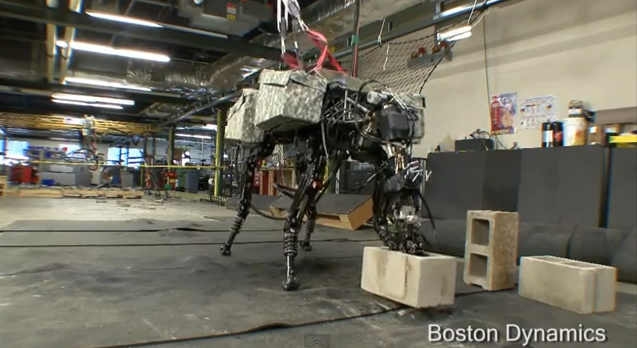
Our loyal readers might be familiar by now with Boston Dynamics, the local Robotics company creating with remarkable behavior: mobility, agility, dexterity and speed, the most advanced robots on Earth. That includes the "BigDog", one of a few models utilizing the company's LS3 - legged squad support system - technology. But what happens when you add a brick throwing arm to those legs? Uh-Oh...


Yeap, you heard me right. Rise of the machines! 😀

"BigDog" now handles heavy objects and can fling them, using human motion as a model. The mechanical dog is over a meter tall and weighs more than 100 kilograms (which is more than the average man), and can throw using its whole body, 35lbs of concrete blocks across a room (a bit more than 17 ft). The company has been steadily improving “BigDog” for years with funding from the Army Research Laboratory (RCTA) and seems to have high hopes for this latest advance...


"The goal is to use the strength of the legs and torso to help power motions of the arm. This sort of dynamic, whole-body approach to manipulation is used routinely by human athletes and will enhance the performance of advanced Robots. Boston Dynamics is developing the control and actuation techniques needed for dynamic manipulation", a Boston Dynamics spokesperson said.


“There are a wide variety of applications, both military and civilian, where strong and dexterous manipulation would be needed,” another spokesperson added. “Think of anything a person does now in the field, such as clearing ruble, fighting a fire, digging up an IED, etc. Rather than focus on a specific mission right now, the RCTA program is focused on core functionality that will be useful for many applications.”


You might say it is hard to imagine any real world practical applications for this project. Actually almost everything has a real world practical application, especially if imagination flows without bounds. Moreover, in this case, it is not even hard to imagine! How about: close quarter combat, tear/rip the enemy (human or other robot) apart or throw the enemy somewhere to be terminated, rescue excavation (after an explosion, mine collapse, bombing, earthquake etc.)?

The problem though is that when we create things for destruction, they get used for destruction. What do you think? Let us know in the comments below. 

Subscribe on our Daily Newsletter to get free updates straight to your inbox! If you want to get in touch, then contact us by using this form

*by andreascy*

🧑‍🧑‍🧒‍🧒 Join our Reddit Community

🦾 Stay Motivated

🏅 Featured on Product Hunt