7 Reasons to Consider a Home Gym

If you think of picking up better health habits and don't like crowded gyms, consider setting a home gym catered to your needs.

5 Top Picks for Christmas Holiday Like a Fairytale

If you imagine Christmas holiday this year being like a fairytale, you should consider visiting these hidden gems!

7 Fashion Accessories To Lift Up Your Style Quotient

Get heads up on the trendiest as well as classic fashion accessories that would elevate your style to another level.

Sensibo

Showing posts with label 4G LTE. Show all posts

The Future Landscape of Software Development

Description :

The advent of laptop computers marked an important milestone in the history of mobile computing. Laptops made it possible for people to bring their work with them almost everywhere they went. The evolution of Palm Pilot-style digital planners further fueled the trend and defined what it meant to "stay connected" while out in the field. However relevant or essential these products were, no technology changed the digital landscape more or pleased consumers as much as those wireless handheld devices put out by the now-famous technology giants BlackBerry and Apple.

The Future Landscape of Software Development

Future technology trends are expected to continue to extend the nebulous bounds of the cloud, and further leverage the capacity and reach of the 4G mobile spectrum. Of course, the most impressive and stunning technology trends always seem to spring from unexpected places and are generally the most difficult for industry insiders to forecast.

The Future of Software

Current and emerging trends in the field of software development are being driven by new programming languages and platforms, new development methodologies, updates to core Internet technologies (HTML5), changes in customer expectations, and the unstoppable ascendancy of powerful new mobile computing devices.

Rapidly expanding demand for greater numbers of mobile computing devices has put pressure on software developers to create more mobile applications. Key stories circulating in the industry press seem to concentrate on a shift toward revamping familiar and standard software packages so that they run smoothly and easily on tablets and smartphones. Indeed, future launches of the most popular and time-honored business applications written for the PC are expected to become available for tablets and hybrids in the months ahead. 

More Programming Languages

It should surprise no one in the industry that coders are going to need to know more languages. Today, Java and Objective-C with a little jQuery thrown in account for most of the heavy lifting with respect to building complex software applications and mobile apps. The performance requirements of modern mobile computing devices will create a need for developers who are conversant in such languages as Ruby, Python, Node.js, and certain exotics such as Clojure and Haskell. No examination of this subject could be considered thorough or complete if it did not touch on HTML5 and CSS3, or if it ignored how cross-platform app design is greatly enhanced when developers are comfortable with the development and implementation of bespoke programming languages.

Customer Satisfaction is Paramount

New ways of thinking, along with an increased demand for multi-paradigm solutions are driving the accelerated rate of change in the development process itself. At present, Agile principles many not make one agile enough to satisfy today's consumer because customers today are no longer happy just being satisfied, they want to be delighted. According to Forbes, organizations such as Apple and Amazon have conclusively shown that delighting customers is a worthy, profitable part of the development process.

Finally, other future trends that software developers and engineers can look forward to hearing more about in the months to come include more current philosophies concerning version control systems, where most versions of a product will be staged in the cloud. Other trends to be aware of include the potential for removal of certain highly important open source products from the public domain. If this should occur, developers will need to brush up on alternative database solutions such as MariaDB, SQLite, PostgreSQL, and MongoDB.

ALSO OF INTEREST: What's The Big Deal With Software Bugs?

We hope this information has been helpful. 👍

*by andreascy*


Tips For Making Your Garden An Internet Hot Spot

Description :

Many people have experienced the problem of weak wifi signal in a particular room or a different floor of their home. However, what do you do when you need that signal out in your garden. 

Tips For Making Your Garden An Internet Hot Spot

Whether you keep an office outside the house, or if you just want to check your email outside, there’s a multitude of ways to make it happen. We’ve put together a list of the top suggestions for turning your garden into a hot spot.

PC (or Mac) Maintenance

The problem with your internet speed out in the garden may lie within your laptop itself and not the signal strength. You can carry out general maintenance such as scans for malware and viruses. Defrag-ing your laptop will only further help its speed. A good rule of thumb as for how much space should be left free on your drive is usually double your RAM or 10 percent (whichever comes first in your case). For example, if I have a laptop with an 8 GB RAM, I would want to leave 16 GB free on my hard drive. Or if I have a 750 GB hard drive, I may want to leave 75 GB free. Not only is everyday maintenance help your laptop performance, it may aid in your internet speed so you don’t have to go out and buy a product to improve connection.

Outdoor Repeater

A repeater is an electronic device that simply replicates a signal coming from the original router in your home. These can be used if the wifi signal is particularly weak in one side or level of the house. If you have an old router lying around, then there isn’t even a need to buy a repeater as an extra router can perform the same function.

However, for wireless to reach your garden, an old router might not be ideal since they’re suited for indoors. Outdoor repeaters are more suited to the elements, be it rain or shine, and tend to offer a greater range. They can be expensive, but they come with perks such as water proofing, built-in firewalls (depending on the brand), and the ability to be mounted outdoors. You can’t say the same for your indoor router.

Outdoor Access Points

If trees aren’t in the way, an OAP can offer a range of up to 2000 ft when it comes to getting a wireless signal. Even better, they can be placed outdoors (if you can manage an Ethernet cable connection). The reason these have gained popularity is due to price increases by ISPs. As a result, neighbors sometimes use OAPs to share a connection in order to save money. Similar to repeaters, OAPs come waterproof, are tolerant of wider temperature ranges, and are made for sometimes rugged environments. OAPs can even act as repeaters, bridges, and offer other operations depending on the brand you select.

Stick it Out

If all else fails, just stick it out. These laptop sticks can allow you the luxury of internet connection simply by plugging into your USB port. This can be used almost anywhere where your wireless provider is located. The downside is you may be limited to a 3G or 4G connection speed, and the sticks can be lost. However, the stick can be used on multiple devices and offers you a mobile hotspot almost anywhere.

Like what you're reading? Follow us on Twitter for more!

*by andreascy*

Pros and Cons of Mobile Broadband Service

Description : 

To provide access to the Internet, mobile broadband makes use of similar technology as the one found in mobile phones. 4G mobile broadband is the current standard from the former 3G network. 

Pros and Cons of Mobile Broadband Service

4G is designed to be much faster and can provide internet access to laptops, smartphones, and other personal mobile devices. If you are thinking of picking up a mobile broadband dongle soon, then read on first and learn about its pros and cons

Pros 

 Mobility: This is the selling point of mobile broadband connection. You can use it to get access to the Internet as long as you have 3G or 4G reception. The stronger the reception, the better your browsing experience

 Plug and play: Just plug your USB modem or dongle into your laptop, and the software you need to connect to the Internet is installed automatically. There’s no need to go through any tedious installation process while talking to a technical support representative on the phone. 

 Convenient: There’s no clunky Ethernet cabling involved. You only tote a small USB modem, plug it to your laptop, and get Internet connection. 

 No landline bills: If you only keep your landline to maintain a high-speed Internet connection, then you can cancel your landline subscription and save money. 

 Pay as you go: You have the option to prepay or to sign up for a mobile broadband subscription package. If you only need to go online occasionally, then a prepaid option can save you money.  
Cons 

 Coverage: If you live in a remote area, you may not get reception to your provider’s 3G or 4G network. That’s why it is wise to sign up with a major ISP for your mobile broadband access. A major ISP has more infrastructures in place to cover a wider area. 

 Usage limit: To prevent the network from being overwhelmed, your mobile broadband plan comes with a capped data usage. Thus, you need to learn ways to conserve your bandwidth to avoid getting charged for exceeding your download limit. Install a free program (like BitMeter, NET Traffic Meter, or TrafficStatistic) to monitor your data usage. Then enable the pop-up blocker, uninstall unneeded plugins, and tweak some of the settings in your browser. You need to research on ways to save bandwidth by changing the settings of your browser. 

 High price: Compared with conventional residential high-speed internet packages, mobile broadband services can be quite expensive. 

 Speed and performance issues: Mobile broadband is not suitable for heavy downloading, streaming HD movies, and online gaming. Mobile broadband speeds average around 1 Mbps, while the average speed offered in residential broadband services is at 3 Mbps. The connection speeds in mobile data can also fluctuate throughout the day, depending on your location and the number of people connecting to the network at a given time. 

 Locked dongle: Your mobile broadband dongle is locked to only one operator, so if you plan to switch to another provider, you need to buy a new USB modem.

Mobile broadband has always presented issues for the user. We’ve picked out the benefits and drawbacks, of using mobile broadband instead of a fixed-line connection, and mentioned all of the latest developments. Hope you liked them!

SEE ALSO: 


We would love to share updates with you. Get all the latest hot stories and exclusive insights advice by email. Have something to add to this story? Share it in the comments.

*by andreascy*

Inner Workings of High Speed Internet

Description : 

The term "Internet" has many meanings depending on what network a person uses. No one person, no one government, no one entity owns or controls the Internet. Instead, it consists of many networks cooperating and making alliances all over the world. 

Inner Workings of High Speed Internet

Each organization monitors and maintains its own network. A group known as the World Wide Web Consortium (W3C) sets standards, oversees research, and gives guidance for many areas of the network. Best of all Tim Lee Burns who oversaw the majority of work on the early Internet is part of that group.

Managing Traffic

High speed on the Internet happens from local, regional, and international networks communicating on needs and hardware. Each group contributes to the internal structure of the Internet in a variety of ways. Companies lay down the infrastructure that carries the bits and bytes cable, satellite, fiber optics, and wireless. Organizations and governments create guidelines on use, bandwidth, and standards. Of course, most of the work is finding ways to make the bits and bytes flow as quickly as possible between home and the site a person is accessing. As a human enterprise, it ranks as the first global cooperation created solely for offering a means of communication for anyone anywhere.

Internet 2

A living breathing ecosystem comes as one of the best ways to describe the Net. It has an overarching framework that everything else connects on. It has niches for specialized needs in the ecosystem. What affects one part or section of the Net has effects on the rest of the Net. It changes daily and reacts differently every day. It is all determined by human interaction and communications with others either directly or indirectly.

Not for profit research since 1996 in 200 universities and 115 companies across the globe have been testing advanced network technology daily. All require high speed networks. Many of the wonders of technology a person experiences today came out of these universities and companies. Other entities pick the technology up, adapt it, and make money with it. Online books, music, movies, and magazines started out as ideas and seeds for use at the not for profit research facilities. Presently, these places are working on high definition video, quicker ways to resolve network problems, and enhanced detection of any problems.

Connection

What high speed Internet providers give to a consumer is an access point, not the Internet itself. A provider may have their niche and personal network where they give their brand of news, weather, financial data, games and storage. It pays to determine your needs and shop around. These providers come at different levels. An ISP (internet service provider) may cover a specific geographical area and offer the initial connection to that area. National ISP exists and serves cities and towns in a nationwide network.

Another access point is OSP (online service providers). OSP is like a club where one must become a member. It functions more as a large gateway to the Internet. These entities regulate what services members have access to. It customizes a version of the web to its companies vision and needs.

More and more wireless Internet service providers are becoming the norm. Smart phones, laptops, desktops or any device with wireless capability can access a hotspot. Some wireless access points are free, and others take a monthly fee for access. In urban areas, restaurants, colleges, community areas such as airports offer free wi-fi for the public use.

Join

Internet has become one of the major means of communicating in business, in the news, in media and among many individuals. Every day across the globe it becomes a culture of its own and part of people’s lives. The astronomical amount of data streaming through it in its many forms ensures something is available for anyone in any format if they have a need.

SEE ALSO: Online Security Education Program for Your Employees

Like what you're reading? Like us on Facebook for more! TY!

*by andreascy*

Making The Switch To High Speed Internet

Description : 

These days, it seems everyone wants high speed internet. Fortunately, the infrastructure for cable and DSL internet is widespread enough for almost anyone to have access to these services, but failing that satellite internet is available essentially everywhere. 

Making The Switch To High Speed Internet

10 years ago, dial-up internet was enough for most people's internet surfing needs, but with online video and music streaming gaining in popularity, as well as wanting to stay constantly connected, high speed internet, also called broadband has become the standard for getting online.

What are My Broadband Options?

The three major types of broadband available are cable, DSL and satellite. Cable and DSL both rely on existing infrastructure in your home to bring you internet service, while satellite relies on a receiver provided by your ISP. If you live in an area with 4G mobile data coverage, 4G mobile broadband should also be available to you.

Of the major broadband types, satellite is the slowest but most widely available. If you live far from a city, coverage for broadband internet is often rather spotty, but satellite is available almost everywhere. Satellite service will give you internet that is always on and available, but during peak usage hours the service slows down.

DSL internet service is the most like dial-up internet service of all the broadband options since it uses your existing phone line to bring you fast internet service. It is one of the simplest to switch to from dial-up internet service, since you already have a land-line phone and a phone company, which also will offer DSL service. DSL is always on like all broadband internet, and provides a good price to speed ratio. 

Cable internet is the fastest and most expensive broadband option. Provided by the same company that offers your cable TV service, it is the most feature-rich broadband option, but with this comes a high price. Cable is the best choice for home-based businesses and other heavy use consumers.

Finally, mobile broadband is gaining in popularity, especially in major metropolitan areas. Utilizing the mobile data network that powers your smartphone, this technology lets you use either a dedicated device or your phone linked to your computer to provide broadband internet access. While this service is often expensive for heavy users because of data limits, it is a good option for anyone who wants broadband available to them when they travel as well as at home.

Why Switch?

The world is becoming increasingly connected daily, and having access to the internet when you need it without having to wait is invaluable. While dial-up internet is still cheap and reasonably reliable, fewer and fewer ISPs are offering this option. Finally, with some broadband plans only costing a few dollars more per month than dial-up, there are very few reasons not to make the switch. When you can have access to any of your file sharing, music and video streaming, email, social networks and more when you want it, you will never want to switch back.

It really is a simple matter to transition to high speed internet regardless of if you use dial-up now or have no internet service at home. All the major service providers offer tools online to let you see what coverage is available in your area, and if you don't have internet at home, their customer service centers will help you over the phone. Choose a service that will let you see what options are available for TV, phone and internet at your address. Once you have decided on a plan, there is little else you have to do besides be home for a technician to come by and hook up your new service. When everything is ready to go, you will be connected and able to access the internet whenever you want. 

*by andreascy*

LTE - The Basics

Description : 

Wireless carriers really like using technology-laden acronyms like 3G, HSPA, EV-DO, 4G and LTE and they expect us all to have a degree in rocket science. 

LTE - The Basics

In reality, most people do not know what any of these acronyms means. This article is aimed at revealing what LTE stands for.

LTE – The Meaning Behind The Acronym

LTE is short for Long-Term Evolution. This is an extension of the popular GSM (‘Groupe Special Mobile’ or Global System for Mobile Communications) technology, which is used all over the world nowadays. GSM is capable of simultaneous high speed data with 3G and voice and this is the way you surf the web while talking on your phone if you choose most of the carriers all over the world and have a 3G-capable mobile phone. The easiest way to tell that a mobile phone is a GSM is to look for its SIM or Subscriber Identity Module card. This is a tiny chip that has information about your phone number. Moreover, you can transfer it from one unlocked cell phone to another one quite easily. 

Other carriers nowadays use CDMA, which stands for Code-Division Multiple Access. This is an older standard for data and voice and it does not need a SIM card. It is most common in the US and only some mobile carriers rely on this standard. This technology is limited to either data or voice at any given time. This means that you can never have both even if your phone supports 3G. 

ETSI or the European Telecommunications Standards Institute is the one to establish the standards for the whole telecommunications business. This is a non-profit organization and it supports the relationship between the companies that made the hardware (the cell phones) and the carrier companies which provide networks for those phones. LTE is the product of a cooperation known as 3GPP or Third Generation Partnership Project. 

Nowadays, there are two different versions of LTE. There is the current pre-4G standard and it is advertised by carriers who say it is actually 4G anyways. There is also the LTE Advanced and this is the true 4G, but you will not see it for quite some time. The currently advertised 4G LTE is a baby step taken towards the adoption of LTE Advanced, which is going to be compatible with the standards used nowadays.

LTE is a technology of the future and the hardware available nowadays cannot handle LTE Advanced just yet. This means that for now we have to stick to the pre-4G standard, which is the 4G we know. LTE is the most recent evolution of GSM. It is created in order to bring broadband speeds to mobile data transfers. It is supposed to unify all the carriers around the world and especially the rivals in the US. 

Why do we care about LTE? 

This new standard promises us high speeds for mobile data. It can offer up to 100 Mbps download speed and up to 50 Mbps upload speed at best.

RELATED POST: CNETTV: 4G Networks - How they're Tested

If you like our site and articles then kindly recommend us to your friends. Thanks!

*by andreascy*

CNETTV : 4G Networks - How they're Tested

Description : 

Based in the Seattle area, a few miles away from Microsoft, a small company called Root Metrics (formerly Root Wireless) is a data company dedicated to helping improve your Mobile experience. They’re finding ways to use Technology on your Smartphone so that the carriers hear your concerns, can make smarter decisions on how to upgrade their Networks, and connect with consumers. 


They’re gathering accurate, trusted data that helps you find the Products and Services that best fit your unique needs 


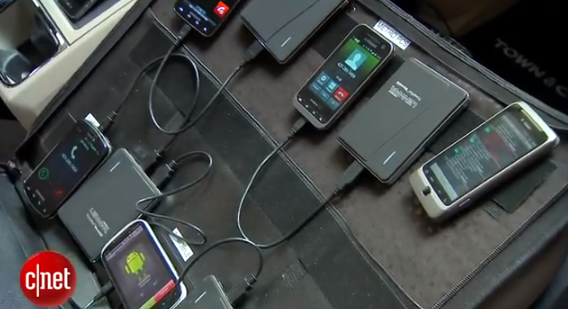
They send out some testers called scouts to independently test carrier networks, and they do it using little more than a Garmin GPS unit and a briefcase full of phones.


Inside the briefcase, one phone per carrier runs through the battery of tests. Every 5 minutes, the phone tracks calls, upload and download speeds, and texting. 


After the weeklong-testing period (or longer,) RootMetrics crunches the data. Twice a year, the company compiles a larger report on the health of each Network around the Country.


Together, the scouts that form the backbone of the operation clock 20,000 hours of testing and calculate information from 100,000,000 data points in a single year. Network testing is serious stuff. 


It takes about a month for RootMetrics analysts to crunch the numbers and compile them into meaningful reports. Free reports appear online every six months for consumers, and the numbers also feed into free apps that you can download for Android and iPhone


In addition to drawing from RootMetrics' database, the apps also combine crowdsourced results from phone owners' real-time tests.


Revenue comes from syndicated reports that the device-makers and carriers buy. The four major national carriers are all RootMetrics clients, and use the tests to compare their strengths and weaknesses against their competitors. 


"We offer carriers the opportunity to see what they get in terms of network performance and signal strength," said RootMetrics' Doehne.


In the future, RootMetrics plans to move into device-specific tests, perhaps for individual tablets, and may license their testing software directly to phone-makers and carriers so they can perform their own in-house testing using some of RootMetrics' methods. The Company also partners with 3rd parties like CNET, to provide interactive coverage maps.


More than ever, a carriers quality, especially 4G data speed is very critical in choosing one provider over another. Companies like RootMetrics although they're not the only ones in the game, offer a useful Service to consumers seeking independent information about carrier performance in their cities and towns.

Discover more CNETTV Topics and let us know what you think below.

*by andreascy*

Android 4.0 Ice Cream Sandwich Upgrade for DROID RAZR & DROID RAZR MAXX

Description :
Two Motorola phones making the global jump to Android's latest Operating System. The DROID RAZR and the DROID RAZR MAXX by Motorola are the first 4G LTE smartphones on the Verizon Wireless network to be Global Ready.


If you’re the owner of a Motorola Droid RAZR or Droid RAZR Maxx, the day you’ve been waiting for is finally here. As promised by a Verizon, the Android 4.0 update for the RAZR Devices is finally here. You don’t have to wait for it to get pushed to your device, just go out and get it on your own.


- To get the update, simply go to Settings > About phone > and check for a system update. The update should be available, and once applied, you should be rocking Android 4.0 in no time.


Ice Cream Sandwich features upgraded functionality and new features, such as Face Unlock. By looking directly at the screen, the smartphone recognizes its owner and automatically unlocks the device. It also includes Direct Access Lock Screen, which allows you to easily open camera, text messages, and dialer from the lock screen. 


Customers can use the front camera to video chat with friends and family to share summer stories or even just to wave hello. The new Video Calling icon makes it easy to access video chatting apps like ooVoo and Tango. 


The upgrade also enhances the voice input technology, typing your words as you speak emails or texts. Speak continuously for paragraphs at a time, add punctuation and even edit mistakes with voice input. 


As a Global Ready device, customers with the DROID RAZR and DROID RAZR MAXX will be able to have voice and data service in more than 220 countries, when subscribed to an international plan


Additional information on the ICS upgrade can be found on the DROID RAZR & DROID RAZR MAXX by Motorola support page. 


Before you upgrade : 

Learn what's new with Android 4.0. Ice Cream Sandwich on your DROID RAZR and DROID RAZR MAXX. 


Home Screens and Notification Window :

Discover more about the interactive home screens and notification window.


Home Screen Folders :

Learn how to group and organize your apps in labeled folders.


Webtop Basics :

Discover more with your phone in a full desktop experience.


Calling & Messaging :

Check out the features of calling and messaging.


Adding & Deleting Widgets :

Learn how to add and delete widgets on the home screen pages.


Taking and Sharing :

Learn how to capture a screenshot and share it with friends.


Smart Actions App Setup :

Learn how to setup triggers and actions in the SmartActions app to automate your everyday tasks.


Face Unlock :

Learn how to setup Face Unlock in order to protect your device.


Google Voice Actions :

Learn how to send text messages, set alarms, get directions and more through Google Voice Actions, by using only your voice.


*by andreascy*

🦾 Stay Motivated

👩🏻‍🚀 Artemis II Crew: From Friends to Family

▶️ Just Press Play

We all have days like this

[image or embed]

— Chris Paxton (@cpaxton.bsky.social) April 17, 2026 at 1:51 PM

⭐ Leading ShipYard's Leaderboard

🚩 Milestone Unlocked!

🏅 Win-Win