7 Reasons to Consider a Home Gym

If you think of picking up better health habits and don't like crowded gyms, consider setting a home gym catered to your needs.

5 Top Picks for Christmas Holiday Like a Fairytale

If you imagine Christmas holiday this year being like a fairytale, you should consider visiting these hidden gems!

7 Fashion Accessories To Lift Up Your Style Quotient

Get heads up on the trendiest as well as classic fashion accessories that would elevate your style to another level.

Sensibo

Showing posts with label Photos. Show all posts

How to Convert PDF File to JPG Format for Free

Description :

More than 20 years after its creation, the PDF format is still the most used way of packaging text and images into shareable documents and files. However, if you wish to edit your PDF content, (to export images, for example) you’ll need to get some help, most often in the form of productivity software. The biggest culprit for that: The PDF format itself, which does not allow you to manipulate it easily. 

How to Convert PDF File to JPG Format for Free

Now, there are two options in situations like these. One is to find and buy an expensive PDF conversion software which can easily convert your PDF to an editable file type. The second option is to find a dependable online converter that can do the exact same job. As you might imagine, one of those solutions involves spending a couple of hundred euros and one doesn’t. Can you guess which is which? Bingo! Long live the free online tools. 

Today, we are going to use one brand new PDF to JPG converter (from a reputable company) to show you just how easy it is to transform PDFs into images in 2017. 

Before we go on to the tutorial, here is a list of that tool's features: 

● Unlimited number of conversions

● Conversions are instant

● Completely free

● No ads

● No downloads

● No need to leave your email 

● No limitations on the file size

As you will see, it also has a simple and intuitive interface that anyone can understand. So, without any further ado, here is how to convert PDF file to JPG:


Click on the upload button and select the PDF file from your computer. 

How to Convert PDF File to JPG Format for Free

2. Press Convert and Let The Tool Do Its Job 

Using this app, you can convert almost any PDF file can be converted, large or small, basic or complex.

How to Convert PDF File to JPG Format for Free

3. Your JPG is Ready

Once the progress bar loads up, click the download button to download your JPG file. 

How to Convert PDF File to JPG Format for Free

The conversion quality is spot on and the converted files are delivered in a zipped folder. As for your document security, Investintech claims that once you download your document, both the PDF and the JPG files are deleted from their servers.

So, there you go guys. A quick little tutorial with a tool that can save you a lot of time when the going gets tough. Check it out and leave your thoughts in the comments below. 


We want to hear from you, your feedback is so important to us! Do you like the content of this article? What do you think about our website? Be a good friend and let us know.

*by andreascy*

5 Top Picks for Christmas Holiday Like a Fairytale

Description :

As the festive period of the year sneaks up on us in a couple of weeks from now, it might be a good idea to plan ahead if you are looking to spend the holidays somewhere special. Not sure on where to go? Then here are some hidden gems to consider if you want to enjoy an experience that resembles the most to a Christmas fairytale like the one you have dreamed about. These are about as close as it gets to the real thing! 

5 Top Picks for Christmas Holiday Like a Fairytale

Whichever idea you may have set as the perfect Christmas fairytale, it probably entails white days, warm nights, campfires, theme markets, warm drinks and cozy nights in. It’s a part of what many of us see Christmas as the favorite holiday season– the white ground laden with a magical feeling floating in the air! There are definitely quite a few places that can fit this description, yet we’ve gathered 5 top choices promising to offer majestically Christmas vacation.

Bibuby, Cotswolds, UK

This wonderful rural part of the United Kingdom can feel like a true Christmas special. If you find that you want to enjoy the beauty of Christmas in a fine festive theme, this might be the place to go. With fabulous thatched roofs to the old-school yellow-stone walls, Bibuby is a location that manages to capture that iconic Christmas look in kind.

5 Top Picks for Christmas Holiday Like a Fairytale

If you were to receive a post card of this place, you would likely believe it was a fictional location made just for the setting of a Christmas movie, such is the quaint and wonderful nature of the town.

Dinant, Belgium

Dinant, one of the most picturesque towns in Belgium’s Wallonia region is a fine place to visit if you want to experience something that is bound to have that true festive feeling to it. This is a lovely hotspot for winter travel, based just on the beauty of the Meuse River. It looks magnificent during this cold weather, with the shine of the frost coming down and landing perfectly across the ground to make that true Winter Wonderland feeling.

5 Top Picks for Christmas Holiday Like a Fairytale

Add in the fact that old ivy-clad castles and forts still stand so proudly here, and you can easily see why people might feel more than comfortable coming here for a winter break. It carries a unique and charming design that is pretty hard to forget, as well as a city that has all the appeal of a true Christmas fairytale story. 

For a picturesque Christmas this year that looks the part, Dinant is the perfect choice.

Rakotz Bridge, Kromlau Town, Germany

Don’t let the name fool you. This stunning bridge called Rakotzbrücke (Devil’s Bridge) as the locals call it can be found in Kromlau, Germany and is one of the most fantastically designed and detailed locations for a festive feeling and shine. It’s got a classy look that can be hard to forget, as well as a fine combination between the beauty of nature and the hardship of man to make that beauty stand out even more than ever before. 

This is a location that manages to fit the two perfectly together. The awesome stone bridge manages to appear almost natural, with a rather uneven look making it appear as if it was all put together without human touch!

5 Top Picks for Christmas Holiday Like a Fairytale

For a Christmas wonderland design, this is the perfect place to pick and experience winter tranquility like never before. Constructed over 150 years ago, the bridge itself has a wonderful river below it that reflects wonderfully.

This creates the impression of a circular design – especially in the winter, when the snap of the ground illuminates back up and creates the perfect look down below. Hence, it goes to show that choosing Kromlau and Rakotz Bridge as your travel destination is definitely bound to be one of the most memorable sights at Christmas!

Giethoorn Village, Netherlands

This stunning like Dutch ton in the northeastern province of Overijssel, Netherlands is the perfect place to spend Christmas if you are looking for a place away from the bigger cities and be somewhere far more natural, less bothersome and nowhere near as busy. This stunning little town is known by many as the “Venice of the North” due to the fact that it’s loaded with canals like the famous Italian city.

When the frost of the winter helps to bring this all together and create something exemplary, it does create that truly wonderful Christmas fairytale look. If you arrive before the frost sets in then you can hire a little boat and go along the canals, taking in a winter sight that is truly hard to top.

5 Top Picks for Christmas Holiday Like a Fairytale

From the shining lights from the houses and the locals to the stunning reflection of the town on the water, this manages to sell the picture of winter like few other places in this wonderful nation.

If you are going to be in the Netherlands for Christmas, then you should definitely do yourself a favor and pop down to the Giethoorn area to take in one of the most relaxing festive periods around.

Shirakawa Village, Japan

As a location well-known for making the most stunning take on winter-style designs, Japan makes its mark on this list with the pristine and wonderful Shirakawa Village, located in Ōno District, Gifu Prefecture. Easily seen by many as one of the most natural and fitting winter images around, this is a UNESCO World Heritage Site for a good reason. The small traditional village is something that can appear like it came directly from the tomes of a Christmas book, with a welcoming and engaging layout mixed with the tranquil, calm nature of the wilderness.

5 Top Picks for Christmas Holiday Like a Fairytale

From stunning farmhouses which are centuries old to the snowcapped roofs that have stood for equally as long, this is a little location that really helps to show everyone what the true heart and beauty of Christmas is.

Final Words

Feel like you want to grab your passport and take the first flight to reach one of these destinations? We know the feeling! If you want Christmas this year to be a little bit more exciting than before, these magical places are worth considering. Obviously, these are just a few locations to check out, but each offers a distinctive and rather amazing Christmas fairytale type holiday for you and your loved ones.

From the comfort and calmness of a festive period to the beauty of lights and layout, the above list can satisfy any curiosity and preference, adding some stardust to your Christmas! Enjoy!


Need more articles? No problem! Be sure to subscribe to our Daily Newsletter and YouTube channel. It's just that easy.

*by andreascy*

Cherami Cards: A Fun New App for Creating Online Cards

Description :

There are many sites for personalizing greeting cards and sending them to friends and colleagues for birthdays, holidays, special occasions, etc. However, the personalization process on many of those sites comes down to simply inserting a line of text into an already created image or animation. Those solutions are great when we don’t have much time for original design, but we still want to show we’re thinking of someone.

Cherami Cards: A Fun New App for Creating Online Cards

On the other hand, there are web apps such as Cherami Cards that help people fully customize their online cards, which can make the recipient feel really special. Though this piece of software is not about boosting productivity or revolutionizing any industry, like some powerful programs that we can’t live without, Cherami can be a very handy partner in “boosting relationships” and stirring someone’s emotions. 

Let’s see how it works, and then we can give you some tips on how and when to use it. 

The Basics of Using Cherami 

Head over to Cherami Cards to make your own card. Officially, there is only one type of e-cards that the app lets you create. Those are love cards. However, very soon there will be more online cards categories, such as holiday, humorous, inspirational cards and more. 

Cherami Cards: A Fun New App for Creating Online Cards

You’ll be prompted to start the creation process by selecting a shape. All current versions of card shapes can be seen on the left side of the screen. If you inadvertently click on some other option, you can always go back to the Shape category by clicking on it on the top “wheel of options.” 

Cherami Cards: A Fun New App for Creating Online Cards

Once the card shape has been carefully selected, you can do the same with other design options, such as Background, Border and Graphics. Go to each section and play with different possibilities. For example, in the Background category you can choose between different background patterns (transparent or solid) as well as pick a color for your background by clicking on the color wheel.

Cherami Cards: A Fun New App for Creating Online Cards

Similarly, you can choose a pattern for your border and its color. Of course, you don’t have to apply any border if you don’t want to.

The graphics category currently has a limited selection of illustrations, but if you’re sending a love e-card, you’ll certainly find what you’re looking for.

Cherami Cards: A Fun New App for Creating Online Cards

However, if your online card is not meant to inspire romantic feelings but serve some other purpose (e.g., scare your friends for Halloween or send thanks for Thanksgiving), then we suggest you click on the Media category and then on the Upload Image option. This will let you upload any photo you want from your computer, such as bats, pumpkins or any appropriate image.

When you click on the Upload Image, you’ll be able to browse through your folders to find the photo. Once you click on it, Cherami will let you crop it in the shape you prefer.

Cherami Cards: A Fun New App for Creating Online Cards

Just click on the Apply button that will appear below, and your image will be placed on your online card.

Finally, click on the Text option and write something cute, witty or wise to make your card even more interesting and original. You can then play with font, text color, etc.

Cherami Cards: A Fun New App for Creating Online Cards

And here’s what we created in a few minutes, but of course, you can do better!

Cherami Cards: A Fun New App for Creating Online Cards

Now click on the Save button in the upper right corner, and then choose whether you want to share, edit or create a new card. If you click on the Share option, you’ll be able to share your romantic e-card on social networks, or send it to someone special via email. Of course, you’ll need to create an account with Cherami in order to do that. 

And the best news goes last: Cherami Cards is a completely free service, so you can create as many cards as you like whenever. In a week or two the mobile view of the tool will be complete, so users will be able to use the service from their mobile devices as well. 

Use Cherami to cheer someone up, remind them that you’re thinking about them, wish them a happy birthday or without any reason whatsoever. That’s what love, friendship and Cherami Cards are about!


Hit share if you like this article.

*by andreascy*


Image to Word App: How to Convert and Edit Your Receipts

Description :

How Fast Do you Lose Track of Your Cash?

Do you find it hard to keep track of your daily spending? Many people often have problems with handling their finances, day-to-day spending and taking care of their bills, so they turn to technology for help. Ask any millennial and they will tell you the importance of managing your cash in today’s world… There just isn’t any money we are ready to give up that easily!
Image to Word App: How to Convert and Edit Your Receipts

If you are an avid fan of money, you should consider using technology to help you save your money. There are many useful apps that can provide the same user experience as if you were reading out the receipt just handed to you. One such app is Image to Word, a mobile app converter that will help you track your spending. This app allows its users to take a photo of their receipt, or a screenshot of an image, and convert it to the easily editable MS Word file. The apps developer Cometdocs has recently released a bunch of new apps, among which this was one of them, if not even the most successful of all apps in this past release.

Money in the Bank, Tracking Ain’t Easy!

Well, not really in the bank since you are spending it, but at least this way you will know how to track it. Here are some of the standout features that make Image to Word one of the best converters on the market:

- Great conversion quality and absolute data recognition

- Screenshots and complex tables are convertible too

- No limitations when it comes to file sizes and numbers

- Won’t drain your battery

- Very intuitive and easy-to-use

The app offers two ways of converting files: by choosing a file from your library, or taking a photo with your camera and then selecting to convert it.

Image to Word App: How to Convert and Edit Your Receipts

If you click on Photos, you will see a list of folders which are located on your device, and from there you can select any image you want to convert. If you wish to convert a screenshot of you receipt, or a photo you previously made, this is the option you need to select. If you click on Camera, the app will open your rear camera, with which you can quickly snap a photo of your receipt or maybe a newspaper. 

Once you’ve selected your file, the conversion will begin. The file being converted will appear on the main screen. You can also see all active and finished conversions on your main screen below the part where you choose between Camera and Photos. Those files are saved on your phone for future use, unless you choose to delete them by hand.

Image to Word App: How to Convert and Edit Your Receipts

The converted file will be in .docx format, which is the primary format for editing text in many apps, mainly MS Word. By clicking on your converted file, you will see a preview of your new file and you can export it to the app where you wish to edit it by clicking on the Share button in the bottom left corner. The app will then open a list of suggested apps to use, as well as all previous editing apps you used.

Image to Word App: How to Convert and Edit Your Receipts

If you are having trouble using the app, click on Options and then click on Guide for better results for a few quick tips. This guide will take you through the app and show you the proper way to take a photo of your receipt, or how to make a screenshot suited for conversion.

Image to Word App: How to Convert and Edit Your Receipts

From there you can also rate the app, stop all conversions or contact customer support in case you have issues with using the app. Also, by clicking on Settings in that same menu, you can allow and deny Image to Word access to certain parts of your iPhone/iPad, such as the Photos and Camera, as well as managing the notifications you get from this app.

With this app you shouldn’t have anymore trouble tracking your receipts because now you can have them all stored in your phone. While this app is very popular among iOS users, Image to Word is also available on Android so feel free to try it out, and let us know how much it helped you in managing your finances.


If you enjoyed our post kindly leave us a like on Facebook.  Hope you will come back soon!

*by andreascy*

Labeley: Designing Custom Labels Has Never Been This Easy and Fun

Description :

There are multiple reasons for using labels: to inform users about the product’s contents, to make the product look attractive so people would be interested in trying it out, to help people organize their belongings, to alert others about potential dangers of using an item, etc. 

The most basic, simplest label would be a piece of paper applied to an item with a sticking tape. That certainly does the job of identifying a product, but it’s not the best solution if you want to sell an item or make a gift that includes a sticker. In most cases you want your label to look presentable. 

Labeley: Designing Custom Labels Has Never Been This Easy and Fun

Not everyone can afford to hire graphic designers when branding their products. And in many cases people need labels simply for their private purposes (labeling their kids belongings for summer camp, making stickers for a beer party or a small, intimate wedding, etc.), so paying someone to design their label is out of question.

That’s where a simple, smooth tool such as Labeley comes in. It’s a custom label maker that only requires users to have some imagination, playful spirit and, of course, Internet connection. The tool is web-based and completely free, so it’s definitely worth trying out.
 

Use Labeley to Create Beer, Wine, Kids, Household or Any Other Label

Here’s how to use this neat label creator:

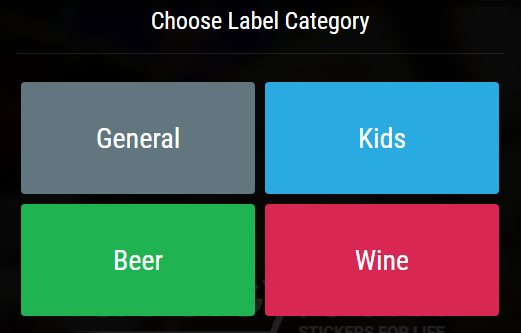
Go to the tool’s main page (labeley.com) and first click on Start Designing. You’ll see four category options: beer, wine, kids and general. Check out all four to see different options, backgrounds, illustrations… Then choose the one you like.

Labeley: Designing Custom Labels Has Never Been This Easy and Fun

Let’s say you chose the Beer category. Select an appropriate label shape from the selection on the left side of the screen.

Labeley: Designing Custom Labels Has Never Been This Easy and Fun

Now click on Border and pick one whose color you like. This step is optional.

Labeley: Designing Custom Labels Has Never Been This Easy and Fun

The following step is optional as well. If you want some interesting background, click on Background and choose one from Labeley’s backgrounds gallery. You can also choose the background color.

Labeley: Designing Custom Labels Has Never Been This Easy and Fun

Next, click on Graphic and pick any graphic that you like. Maybe these illustrations will also give you ideas for a name for your beer brand.

Labeley: Designing Custom Labels Has Never Been This Easy and Fun

If no illustration is quite what you want, you have another option: to upload any photo/design you want from your computer. Just click on the Upload tab, then on Upload Image, and then browse your computer for an appropriate photo for your beer label.

Labeley: Designing Custom Labels Has Never Been This Easy and Fun

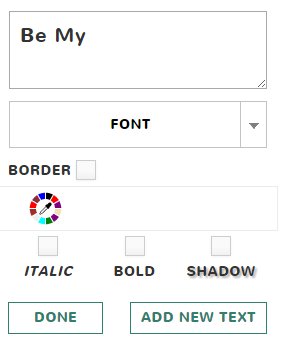
Then go to the Text option, click on the green Create Text button that will appear, and select from a wide range of fonts. 

Labeley: Designing Custom Labels Has Never Been This Easy and Fun

You can also choose the font’s color, style (normal or italic) and weight (normal or bold).

Finally, here’s what we’ve created for the purposes of this tutorial:

Labeley: Designing Custom Labels Has Never Been This Easy and Fun

Play around with Labeley’s design options to see how the tool works, and after 10 minutes you’ll be able to create a professional-looking label for any purpose and occasion. You might even surprise yourself with your newly discovered design skills and talent!


Give us a shout if you have any questions. Thank you for reading!

*by andreascy*

Tech Gadgets That Make Traveling a Breeze

Description :

Supposedly half the fun of travel is getting there, but what if traveling could be fun from start to finish? This year's CES was all about travel tech designed to make your next vacation (or business trip) a lot less stressful and a lot more enjoyable. 

Tech Gadgets That Make Traveling a Breeze

Of course, an open mind and adventurous spirit are the most important things to bring with you on any voyage but there are plenty of gadgets and accessories that are worth packing. Here's some of the newest travel tech, some of which debuted at CES 2016, that's equally useful for world travelers and weekenders.

The Egg – a Phone to Cloud Photo Solution

Eggcyte's personal cloud device, the Egg, is a must have for phone-wielding shutterbugs who have more subject matter than storage space. 

Tech Gadgets That Make Traveling a Breeze

The Egg can connect to your phone from anywhere in the world so you can share up to 50,000 snapshots with friends and family back home. And after you've said goodbye to your favorite destination, scrolling through those vacay pics is as easy is firing up the app. 

Samsung's Galaxy S7 – Best in Class Photos on the Go

The Samsung Galaxy S7 has premium specs that include a best in class camera with 4K capture capabilities, low-light optimization, a cool menu of effects and a fully outfitted manual mode. Why make this your go-to travel phone? 

Tech Gadgets That Make Traveling a Breeze

The brand's latest offering brings back IP68 dust resistance and long-term water resistance up to 3m, which means you can bring it just about anywhere. And best of all, if you get it from T-Mobile this phone comes with a free year of Netflix, perfect for binge-watching your favorite shows on the go.

Bluesmart – the Smartest Suitcase 

This four-wheeled, extra strong carryon-friendly bag does more than keep your stuff safe. Bluesmart can weigh itself, has not one but two USB charging stations, and comes with a built-in tracker that's smart enough to alert you if it senses that your luggage is on its way to Timbuktu. 

Tech Gadgets That Make Traveling a Breeze

Want the tracker without all the extras? Stash Trakdot in your suitcase and you'll always know where in the world your bags are. 

Zagg – Untethered Audio Anywhere

The retractable earbuds on Zagg's versatile Flex Arc headset let you curl up and forget about your neighbors on the plane. 

Tech Gadgets That Make Traveling a Breeze

And then when you get to your destination, you can get the party started with built in external speakers that offer surprisingly souped-up sound for such a small package. 

Sol – a Bag that Does Double Duty

Samsung C&T's Sol Bag is a stylish oversized clutch that features integrated solar panels that charge your devices whenever you're walking in the sun. Of course, if you're traveling to an out of the way destination a high capacity power bank makes more sense.

Tech Gadgets That Make Traveling a Breeze

In that case, grab Aukey's portable charger – it has enough emergency backup juice to charge your iPhone ten times plus a built in flashlight.

Bedphones – Promoting a Good Night's Sleep

DubsLabs has created Bedphones, a new kind of nighttime earbud designed to combat the challenges travelers face when falling asleep away from home. This speaker sits outside your ear so you can bliss out with white noise or fall asleep to your favorite podcast without the uncomfortable feeling of something in your ears. 

Tech Gadgets That Make Traveling a Breeze

Better still, the Bedphones app senses when you've nodded off and automatically shuts off your audio to save you power. 

Mobi EyeFi – for Faster Photo Transfers

The Eyefi Mobi WiFi SD card makes the chore of transferring photos from camera to device a breeze.

Tech Gadgets That Make Traveling a Breeze

Your snapshots are automatically sent from your camera to your iOS, Android, or Kindle device using wifi. 

What else do you need to stash in your carryon? Definitely check out the latest on-the-fly audio translators and ultra light laptops – especially if it's business bringing you to the far reaches of the globe. Ultimately there's no such thing as 100% stress free travel but with the right tech you can come pretty close.


As always, would be great to hear what you think!

*by andreascy*

Keeping Your Treasured Photos Safe

Description :

Just imagine all the thousands of photos stored in phones, digital cameras and laptops. The Daily Mail estimates that almost 40 percent of such individuals have no backup of those files. 

Keeping Your Treasured Photos Safe

These devices break, wear out or are damaged every day, and with them thousands of photos are lost. Make sure you have backup plan for your treasured memories. Those moments in time can be lost forever if you don't protect them.

Local Backups and Broken Hard Drives

Most people know they should back up their files regularly. This often happens at home to a computer hard drive or maybe to an external drive. Local backups are a good idea because it does make a copy of the files. However, it's not such a good idea for long-term storage because hardware does break.

Backblaze estimates that 22 percent of hard drives, on average, fail in the first four years of use. The failure rate is higher if the computer or hard drive is used continually, or is used in hot, dusty environments. You also could experience a failure if there is a sudden spike on the electric circuit, such as during a lighting storm. You could lose years of photos on one failed drive.

While there are recovery services who will attempt to retrieve files off of a dead hard drive for you, these are expensive with no guarantee the recovery will be 100 percent successful. A better option is to have multiple ways of backing up your photos.

Backing Up to the Cloud

Cloud Storage Services have matured into an easy way for people to save all types of files, including photos. Most are easy to set up. Some offer automated backup, so you don't even have to remember to do the backup yourself. Some vendors require you to load small programs onto your computer to do the backup while others rely on a browser-based online application.

Having a combination of backups is safest. Do a local backup of your photos from your phone or camera to the computer and a regular backup to your cloud storage. One way to use your cloud storage is as an archival system.

Since your files are in the cloud, you have access to them anywhere. For example, photos you take during a vacation can be uploaded to your cloud storage from your hotel room and then you can access them again when you get home. Or you can check on photos you took during your last trip to your destination to see if you already have photos of certain scenic spots.

The Safety of Your Photos

USA Today finds that cloud storage is as safe as other storage options. Most cloud service providers use encryption to store your files so they can't be viewed by others. Data is stored on huge disk farms, which are constantly monitored for potential disk failures. The systems cloud providers use allow the replacement of disk drives without creating any downtime. You don't have to worry about a drive failing and losing photos.

Keeping Those Non-Digital Photos Safe

If you have a number of regular film photos, you can keep them save as well. CNET shows how you can scan those photos to create digital copies. Or you can have a service do that for you. A digital copy of a film photo is easier to store, doesn't fade, or get damaged by water or fire. You could scan your print photos and store the originals in a fireproof box or in a safe deposit box with your bank.

RECOMMENDED: 5 Ways to Preserve Precious Family Photos

We'd like to take a moment to thank everyone here for being a member of THE OFFICIAL ANDREASCY club! It's because of your great feedback and constant support that we're able to continue as a powerful community. More will come. 😊😊

*by andreascy*
5 Ways to Preserve Precious Family Photos

Description :

It's worse than a punch in the gut—that awful realization that your computer has crashed and your wedding photos are gone, your beach vacation photos are gone, and your baby's first birthday photos ... gone. 

5 Ways to Preserve Precious Family Photos

You scold yourself for not backing them up, saving them to a disk, or leaving them on your memory card. You swear you'll never make that mistake again, but how can you prevent a virus from wiping out your priceless photos again? Here are a few ways to make sure they're stored safely and securely.

1. Keep them in the Cloud

Upload your precious photos to cloud storage where they'll be safely stored until you need them again. Accessing them at any time is easy, and you'll never again experience that sinking feeling that comes with knowing you've lost an entire year's worth of memories to one annoying computer crash. Different features and fee structures are available at the various providers, so do your research—decide what type of storage you need and research cloud storage rankings for dependability.

2. Save them to Disc

Another efficient way of saving your digital memories is to burn them onto a disc. According to the International Journal for the Preservation of Library and Archival Material, CD-R discs made with phthalocynine dye are the ones that stand the test of time. They're less likely to exhibit laser rot and deterioration over time. The fact that the disc is a CD-R instead of a CD-RW, also means you can't accidently copy over the photos you have stored.

If you choose this method of storage, it's still a good idea to have a backup system in place. Even the best CDs deteriorate over time, so have an alternative storage method.

3. Use an External Hard Drive

Although external hard drives can be susceptible to viruses, they're a good back up to discs and to the regular hard drive on your PC. External hard drives hold a ton of photos without slowing things down and they're easy to retrieve when you need them. PC Magazine recommends the top five external hard drives, which include: 

 LaCie Little Big Disk Thunderbolt (1TB SSD) 
 LaCie Rugged USB 3.0 Thunderbolt (120GB SSD) 
 Lenovo ThinkPad USB 3.0 Secure Hard Drive 
 Seagate Backup Plus 
 Seagate Backup Plus Portable Drive for Mac (1TB) 

4. SD Card

SD Cards are the small memory sticks that go inside your camera before you leave on a photo expedition. These are a viable option for storing photos, except that they have a size limit and can fill up quickly if you're not cautious of your volume of large file sizes. These are also not foolproof for life, but they'll do until you have a chance to upload your memories to the cloud.

5. Combination Storage

Of all these options, cloud storage is the safest file storage method of hanging onto precious digital files. Be extra safe, however, by using a combination of storage solutions. With more than one dependable storage solutions in place, your cherished memories will be safe and secure for years to come.


We’ve shared our ideas, now we want to ask you – how do you preserve your family memories and not lose them forever? Share them with us in a comment below!

*by andreascy*

Common Printer Paper Buying Mistakes To Avoid

Description :

These days, you can find printers that come in different sizes. In addition to that, different types of printers come with different features in order to accommodate the varying needs that the user may have at home. Because of this, you must know what type of printing paper would work well with your printer. Your choice of printing paper will be as important as choosing the right ink and software.

Common Printer Paper Buying Mistakes To Avoid

For the usual documents, a generic printing paper will do. However, printing some important documents will require the use of the right type of printing paper. Here are some of the mistakes that people do when buying the printing paper:

Ignoring the Printer's manual

Printer manufacturers go through all the trouble on writing and printing the printer manual for a good reason. However, lots of people tend to ignore it when they use their printer. They would prefer using the trial and error method than actually making use of the tried and tested method as stated in the manual. When you take a look at the printer manual, you will get to see that they have specified the type and size of paper that will be perfect for your printer. 

Wrong Printer Paper weight

Once again, you will be able to see the specified weight of printer paper in the manual if you read it. 

Wrong printer paper Color

The whiter the paper you will use, the better color will appear on it after printing. This is one thing that not all printer paper users tend to overlook. Printer paper comes in different colors. However, the whiter, the better. This is true when it comes to printing documents that is related to your business or office.

Wrong Paper Finish

The finish of the paper will play an important role in the outcome of your documents. If for example, you are printing a picture, the wrong choice of paper finish will lead to unsatisfactory appearance of the pictures.

Too Much Money For The Paper

Another one thing to keep in mind when choosing a paper to print on is the budget. If you wish to find the perfect paper, then you must be able to know where is the right place to buy it. The place where you will be buying the paper can greatly affect the price you pay for it. There are lots of places where you can buy printer paper -- office supply stores, retails stores, online suppliers and many more. Make sure to do price comparison before you buy one.

Conclusion

The right choice of printing paper will allow you to save time on money. A lot of problems can be solved or printed just by reading your printer manual. Take time to do so. Avoid all these mistakes and you will surely enjoy a hassle-free document printing experience.


Do you like this post? If so, sign up for our Newsletter. Help us spread it by sharing it with your friends and family on Facebook, Twitter, and all other social networking sites. 

Thank you! 💛😎

*by andreascy*


Six Awesome Family Vacation Ideas

Description :

If you happen to be planning or want to plan a family vacation and have run out of ideas, you have come to the right place! 

Six Awesome Family Vacation Ideas

While it may not be very exciting, advanced planning is necessary to ensure a great, stress-free vacation, and the first step in planning ahead is picking your perfect vacation spot! Here are six awesome family vacation ideas that you can consider.

1. The Grand Canyon

This might sound rote, but it can actually be a fun and inspiring experience to visit the Grand Canyon. While it is a popular location, you have to make advanced reservations. You cannot wait until the last minute, especially if you want to experience some interesting things like the mule trip.

Six Awesome Family Vacation Ideas

The South Rim is opened all year round. However, you can only access it during the months of May through October. If you have never been to the Grand Canyon, this is a great experience for the entire family. Its scenic view and awe-inspiring geography will positively captivate you.

2. The Outer Banks

In the state of North Carolina, the Outer Banks is a great place to visit during your family vacation. It is a chain of barrier islands connected to bridges and ferries. The beaches are magnificent.

Six Awesome Family Vacation Ideas

Throughout the year, weather is usually mild. However, in August and September, you can expect a change in weather because of the hurricane season. The off-season is between September and May. You may be able to get better rates then.

3. Miami, Florida

Miami, Florida, is a hot (literally!) vacation spot where you will find so many things to do as a family. You can go shopping or visit the museum, zoo, and parks. Miami has many street fairs, concerts and festivals, as well. There will never be a boring day on your Miami vacation.

Six Awesome Family Vacation Ideas

For active, outdoor fun, you can go scuba diving, sailing, biking, snorkeling and fishing. You can also play golf or tennis. And be prepared to do a lot of walking if you are a shopaholic! On South Beach, there are fun night clubs to enjoy, as well as a diverse cultural cuisine at exotic restaurants.

4. Maine Coast

The Maine Coast is a long stretch of white, sandy beaches. There are many hotels, rentals and beautiful beach villas to choose from. There are also restaurants located along the ocean.

Six Awesome Family Vacation Ideas

You will be able to do all of your shopping in Freeport. The peak season is during July and August, but the best to vacation on the Main Coast is after Labor Day in September.

5. Great Wolf Lodge

If you live in a cold climate and want to escape the snow without leaving the country, the Great Wolf Lodge, an indoor water park, is a great option (especially if you have young kids!).

Six Awesome Family Vacation Ideas

These indoor water park resorts can be found all over the country, including North Carolina, Pennsylvania, Virginia, Texas, Wisconsin, Missouri and Kansas just to name a few. It’s also a great option if you live in a tropical climate (like Florida) and want to escape somewhere colder without being entirely at the mercy of snow!

6. Caribbean Cruise

To get away during the winter, you can opt for a Caribbean cruise. Places like the Bahamas, Jamaica and Barbados are ideal vacation spots all year round.

Six Awesome Family Vacation Ideas

The climate is similar to Florida’s. A cruise offers fun and interesting things to do for the entire family!

Which one would you choose? 😍😎

GIVE THE GIFT OF MEMORIES: 5 Top Picks for Christmas Holiday Like a Fairytale

Subscribe on our Newsletter for more updates straight to your inbox. Like, share, and comment if you are currently looking into great experiences. If you need an expert on planning trips, someone with years of experience as a travel agent, then we can help you.

*by andreascy*

🦾 Stay Motivated

👩🏻‍🚀 Artemis II Crew: From Friends to Family

▶️ Just Press Play

We all have days like this

[image or embed]

— Chris Paxton (@cpaxton.bsky.social) April 17, 2026 at 1:51 PM

⭐ Leading ShipYard's Leaderboard

🚩 Milestone Unlocked!

🏅 Win-Win