7 Reasons to Consider a Home Gym

If you think of picking up better health habits and don't like crowded gyms, consider setting a home gym catered to your needs.

5 Top Picks for Christmas Holiday Like a Fairytale

If you imagine Christmas holiday this year being like a fairytale, you should consider visiting these hidden gems!

7 Fashion Accessories To Lift Up Your Style Quotient

Get heads up on the trendiest as well as classic fashion accessories that would elevate your style to another level.

learndirect flexible online learning

Showing posts with label iOS. Show all posts

Top 6 Social Media Mobile Applications for Business in 2017

Description:

As we head into a new year, it’s vital that businesses appreciate the various challenges that may lie in wait in the weeks and months ahead. What does 2017 promise us in terms of the genuine development of technology to amplify business performance? Let’s take a look at some of the most powerful social media mobile applications for businesses.

Top 6 Social Media Mobile Applications for Business in 2017

With the increasing interest in social media, comes also the more intensive use of mobile applications, along with relevant business content. As this infographic demonstrates, businesses recognize the value of social media and therefore it makes sense to seek related mobile apps as a means of promoting more efficiently, networking productively, and appealing to clients. 

As we are at the beginning of 2017, we figured on exploring some of the potentially best apps for boosting social media reach, among other benefits. Some are already here, but there could be an explosion in popularity for others in the months to come. 

1. Peach 

Peach is an iOS app that provides an easy way to use various social media features all in the one place. It’s like a simple version of Facebook, Snapchat, Tumblr, and Slack all put into one powerful marketing tool.  

Top 6 Social Media Mobile Applications for Business in 2017

As some people look to cut down on the amount of apps they use, this all-in-one package, might be just what they need.

Peach is a very effective marketing tool, but it is expected to offer businesses much greater versatility in the weeks and months to come. It’s not there yet, but 2017 could be the year it breaks through. 

2. Wanelo 

One of the major problems so far with social media, has been the lack of integration with buying and selling—for the most part. Wanelo, is a social shopping app that promises to be very powerful for businesses in the long-term. It has got lots of sellers on it, including big-name brands and single product Etsy accounts.

Top 6 Social Media Mobile Applications for Business in 2017 
As such, being on this app, is like being on a Yellow Pages for online businesses, which is worth paying attention to. Wanelo is expected to continue in its growth and development after what was a very good 2016 for the app. Businesses should look to get themselves on here, and make themost of what some people are referring to as a “Tinder for Buyers”. 

Overall, this app is not perfect by any means, but it provides the means to promote your business in yet another way. 

3. The Roll 

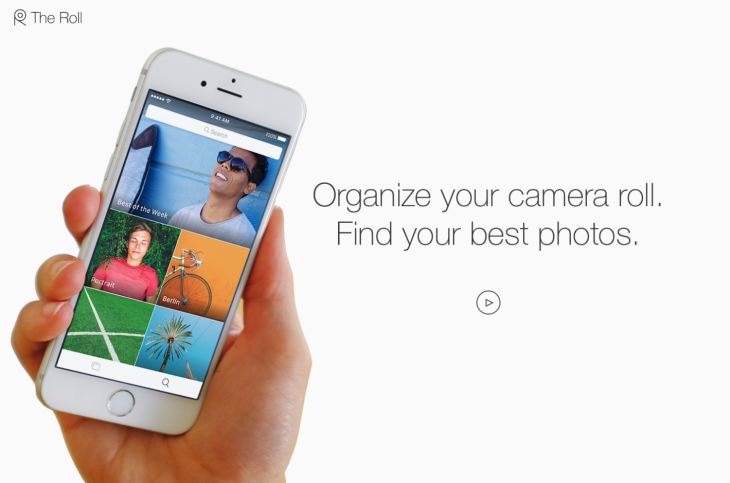
The Roll is a brilliantly named tool by EyeEm that is all about making the power of visuals even more effective for your content. You already know the vital nature of design, no doubt, but The Roll facilitates a much better quality of image overall. It uses a smart analytical program to analyze your content and rate it on a scale of 0-100. It then adds smart keyword suggestions for your images to help them rank better on Google, which is VERY important for marketing growth and visibility. 
Top 6 Social Media Mobile Applications for Business in 2017

Since this is an artificial intelligence (AI) app, it’s only going to grow more with input and therefore we expect 2017 to be the year that The Roll starts to rise from above its competitors and takes control of the web. 

4. Tuurnt 

Tuurnt is a brilliantly named tool that you can use as both a business app and a social media tool. Some of its more disparaging reviewers, claim it’s just a Snapchat clone, but it’s nothing of the sort. 

You get around 24hrs to respond to a photo or a video, and then the chance to respond is gone. This helps to turn a basic image or caption into a massive social event, helping to get people contributing and engaging with one another. 

Top 6 Social Media Mobile Applications for Business in 2017

This allows people to join in using images and video to create a more hospitable feel to your marketing as a business. Although this is still quite niche, it’s showing a very impressive level of growth as the years go on, with increasingly impressive changes to the app’s interface and overall participation numbers. 

For that reason, we expect Tuurnt to see a big 2017. 

5. Yubl 

Last year, Yubl managed to surpass the likes of Skype and LinkedIn as the fourth most downloaded free app in the United Kingdom, and it is likely to see continued growth in 2017, as people cotton on to just how good Yubl is. 

Yubl offers an easy way to get access to a social media and networking platform that just works. The app comes with a very impressive interface that attracts users in the first place, as well as facilitating easy interaction between business and customer.

Top 6 Social Media Mobile Applications for Business in 2017 
Many believe that Yubl is not yet diverse enough to break the mold of the likes of Facebook and Twitter, but at the very least, 2017 should see it take some very interesting strides in the right direction. There is little it needs to change or improve upon, and it will gradually become more visible next year which is equally important. 

You might not think that your business needs another social media profile, but that couldn’t be any further from the truth when it comes to Yubl. 

6. Shake 

The wonderfully named and designed Shake is a good choice to go for, when you want to start managing contracts a little better than you already do currently, by sending legally binding documents quickly and easily. With everything from NDA samples to freelancing contracts, you can make sure that your business comes across far more professionally than ever before. 

Top 6 Social Media Mobile Applications for Business in 2017

Legality is a vital part of the world of business and freelancing, and smart contracts are very useful in covering yourself legally. With this tool, you can create, manage, edit and send legally binding documentation, in a process that is bound to become a staple for businesses in 2017. 

In Closing...

Undoubtedly there is an array of apps to choose from when it comes to social media business apps, yet we think the aforementioned should be top of your list to embrace a more successful 2017!


Let's be Instagram buddies! 😃

*by andreascy*

Image to Word App: How to Convert and Edit Your Receipts

Description :

How Fast Do you Lose Track of Your Cash?

Do you find it hard to keep track of your daily spending? Many people often have problems with handling their finances, day-to-day spending and taking care of their bills, so they turn to technology for help. Ask any millennial and they will tell you the importance of managing your cash in today’s world… There just isn’t any money we are ready to give up that easily!
Image to Word App: How to Convert and Edit Your Receipts

If you are an avid fan of money, you should consider using technology to help you save your money. There are many useful apps that can provide the same user experience as if you were reading out the receipt just handed to you. One such app is Image to Word, a mobile app converter that will help you track your spending. This app allows its users to take a photo of their receipt, or a screenshot of an image, and convert it to the easily editable MS Word file. The apps developer Cometdocs has recently released a bunch of new apps, among which this was one of them, if not even the most successful of all apps in this past release.

Money in the Bank, Tracking Ain’t Easy!

Well, not really in the bank since you are spending it, but at least this way you will know how to track it. Here are some of the standout features that make Image to Word one of the best converters on the market:

- Great conversion quality and absolute data recognition

- Screenshots and complex tables are convertible too

- No limitations when it comes to file sizes and numbers

- Won’t drain your battery

- Very intuitive and easy-to-use

The app offers two ways of converting files: by choosing a file from your library, or taking a photo with your camera and then selecting to convert it.

Image to Word App: How to Convert and Edit Your Receipts

If you click on Photos, you will see a list of folders which are located on your device, and from there you can select any image you want to convert. If you wish to convert a screenshot of you receipt, or a photo you previously made, this is the option you need to select. If you click on Camera, the app will open your rear camera, with which you can quickly snap a photo of your receipt or maybe a newspaper. 

Once you’ve selected your file, the conversion will begin. The file being converted will appear on the main screen. You can also see all active and finished conversions on your main screen below the part where you choose between Camera and Photos. Those files are saved on your phone for future use, unless you choose to delete them by hand.

Image to Word App: How to Convert and Edit Your Receipts

The converted file will be in .docx format, which is the primary format for editing text in many apps, mainly MS Word. By clicking on your converted file, you will see a preview of your new file and you can export it to the app where you wish to edit it by clicking on the Share button in the bottom left corner. The app will then open a list of suggested apps to use, as well as all previous editing apps you used.

Image to Word App: How to Convert and Edit Your Receipts

If you are having trouble using the app, click on Options and then click on Guide for better results for a few quick tips. This guide will take you through the app and show you the proper way to take a photo of your receipt, or how to make a screenshot suited for conversion.

Image to Word App: How to Convert and Edit Your Receipts

From there you can also rate the app, stop all conversions or contact customer support in case you have issues with using the app. Also, by clicking on Settings in that same menu, you can allow and deny Image to Word access to certain parts of your iPhone/iPad, such as the Photos and Camera, as well as managing the notifications you get from this app.

With this app you shouldn’t have anymore trouble tracking your receipts because now you can have them all stored in your phone. While this app is very popular among iOS users, Image to Word is also available on Android so feel free to try it out, and let us know how much it helped you in managing your finances.


If you enjoyed our post kindly leave us a like on Facebook.  Hope you will come back soon!

*by andreascy*

Spotify vs Apple Music; Where Does the Scale Lean?

Description :

If you are one of those people who cannot live a day without listening to music, chances are that you have done so via a popular streaming music platform. As of late, the two main contenders in the arena seem to be Apple Music and Spotify. 

Spotify vs Apple Music; Where Does the Scale Lean?

These streaming services are the present and future of music industry. Each has its own unique advantages; but which one will surpass the other?

Spotify

Spotify is a platform that uses streaming as its means of media acquisition. Streaming is quickly becoming the dominant choice among media consumers. It doesn’t eat up memory on the device, new music is refreshed to the package, and playlists are sharable among friends, and the world, if you wish. Gone are the days of entering a password every time you make a purchase.

Spotify vs Apple Music; Where Does the Scale Lean?

Soundtracks and compilation albums have been proven money makers in the music industry. Think of the playlist as a graduated version of the variety CD. These shared playlists benefit the user and composer alike. Every time and artist’s song is played, they get paid for it. Likewise, the user gets to enjoy the music at a fraction of the price, had they downloaded it.

Apple Music

Apple Music has been the dominating force when it comes to media downloads. You have the option to download a single song or an entire album from the 45 million in the iTunes Library, 15 million of which are unavailable to stream though. Also you have the option to get the digital art if you miss the old school days of CD booklets.

Spotify vs Apple Music; Where Does the Scale Lean?

Apple has about 1 billion registered users on its network as well as a reputation for continued longevity. Despite iTunes’ staying power, Apple has seen a decline in downloaded albums and songs in 2015 by 16% in nominal terms, according to music industry analyst Mark Mulligan at Canadian Music Week in Toronto. This decline is expected to increase between 25% and 30% this year, nevertheless, iTunes music downloads are still estimated to be worth $600 million in 2019. Does the decline in sales spell the end of iTunes as Apple is preparing an aggressive two-year termination timetable for iTunes store?

Spotify vs Apple Music: the Clash

With music crossing over to the digital, the industry is poised to offer better quality, at a competitive rate. One of the major down sides to having music so readily accessible is that the sound quality suffers a bit. Even on the newest devices the compression technology doesn’t offer the same fidelity and listening quality that a CD does. Although the idea of streaming is still catching on, eventually the growth will plateau. This will give the music industry the chance to introduce ‘premium packages’ in which they can charge a slightly higher fee, for better sound quality. This may seem a tad on the greedy side, but compare this to the days when you were forced to pay $13-$17 dollars for one song, and maybe a few others you might like. When the two are seen side by side, streaming seems like a much more agreeable option.

1. Subscription Plan:

When comparing the subscription prices, Spotify and Apple Music have similar competitive packages. For example if you decide to go with either Spotify Premium or Apple Music Membership, the cost is $9.99 a month (with a 3-month free trial on both platforms), or you can sign up to a Family Plan for $14.99 a month, for up to 6 different people. Most people opt for the $9.99 option, so the actual cost is $120 a year, but that’s still pretty good. Apple Music also offers a Student Membership for $4.99 a month, which is quite cheap considering its benefits.

Another advantage that Spotify has is that you can listen to an entire album the day of its release, rather than just samples. A major downside to this service is that it doesn’t have all songs available. That ends up being true with both services because even Apple Music has a few bands that you won’t be able find in its libraries.

2. Compatibility:

In terms of beating the competition in providing digital services, one major factor comes down to compatibility issues. Spotify adhering to this concern, is compatible with a number of devices and even supports older versions of iOS. It also has native clients for Windows, Android and Linux. A strong advantage, Spotify’s web player will work almost on any operating system. 

Apple on the other hand, has taken a leap of faith by working on different operating systems, including Android. However, it is still not possible for users of older iOS devices to enjoy Apple Music, as it is not supported on iOS 8.4 or less. In addition, Apple Music has the disadvantage of not working on a web player and needs iTunes to play on a desktop. Practically, it is therefore inconvenient to play Apple Music for example when you are not using your own computer and have to install iTunes.

3. Sound Quality:

Music is all about the sound quality, right? Both Spotify and Apple Music bring decent audio quality to your ears. Spotify premium offers an adjustable rate with extreme quality as it calls it reaching a peak at 320 kbps Ogg, whereas Apple Music uses 256 kbps ACC. Hearing the experts’ viewpoint on the matter, findings from a listening study conducted by CNET comparing Spotify and Apple Music audio quality, it seems that Spotify wins this battle over their rivals.

4. Music Discovery:

This list of examining the pros and cons of each music streaming service, would not have been complete without looking into the discovery features of each platform. 

Spotify has a number of options to find songs and artists or albums. Spotify’s “Discover” feature is perhaps not as effective, and does not recommend playlists but only artists, albums and individual tracks. However, its more recent addition “Discover Weekly” is a great way to browse new releases, as it offers a custom playlist of up to 2 hours of the hottest hits each week according to your preferences. There is also the “Now section”, a smart feature which recommends songs based on the time of day and day of the week using a grid instead of Microsoft’s hip tiles. 

Their competitors, Apple Music shares a similar feature with the “For you” screen, a cool layout offering a mosaic of music suggestions inspired by Windows Phone’s live tiles. The feature allows you to find playlists, individual tracks and artists though it might take a bit longer to incorporate your preferences to know what suits you. There is also its “New” section which indicates suggestions of what other Apple Music users are listening to, and current playlists to enhance your music experience. 

Spotify has a “Browse” section serving for similar purposes, yet it seems to have a more user friendly interface with top lists, genres and moods, as well as news.

5. Free Music:

Spotify is an exclusive streaming music service provider of free in-demand music. Users can enjoy any song or album for free, although intermittent ads subsidize the streaming. This free service feature has been heavily criticized by artists who claim that there is little gain money-wise. Nonetheless, Spotify claims that their free service prevents piracy and artists do get compensated through Spotify. 

On the other end of the scale, although the impression is that Apple Music does not allow users to listen to songs for free, the reality is that Apple Music is available for free, including the Beats 1 station. This feature is available although interfered by advertising and you can enjoy up to 6 songs per hour. 

6. Voice Control:

As far as apps is concerned, perhaps not surprisingly, Apple has the upper hand. On iOS for instance, only Apple can use Siri with apps, a feature that has been integrated into Apple Music. This digital assistant can handle requests like playing songs, albums or artists, and even locate and play the top playlists from a given year. 

Spotify on the other hand, does not offer this type voice control or digital helper. You can enhance your overall Spotify experience with third-party apps like Vela, yet they are not integrated into iOS.

Conclusion

It’s tempting to look for a winner-looser situation when it comes to rivalry services or software. 

The above comparison, was not meant to be exhaustive. In a perfect world we would just be able to combine the services, and then use it as we saw fit. Some songs that you like may not be on Spotify, and likewise, Apple Music may not have the songs you’re looking for either. There are people who use both services and cherry picking the features they like. People like the convenience of access to songs on the go, as well as being able to download and save them once in a while. Both services have their advantages and disadvantages. Who knows? Maybe soon the companies will merge and then we can enjoy all the benefits. 

Until that happens, the answer to the question of which is better, Spotify or Apple Music, boils down to personal preference. If you like owning your music and having the files physically on your computer, Apple Music is the way to go. If you don’t want to be hindered by computer memory loss and have access to a ton of songs at any time and virtually from any device with decent sound quality and different discover music options, then check out Spotify.

COULD BE OF INTEREST: Best Apps for Music Lovers

We're always around if you have any questions or suggestions. 

*by andreascy*

Is the Nearshore Trend All about Cost?

Description :

To say that nearshore outsourcing is a hot trend right now is to state the obvious. Whether you are talking about technology, the legal industry, or even the energy space, companies of all scopes and sizes are seriously looking at trading in their offshore outsourcing partners for new nearshore partners. iTexico, a nearshore services provider in Austin, has firsthand experience of this growing phenomenon.

Is the Nearshore Trend All about Cost?

The nearshore trend began in the previous decade but did not start gaining steam until just a few years ago. Now it seems to be spreading like wildfire. As it does, experts are stepping back and asking whether this trend is really just about cost.

I don't think so. Sure, iTexico works with a lot of clients looking for nearshore outsourcing for everything from Android and iOS development to cross-platform titanium development. And yes, many of these clients are doing so because outsourcing is a more cost-effective means of accomplishing their goals. The question is why they choose the nearshore model rather than the traditional, decades-old model of offshore outsourcing.

A Technology Industry Redo

To gain a little insight into what's going on in technology; consider a 2013 piece published by Computer Weekly on its website. The emphasis of the article was the idea that offshore outsourcing was for large enterprises while nearshore was for smaller ones. On its face, the argument seems reasonable. But once you dig a little deeper, you find out there is more to it than that.

The Computer Weekly piece asserted that large companies outsource primarily to save money, making offshore locations like India very attractive. On the other hand, small startups outsource in order to get the talent they need in the shortest time possible. They are not necessarily worried about cost while spending investor money. This view seems rather shortsighted, if not somewhat fatalistic.

Still, if the Computer Weekly argument is true, then there is something deeper here. Big tech companies that only outsource to save money may be shooting themselves in the foot by not taking advantage of new ideas, new ways of doing things, and innovative solutions to old problems. They are stuck in the same rut of using the same outsourcing contractors who never seem to change things up.

On the other hand, startups are all about a redo complete with new ways of thinking. They are not relying on the same outsourcing partners their competitors have relied on for years. Rather, they are looking for partners with the same mindset and goals they have while going above and beyond cost savings, which can be reached through undertaking nearshore practices.

Nearshore Is Fresh and Exciting

iTexico's role as a provider of nearshore services in Austin gives them access to a lot of different clients with a vast array of goals. Yet the one thing that seems common to most of them is a desire for something fresh and exciting. Clients want flexible outsourcing solutions that fit their company culture yet do not sacrifice innovation and quality. Itexico is one of those leading companies that will satisfy these needs through their affiliation with multiple partners in Mexico and therefore the client's interest is immediately piqued.

At the end of the day, evidence shows that nearshore outsourcing is about more than just saving money. Indeed, saving money is a significant factor in motivating companies to outsource, but in the arena of technology and mobile app development, companies also want partners who can deliver cutting-edge results that will lead us all into the future. That is what nearshore outsourcing provides. And by the way, nearshore does it exceptionally well.


I have to tell you...we have A LOT of really cool stuff coming VERY soon. 

Stay tuned! 😎💝

*by andreascy*

Tightening Android Security Against Data Stealing Applications

Description :

It’s common knowledge that Android devices aren’t foolproof when it comes to malware and viruses, but for the most part these threats are hiding in the back alleys of the operating system. You’re most likely to run into them when you start downloading apps from sketchy third-party app stores, or side-loading pirated APKs. 

Tightening Android Security Against Data Stealing Applications

But here’s something scary. There is a family of apps containing malware just relaxing in Play Store, and they have multiplied at a decent pace during the last few years or so. 

Last year, DCCI (Data Center of China Internet) released an investigation against various Android markets and found that 66.9 percent applications were tracking private data, and 34.5 percent of them were engaged in cross-border tracking; tracking information that has no relevancy to the app’s main permissions and not informing users about what is happening. 

So what kind of data are these apps tracking from your android device? In short, everything -- from your phone book contacts and text message history to your account credentials. The fact that such apps are looking at your data even when it has nothing to do with the features provided should be a major concern. 

Even more worrying is that the apps responsible may be different than the ones that you expect to breach your privacy. The report, for example, reveals that beauty and study apps are among the worst privacy offenders in case of location tracking, while travel apps top the list when it comes to swiping user contact information. 

And this was just once instance where many applications were unethically crossing the line. A recent report cited by ComputerWeekly reveals that 79 percent of the clones released for the famous Flappy Bird game contained some form of malware. 

These clones were doing more than just tracking user privacy; hackers used them to make phone calls without the consent of the user, extract list of contacts, install more applications and establish root gateway for control over everything on the device. Data-breaching criminals are finding success by manipulating the familiar features in mobile games and apps that users trust and recognize. 

Taking Measures to Protect Your Personal Identity 

So, what can you do keep these app-stealing threats at bay? Before installing apps on your device, follow these best practices to ensure your personal information is not being compromised:

Utilize advanced internet security solutions: Advanced internet security solutions feature support for android and iOS devices. According to Trend Micro, some advanced solutions not only provide internet security virus warnings, they protect your android phone by identifying apps that steal your personal data. Further, they back up and store your information for retrieval in case a hacker is able to gain access to your device and wipe your data.

Review permissions: The next time you install an application on your device, take out a few minutes to read the app permissions for making sure your personal information is not shared with third parties. This kind of information is usually buried in the last few sentences. 

Use official download channels: even though the Google Play consists of data-stealing applications, whatever you download through the official route would be much less harmful due to official policy procedures than downloading apps through third-party app stores and unofficial channels.

RECOMMENDED: Are You Underestimating the Importance of Data Security? 

Thank you to every fan out there for watching! Blessed, humbled and inspired. Please subscribe below to stay connected. We have a better way. 😉💛

*by andreascy*

8 Reasons to Buy the iPhone 5c

Description :

A few weeks ago the Spotify app stopped working on my old phone, a Samsung Galaxy Ace. The phone itself was just too old to support the new flashy Spotify app. 

8 Reasons To Buy The iPhone 5c

On it's own that would have been alright, but to me it just added to the long list of annoyances I had with limited space on top of the list. 

8 Reasons To Buy The iPhone 5c

So it was time for an upgrade, and what phone offers a better upgrade than an iPhone right? I had to choose between the iPhone 4s, the iPhone 5c and the iPhone 5s. Tough choice, but eventually, after camping out in the phone store for about two hours and nearly driving the staff insane I chose the iPhone 5c. Here are eight reasons why i bought this phone and why you should too: 

1. Add Some Color In Your Life 

It’s probably the first thing you notice when you see the iPhone 5c. The colors are amazing and pop out, especially when you compare them to the limited colors of the iPhone 4s and iPhone 5s. The iPhone 5c comes in white, green, blue, pink and yellow with the familiar black front. 

8 Reasons To Buy The iPhone 5c

Personally I strongly believe in the theory that colors have an influence on our emotions and focus, which is why I choose blue. Blue helps you focus and relax, and it keeps you awake. It’s also my favorite color. 

2. It’s The Biggest Out Of The Three Versions

Okay, so the iPhone 5s and the iPhone 5c have about the same screen sizes at 4 inch (the total height between the two only differentiates by 0.03 inch). 

8 Reasons to Buy the iPhone 5c

But when you compare that to the 3.5 inch screen of the iPhone 4s the difference is big, especially in the land of smartphones

3. The screen is beautiful

Recently I got addicted to Suits, a series about a bunch of attorneys from a big law firm in New York. I highly recommend you watch it, especially on this phone. 

8 Reasons To Buy The iPhone 5c

The 4-inch Retina display with a 1136 by 640 resolutions lets both colors and details pop out more than in many HD TVs

4. The material it’s made off makes it less likely for the screen to crack 

I am a serious klutz. I think I dropped my old phone over a million times and to be really honest, all those horror stories about the screen of iPhones cracking after falling once make me shiver. That was the number one reason why I got an iPhone after so long. 

8 Reasons To Buy The iPhone 5c

Turns out that plastic buffers the fall way better than metal ever will, which is kind for your screen as well. Even so, it might be a great idea to get a case when you decide to buy the iPhone 5c. As with all iPhones there is a huge variety of cases you can choose from. 

5. The iOS 7 

A big difference between the iPhone 4s and the iPhone 5c and 5s is that the latter two run on iOS 7, Apple’s newest operating system

8 Reasons To Buy The iPhone 5c

iOS 7 brings a lot of changes along with it like:

● Beautifully and more minimalistic icons for apps

● A new and better Siri, with integrated Wikipedia and different voices that can be male or female.

● Control center, where you have quick access to turning things like your WiFi ON and OFF. It made the switch from Android to iPhone a whole lot easier, knowing I can change my settings just as easily. 

● Airdrop, which is Bluetooth made better. 

6. Make better pictures 

The iPhone 5c has a better front camera than the iPhone 5 and thanks to iOS 7 the camera works better, too. 

8 Reasons To Buy The iPhone 5c

You can change filters, sizes and make a panorama picture with just a tap. The pictures are amazing quality, even if the subject moves or your hand is a little shaky. 

7. It’s faster than most phones

Compared to the iPhone 5c my old phone was a tractor. Everything runs smoothly and I don’t have to wait for website pages to load or for apps to finally load any images. Of course this links back to iOS 7 again, but for those of us used to slow phones, having a phone actually run quickly is like a breath of fresh air. 

8. It’s cheaper than most iPhones

Apple is a brand that likes to give an exclusive and special feel to their products and if there is one thing that screams exclusive it’s high prices. Apple knows this, and sadly your wallet does, too. The iPhone 5c is priced slightly lower than normal iPhones and especially the 8 gig version is a good pick when you are low on cash.


SEE ALSO: How to Easily Edit and Rename Voice Recordings in iOS

Every week I send out a Newsletter with new articles and exclusive content for readers. It's basically my way of keeping in touch with you and letting you know what's going on. Subscribe to stay connected! And if you'd be so kind, please join the conversation and leave a LIKE if you agree. Everyone here values what you have to say.

*by andreascy* 

Google Now Desktop Wallpapers Collection 4

Description :

Hello guys. How are things at your end today? Have you heard about Google's personal assistant application known as "Google Now"?

Having used it for months, I can tell you how great it is. It presents me just the information I need, when I need it, and tailored to my current location. Google's latest hot product for Android and iOS is simply amazing! The more you use it, the more useful it gets, as it figures out what you need and when. 

Google Now Desktop Wallpapers Collection 4

Some days ago, we published here at THE OFFICIAL ANDREASCY some beautiful Google Now(ish) Desktop Walllpaper Collections that let you enjoy the highly artistic backgrounds that you see in the Google Now app, for your 1920x1080px displays. Not the original ones, but inspired from Google Now’s aesthetics and overall design. 

Different artists come up with a bunch of wallpaper ideas but just a few toke our real attention. Our friend Brebenel Silviu with his great and unique skills is one of them! Today, we are sharing with you the 4th part of the series that contains four Beach versions ready to decorate and enchance your screens. 

If you like what you see, then:

1. Right-click on the image you wish to save.
 
2. Click Save picture as… 

3. Navigate to the folder where you wish to save the image to, then click Save.

Collection 4:

(a)

Google Now Desktop Wallpapers Collection 4

(b)

Google Now Desktop Wallpapers Collection 4

(c)

Google Now Desktop Wallpapers Collection 4

(d)

Google Now Desktop Wallpapers Collection 4

Looking forward to hearing your feedback and insights in the comments below. Be sure to leave your thoughts! 

If you are interested to feature your personal works on our Blog, then feel free to contact us. If you want more of us in your life, then subscribe on our RSS feed and Daily Newsletter

Take care everyone! 😎

*by andreascy*

Google Now Desktop Wallpapers Collection 3

Description :

It's being some time now that we've shared with our lovely readers, here at THE OFFICIAL ANDREASCY, a number of carefully picked wallpapers. From motivational wallpapers of every type, to Windows 8, Minimalism, and Google Now. Wallpapers for bloggers, developers, designers, techies, and readers who are hungry for some creativity and inspiration.

We mentioned Google Now wallpapers, because that's the main topic for today. 

Google Now Desktop Wallpapers Collection 3 [Preview]

Since it launched last year, Google Now, for many, has become a staple in the Google or Android experience. It's location within the operating system itself, beneath the Home button in all of the pure-Google-experience Nexus devices, is an indication of just how important Google feels the service is.

We also believe that it represents the best of Google, so we are sharing the next pack of the wallpaper series, made by Brebenel Silviu. Simply, scroll down below and...

1. Right-click on the image you wish to save.
 
2. Click Save picture as… 

3. Navigate to the folder where you wish to save the image to, then click Save.

In case you missed the previous releases, follow this link.

Collection 3:

(a)

Google Now Desktop Wallpapers Collection 3

(b)

Google Now Desktop Wallpapers Collection 3

(c)

Google Now Desktop Wallpapers Collection 3

(d)

Google Now Desktop Wallpapers Collection 3

Sharing equals with Caring! If you like this post, you know what to do. Show your best support to the creator and help this community to reach and hopefully inspire even more people. 

Stay tuned because we hear that Silviu brings some interesting things around including a Google Now Suite for XWidget. 😉

*by andreascy*

Google Now Desktop Wallpapers Collection 2

Description :

Hello folks! Here on THE OFFICIAL ANDREASCY we are always on the hunt for beautiful new wallpapers. We appreciate hard work and creativity from the graphic designers so we are always trying to find ways to support them as much as we can.

We've featured a few Google Now Desktop wallpapers this year that got your interest. We are happy that our first collection received a fair attention on social media and we want to thank you for your support. Today we decided to share the next collection that will definitely make you love it!

Google Now Desktop Wallpapers Collection 2

As you probably know, Google Now gets you just the right information at just the right time. It tells you today’s weather before you start your day, how much traffic to expect before you leave for work, and more.

It's one of the most intuitive things which Google has done for smartphones. I just wish there was an easily accessible way to get in touch with the developers. Also, the events could have addresses on them not just venues so that the user is able to tell at a glance how far away they are, and perhaps cost too. The event feature is incredible though.

So what are you waiting for? Are you ready to enrich your desktop with these cute Google Now-styled wallpapers?

1. Right-click on the image you wish to save.
 
2. Click Save picture as… 

3. Navigate to the folder where you wish to save the image to, then click Save.

 Special only for your 1920x1080px display! If it's a yes then have a look:

Collection 2:

(a)

Google Now Desktop Wallpapers Collection 2

(b)

Google Now Desktop Wallpapers Collection 2

(c)

Google Now Desktop Wallpapers Collection 2

(d)

Google Now Desktop Wallpapers Collection 2

They are awesome, right? 😃😍

Ok that was it for today. Stay tuned on our Blog for the next Collection and subscribe also on our RSS feed for future updates directly to your inbox.

For more interesting backgrounds / wallpapers, check out some of our previous collections. Contact us if you have any great pieces you'd like to share (Write "Wallpaper Collections" in the subject line). 

*by andreascy*

Google Now Desktop Wallpapers Collection 1

Description :

Hi! We are THE OFFICIAL ANDREASCY and We Love to share things with you. 😍 

Some people reading this will already be intimately familiar with Google Now - the intelligent personal assistant developed by Google that is available within the Google Search mobile application for the Android and iOS operating systems.

Google Now Desktop Wallpapers Collection 1

Google Now recognizes repeated actions that a user performs on the device (common locations, repeated calendar appointments, search queries, etc.) to display more relevant information to the user in the form of "cards". The system leverages Google's Knowledge Graph project, a system used to assemble more detailed search results by analyzing their meaning and connections.

If you like Google Now and you want more of it on your desktop, Brebenel Silviu, has put together four gorgeous Google Now-styled wallpapers. It's the first pack that contains Dawn, Day, Dusk and Night versions special for you and your 1920x1080px display!

1. Right-click on the image you wish to save.
 
2. Click Save picture as… 

3. Navigate to the folder where you wish to save the image to, then click Save.

Time to decorate your screen folks! Grab them down below.

Collection 1:

(a)

Google Now Desktop Wallpapers Collection 1

(b)

Google Now Desktop Wallpapers Collection 1

(c)

Google Now Desktop Wallpapers Collection 1

(d)

Google Now Desktop Wallpapers Collection 1

Stay tuned for the next packs!

For more great wallpapers, check out some of our previous Wallpaper Collections. Got any great wallpapers you'd like to share? Contact us with a link with "Wallpaper Collections" in the subject line. 

Aaand... Please submit your own work!

*by andreascy*

🧑‍🧑‍🧒‍🧒 Join our Reddit Community

🦾 Stay Motivated

🏅 Featured on Product Hunt

