
Marketing & Design

Marketing Design Tips and Trends For Success

With website design impacting 94% of first impressions, discover key web design tips and modern visual trends to keep visitors engaged.

Read Full Story →
Cybersecurity

Mobile App Security Threats To Plan For

Learn how hackers target mobile apps and how multifactor authentication, encryption, and code obfuscation protect user data.

Read Full Story →
Health & Fitness

7 Reasons to Consider a Home Gym

If you think of picking up better health habits and don't like crowded gyms, consider setting a home gym catered to your needs.

Read Full Story →
✦ Prime Full-Width Placement • 1450×150 Starting at €99/mo
Buy Ad Space Here

Put your brand, SaaS, or product front-and-center above our daily news feed on THE OFFICIAL ANDREASCY.

Showing posts with label Web browsers. Show all posts

Use Video to Help Mobile Viewers Connect to Your Products & Services

Description :

Americans increasingly want content delivered directly into the palms of their hands. In the fourth quarter of 2013, U.S. mobile-data revenue jumped to $24.8 billion, according to Bloomberg Businessweek. That’s a 20 percent increase, which experts are attributing to the ongoing spike of people using smartphones, tablets and in-vehicle infotainment. Meanwhile, the Cisco Visual Networking Index reported that mobile data traffic grew 81 percent overall last year. 

Use Video to Help Mobile Viewers Connect to Your Products & Services

These numbers are difficult to ignore. The technology is in place to provide users with clear, informative and creative video content—and now is the time to update how your business shares its stories on the mobile video platform.

Mobile Video Should Stand Alone

Most smartphones can view videos sent through mobile apps or via Web browsers through Flash technology. What you see on YouTube on your desktop is the same video you’d see on your phone or tablet, for example. However, from a marketing standpoint, mobile video ought to take into consideration the ultra-brevity of the medium and short attention span of the mobile user.

The Mobile Marketing Association lists 10 characteristics of a successful mobile marketing video campaign. The MMA suggests businesses start with a mobile perspective and work from there by connecting mobile video into a company’s primary site and landing pages.

Multi-screen connectivity is another priority. The MMA cites how many smartphone users juggle multiple devices at the same time, viewing a video on one while navigating the Web or an app on another. Understanding user habits from device to device will help tailor video for an iPad or an Android smartphone, knowing how video looks and feels in the different formats. Ask yourself if the video is fit for an app, or does it exist purely inside a website viewed through a mobile browser? There’s a different feel and the ease of navigation varies. So as you create a campaign, never forget to think like each specific type of mobile user.

Strengthen Your YouTube Presence

If your company doesn’t use YouTube, it’s time to launch a channel. There’s a lot to consider, though, before you attempt to tap into an audience that includes one billion unique viewers each month.

Brand messaging should be consistent with your company’s primary media. To reach the most viewers possible, video content needs to be posted regularly, so the audience grows familiar with seeing recurring features or brand messages. Sharing video links through social networks like Facebook and Twitter helps capture mobile viewers’ attention.

Optimizing videos on YouTube is also critical, especially if your company is new to video. The average user must be able to find it based on keywords related to your services or products.

Not every company has a team of videographers to produce original content, however. In this case, use stock video through Shutterstock or a similar service. You'll get colorful, inexpensive visuals to accompany your product descriptions or company stories, and these sites have footage for just about anything you could look for.

SEE ALSO: 5 Cool Things You Can Do With The Leading Video Editing Software Programs

With today’s media consumption habits, video helps spread messages. What ideas do you have? Let us know in the comments.

*by andreascy*

What New Browser Games Have To Offer

Description :

We now live in the age of computers – everything, anything we want to know or have can be found in that small corner at home or in the office where your laptop or desktop is. 

What New Browser Games Have To Offer

License: Royalty Free or iStock source: http://morguefile.com/

Given, of course, that you have an Internet connection; so whether you are itching to learn more about a particular product that everyone’s been raving about or are simply bored out of your wits, the Internet has something for you. Browser games are just one of them.

What are browser games?

People who are now in their early twenties or older are probably more familiar with video games, family computers, and so on. We have grown up to playing with joysticks and consoles which required us to have a CD or a tape of the games we wanted to play. Browser games are still pretty much these same games, except that they can be played even if the player does not have a copy (CD or tape) of the software. As a matter of fact, one only needs a stable Internet connection in order to be able to play. That is basically how browser games got their name – because they can be played using only one’s Web browser.

Where can one play browser games?

Browser games can be played practically anywhere through a browser, however, they are highly common in social networking sites. There are games that can be played on a single-player basis, while there are also those that allow you to play against other players within your network.

Are these for free?

Most browser games are free; however, serious gamers may also opt to upgrade their gaming features for a certain fee. The free versions are generally fine to go with except for the ads that crop up from time to time. Those who wish to get these ads out of sight, though, may avail of the paid version. Payments are usually guaranteed through credit cards.

Types of browser games

The types of browser games available are limitless. From word games, to adventure games, there are certainly a lot to choose from, and regardless of what type of gamer you are, you will surely find something that suits your fancy.

New browser games

Over time, browser games have gained popularity among volumes of Internet users – from kids to teens, and even adults. Recently, new and exciting features have also been added to new browser games which make more and more players get hooked. 3D effects, and extended gaming arenas are now available even for players who go for the free version.

These games can be such a breath of fresh air especially when you have nothing to do and need to do something to pass time away. Aside from the fact that they can be played for free, they are also an avenue through which you can interact with other players from different places. You can even challenge friends whom you personally know and make it a fun and interactive bonding activity!

ALSO: Top 5 Things Every Mobile Gamer Must Have

We appreciate your readership and welcome any feedback you might have. Say hello at: officialandreascy@gmail.com

*by andreascy*

CNETTV : Wi-Fi Routers Susceptible to Hacking


Description : 

A wireless router is a device that performs the functions of a router but also includes the functions of a wireless access point. 


It is commonly used to provide access to the Internet or a computer network and it does not require a wired link, as the connection is made wirelessly, via radio waves.


On today's video CNET's Kara Tsuboi and Seth Rosenblatt discuss the vulnerability of wireless routers. To the shock and dismay of many, they're far more hackable than initially thought which can leave personal and financial information exposed. 


Find out why router manufacturers are slow to make security changes and what you can do to protect yourself.


Learn more on CNET's full review.

*by andreascy*

Chrome Apps and Extensions - What's The Difference?

Description : 

Google offers a huge range of different services and products, some that we can’t live without and others we don’t bother using. The Chrome browser is one most people rave about. 

While Chrome itself is very streamlined in terms of its interface, the Chrome Web Store allows you to find various additions so you can customize your Google Chrome experience. 

Chrome Apps and Extensions - What's The Difference?

When you head over to the Chrome Web store you will notice some of the listings are for apps and some are for extensions. Maybe you’re one of those people who are looking for fun tools to use during breaks from working at your computer tables. Or you might have the programming skills that could mean you are planning to make a Chrome app or extension.

In either case, you could benefit from understanding the difference between these two installable items.

Chrome Apps :

The easiest way to think of an app is as a combination between a standalone website and a normal computer program that you run from your desktop. Like a website, they run in your browser, but like a normal program they need to be installed.

They have their own user interface and offer an easy interaction. Apps are often used by those who want to develop things like games and video editing tools.

Chrome Extensions :

Chrome extensions have been around for some time and generally customize your normal use of Chrome, rather than acting as a standalone application.

For example, a common way extensions are presented are as a new button in the browser, say one that lets you replace all the nouns on the page with the word banana. You can often set an extension to run all the time on all websites you visit or just enable it on specific pages as you visit them.

Packaged Apps :

Packaged apps appear in the exact same way as normal apps, but they allow you to use much of the functionality of extensions. They can often be a good compromise for those developers who want to build an extension but think the kind of user interface experience that an app can offer might be necessary or appealing to their users.

However, many people prefer the simplicity of an extension, so think carefully before you decide to go with a packed app.

Similarities for Users :

Both apps and extensions can be found in the Chrome Web Store. In addition, they are both installed the same way - you just click a link to download. Also both apps and extensions require the download of a crx file which must then be installed. Users will also be asked if they agree to grant whatever permissions are necessary.

Need more of our News in your life? Then please subscribe on our RSS feed and Daily Newsletter. Don't miss also some of the latest trending news and tweets that take place around the world.

*by andreascy*

3 Programs To Help Keep Your Kids Safe Online

Description : 

Keeping kids safe when online has become increasingly crucial, with threats ranging from viruses through to cyber bullying, as well as more traditional problems with unsuitable websites and entertainment content. 

3 Programs To Help Keep Your Kids Safe Online

When looking to increase safety and monitoring of children’s activity, parents should consider some programs that can be downloaded and installed onto laptops and PCs, as well as standalone hardware. These programs and devices can filter and increase your ability to check what they are looking at. Some of the best programs currently available include AVG Family Safety, McAfee Family Protection, and the iBoss Home Parental Control Router and Firewall. 

1 - AVG Family Safety :

This program acts as an extension of AVG’s safety and antivirus features. The program is set up to connect together the same security features for different devices, and can also be used for mobile phones and tablets. The program works to filter out inappropriate sites based on categories, and can monitor keystrokes and keywords on chat rooms. Emails are generated reporting parents about their children’s Internet history and actions.

Different settings can be established for children’s ages, with the extent of filtering and monitoring varying. Remote access from work can also mean that you can monitor the length of time spent online. With multiple configuration settings, and the ability to screen out videos, free online games for kids, and malware linked to specific sites, McAfee represents one of the most cost effective solutions to child safety at around $30.

2 - McAfee Family Protection :

The McAfee Family Protection suite is similar in scope to AVG, but is slightly more expensive at $45. The program works with an existing McAfee Internet Security and Total Protection package, and works to shield children from inappropriate content. 35 categories of websites can be listed for blocking, while the program can block keywords and certain searches from Google and YouTube.

McAfee also records social networking conversations, and can check which applications are launched. Emails can similarly be blocked if blacklisted, and settings can be established to block out HTTPS secure sites. Some games can be set up to not run online in multiplayer mode. The level of security you use for your computer is variable, and is particularly recommended for filtering out and monitoring the Internet usage of younger children.

3 - iBoss Home Parental Control Router/Firewall :

This child safety program actually works through a physical router that replaces your existing device. The router works to filter out the Internet content from different devices on a network, but has a similar capacity to software in terms of filtering. Instant messages can be blocked, file sharing and downloaded limited, websites blacklisted for keywords, and encryption put in place that prevents unauthorized access to a network. Filters can be installed for different devices and users, and can be extended for up to 15 individual computers and users. iBoss’s network based model is also enhanced by its ability to generate detailed reports on Internet activity, and very specific keyword and blacklisting features. Moreover, an Internet Sleep mode can be activated to maintain a daily limit for Internet usage.

YOU MIGHT LIKE: Should You Use The GPS In Your Child's Phone?

Keeping your kids safe online is a difficult task, but by ensuring they stay on pre-approved websites you can rest easy knowing they'll have a fun and safe time online.

*by andreascy*

Perfect Mozilla Firefox Skin Packs Collection

Description : 

Mozilla Firefox has long been the head of the Mozilla browser family and provides the freedom that helps you express your style with beautiful custom skins. Have a look on some of the best skin packs that make Firefox so popular.


If you like these themes then make sure to hit that like button! Please don't forget to like also our fan page and show your love like always! 

Check also : 


*by andreascy*

Microsoft Performance Lab : Testing and Optimizing Internet Explorer

Description :

In a new post from their Windows 8 Development blog, Microsoft open up about testing and optimizing Internet Explorer. 

This post is authored by Matt Kotsenas, Jatinder Mann, and Jason Weber on the Microsoft IE team. According to Microsoft, the IE Performance Lab collects reliable, accurate, and actionable data to inform decisions throughout the development cycle. They measure the performance of Internet Explorer 200 times daily, collecting over 5.7 million measurements and 480GB of runtime data each day. 

IE Performance Lab Infrastructure : 

IE Performance Lab Infrastructure

The blog post takes a deep look at how the IE Performance Lab is designed and how they use the lab to try and make the web faster. 

In this post, they present : 

- An overview of the IE Performance Lab 

- Lab infrastructure 

- What (and how) they measure 

- Testing a scenario 

- Results investigation 

- Testing third-party software 

- Building a fast browser for users 

You can read more at the Windows 8 Development Blog. Have something to add to this story? Share it in the comments.

*by andreascy*

Mozilla plans to release a concept version of Firefox for Microsoft Windows 8

Description :

Mozilla has announced the fact that there will be a Firefox for Metro project.
As you all know, Metro is a new Windows 8 user interface that replaces the Windows start button and menu with a grid of tiles.
"The feature goal here is a new Gecko-based browser built for and integrated with the Metro environment," Mozilla's planning document said, referring to the Firefox browser engine. "Firefox on Metro, like all other Metro apps will be full screen, focused on touch interactions, and connected to the rest of the Metro environment through Windows 8 contracts," a mechanism by which one app can hand off tasks-opening a Web page or sharing a photo, for example-to another app.

Firefox will be ported to Windows 8

Windows 8 also offers a "classic" interface for old-style apps, and Mozilla expects supporting it will be a simple update to Firefox. But supporting classic only would mean that Firefox won't run when people are using Metro, which Microsoft is billing as core to its future.
To solve this issue, there will be a version of Firefox for the Metro desktop.
This is the second browser we know about that will be available on the new Windows 8 interface, the first being Internet Explorer 10.

Stay tuned for more updates..

*by andreascy*

Metro Speed Dial Extension Mod for Google Chrome


Description :

Hey folks. Our friend smoinuddin1110 released this great Extension Mod, which brings Metro style to your Google Chrome's Speed dials (New Tab page). Here on The *Official AndreasCY* we've tested it and we highly recommend it! Simply visit the provided download link below this image and follow carefully the installation instructions.


Download

If you like this topic or our Blog please help us to improve. Share our works with your friends and kindly spread our voice. We appreciate your support and all the encouraging messages and suggestions. We do read them and respond fairly quick so please feel free to subscribe on our RSS feeds and Newsletters for even more. 

Check also our Daily Tech Magazine and Newspaper and also our Trending Tweets and other Big Stories. You might like some. :) Until our next post take care. Peace and blessings everyone!

*by andreascy*

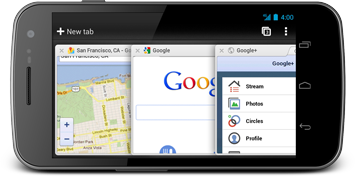
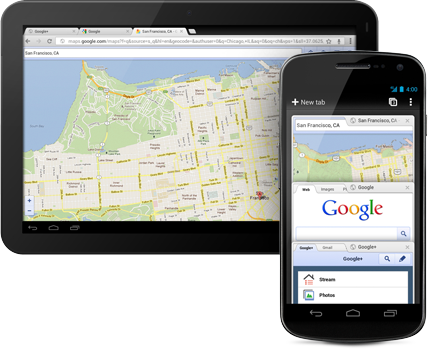
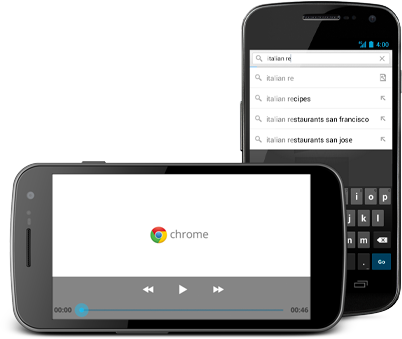
Google Chrome for Android Phones and Tablets (Beta)

Description :

The speed and simplicity of Chrome, now on Android. Chrome for Android Beta is available for phones and tablets running Android 4.0 and higher.

Screenshots : 


Introduction to Chrome :


Chrome Basics :


Learn about it and download it on : http://google.com/chrome/android


Behind the design :

The engineering team behind Chrome for Android Beta shares the design philosophy and approach to bringing the speed and simplicity of Chrome to Android phones and tablets.


*by andreascy*

Internet Explorer 9 Customized for CEOP

Description :
This customized browser provides children with instant access to CEOP's one stop shop for Internet safety. 

ceop toolbar

Visit the Source link and Click "Upgrade Now" to install Internet Explorer 9 with CEOP features preinstalled and access to IE 9's Jump List feature for CEOP. 


*by andreascy*

THE OFFICIAL ANDREASCY Releases An Enhanced Version of Its Browser Toolbar

Description : 

Today, we are pleased to announce the release of an improved version of our "Browser Toolbar", powered by Alexa.com. This Toolbar will keep you updated with Regular Updates and anything related to our web profiles and activities. 

THE OFFICIAL ANDREASCY Releases An Enhanced Version of Its Browser Toolbar

Direct information and updates to your favorite Browser simply by clicking on your desired links!

Toolbar Includes 

1. A drop down menu with some of the most important Blog's sections and links.

2. Blog's RSS feed News. 

3. Daily Magazine RSS feed News. 

4. Drop down menu with our accounts so you can follow them and stay connected with us. 

5. Search box to search anything on THE OFFICIAL ANDREASCY website. 

6. Alexa traffic rank stats for every site you visit. 

7. Options for the toolbar. 

8. It works like a charm! 

Compatibility 

Internet Explorer, Google Chrome, Mozilla Firefox.

How To Download 

(UPDATE: The Toolbar has been retired by Alexa - October 2014)

That's it. Leave any comments with your thoughts.

Kindly share our articles with your friends and other social circles. Feel free to subscribe on our Newsletter to get access to our free Daily & Unbiased news. Do not miss also our Daily Activity on Scoop.it with  exclusives, opinion pieces, and other big stories.

*by andreascy*


Perfect Google Chrome Skin packs Collection


Description : 

Below are some of the latest released Google Chrome skin packs, made by Hattjmh. They work also for Chromium and SrWareIron. Simply drag and drop the desired .crx file into your opened browser window to make the installation. 

Metro skin pack :


Aero skin pack : 


Carbon Fiber : 


Batman Arkham City : 


Joker : 


Winter pack : 


Summer Pack : 


Fall Pack : 


Spring Pack : 


After Hours pack :


If you like those themes check also :


*by andreascy* 


Watch IntuiLab’s Massive Multi - Touch for Any Web Browser in Action, Using HTML5


Description :

IntuiLab has built design and execution extensions for on-the-Web multi-touch. The video embedded below showing off "Massive" Multi-Touch for any web browser using any touch device using HTML5. 


"An alternative to native, rich clients for hosting multi-touch applications is the Web browser. Until recently this has not been possible because the lingua franca of the Web - HTML - did not recognize manual gestures. This meant Web browsers on touchscreen devices reacted to manual interaction as if they were simple mouse events, limiting responses to page scrolling and link clicks," writes Intuilabs. 

Introducing the Web as a multi-touch application hosting option opens the door to instant availability and universal access, giving retailers, advertisers and the like a powerful new medium for communicating with their prospects and customers. Web designers and their clients will be able to create immersive Web experiences without requiring plug-in downloads or excessive cross-browser scripting to ensure compatibility. 


As illustrated in the video, the workflow for creation and deployment of a browser-based multi-touch application will be : 
  • Application creation in IntuiFace Presentation. 
  • The process will be identical to that used for creating multi-touch applications intended for rich client use. 
  • There will be no content limitations. Use any image, video, document, map, etc. and any of our design elements. 
  • Deployment to IntuiLab's in-the-cloud multi-touch application hosting solution, assigning a URL to each deployed application. 
  • Connect to the hosting website from any Web browser on any device and select the application of interest. 
  • Interact with the selected application in your browser as intended.
Interactive mobile phone experiences could be ported to the Web, establishing a consistent look-and-feel, and then expanded to take advantage of additional screen real estate. Ambitious retailers, hospitality vendors and the like could take things a step further and carry over the phone and Web experience to their stores, lobbies and gathering places through interactive tablets, kiosks, tables and touchscreen walls.


If you liked this topic then we have a ton of other interesting stories here. If you are also a fellow Twitter user then i'd suggest to check our Trending Tweets for all the goodies we share. Feel free to discover also the latest BIG Stories and other exclusives by subscribing on our Daily Newsletters and RSS feeds. Take care everyone!

*by andreascy*

AddThis Chrome Extension


Description : 

AddThis allows you to instantly share, bookmark, print, or even translate pages with one easy-to-use tool. Start with the most popular services, or customize AddThis with your favorite ways to share - just select "Options" to personalize your list of services. AddThis was optimized to be as fast as it is easy, so you can share whenever you like without slowing down Chrome. 


New! Now you can share any page just by right-clicking, and selecting AddThis from that page's context menu.

So what do you think? Are you using AddThis? Do you like it? Drop us a message below and let us know more about your experience with this awesome tool. Until the next time feel free to subscribe on our RSS feed and follow us for more. Don't forget also to check out our Daily Newspaper, Magazine, Newsletter, our recommended articles, websites and movies and our Trending Tweets for even more content. Don't miss also our Toolbar with our News feeds.

*by andreascy*
🦾 Stay Motivated

Editor’s Picks

Editor's Picks 01 / 03
Marketing Design Tips and Trends For Success
Marketing & Design

Marketing Design Tips and Trends For Success

With website design impacting 94% of first impressions, discover key web design tips and modern visual trends to keep visitors engaged.

Read Full Story →
Mobile App Security Threats To Plan For
Cybersecurity

Mobile App Security Threats To Plan For

Learn how hackers target mobile apps and how multifactor authentication, encryption, and code obfuscation protect user data.

Read Full Story →
7 Reasons to Consider a Home Gym
Health & Fitness

7 Reasons to Consider a Home Gym

If you think of picking up better health habits and don't like crowded gyms, consider setting a home gym catered to your needs.

Read Full Story →

🌀 Quantum Helium Unleashed

Ideas In Motion

Cybersecurity

Mobile App Security Threats To Plan For

Learn how hackers target mobile apps and how multifactor authentication, encryption, and code obfuscation protect user data.

Read Full Story →
Health & Fitness

7 Reasons to Consider a Home Gym

If you think of picking up better health habits and don't like crowded gyms, consider setting a home gym catered to your needs.

Read Full Story →
Marketing & Design

Marketing Design Tips and Trends For Success

With website design impacting 94% of first impressions, discover key web design tips and modern visual trends to keep visitors engaged.

Read Full Story →

▶️ Just Press Play

Beyond The Scroll

Health & Fitness

7 Reasons to Consider a Home Gym

If you think of picking up better health habits and don't like crowded gyms, consider setting a home gym catered to your needs.

Read Full Story →
Marketing & Design

Marketing Design Tips and Trends For Success

With website design impacting 94% of first impressions, discover key web design tips and modern visual trends to keep visitors engaged.

Read Full Story →
Cybersecurity

Mobile App Security Threats To Plan For

Learn how hackers target mobile apps and how multifactor authentication, encryption, and code obfuscation protect user data.

Read Full Story →

⭐ Leading ShipYard's Leaderboard

🚩 Milestone Unlocked!